
AI music is everywhere right now.
You type two sentences and get a finished song with vocals, a beat, and a chorus. It sounds fantastic, and for a quick experiment it is. But the whole thing raises one question that most demos quietly skip: are you even allowed to publish this music without landing in trouble?
This is exactly where it gets tricky.
Major music labels sued the best-known AI music providers for allegedly training their models on copyrighted material. Several of those cases ended in settlements in 2025. For you as a creator, that means with a lot of tools you can't be sure whether your ad or your podcast intro suddenly becomes a problem two years down the line.
ElevenLabs takes a different route here. With Music v2, launched in late May 2026, there's an AI music generator that, according to the company, was built on licensed data. At the launch of its music model, ElevenLabs put licensing deals with Merlin and Kobalt in place. That documents ElevenLabs' licensing strategy openly. In this guide I'll show you what Music v2 can do, why this foundation matters, what limits still apply, and who it's actually worth it for.
And I'm not just relaying what ElevenLabs claims. I tested Music v2 myself on my own Creator plan, with a real prompt and an actual track you can listen to. In a second test on an account with the Scale plan, I read the credit balance before and after every generation and had the song editor regenerate a single section. You can hear both versions of that track against each other further down.
- ElevenLabs Music v2 documents a licensing-based training strategy with partners like Merlin and Kobalt. Commercial use remains tied to your plan, use case, input rights, and the current Music Terms
- One observed outro regeneration cost 1,350 credits. A complete Auto track cost 4,115 credits in another test. The genre-change result stayed sonically closer to the source material than the new tags suggested
- A 3-minute track in Auto mode costs around 5,400 credits on paper with two selected variations, and my own test measured 4,115 credits for two shorter variations. The variation count is not a fixed rule, so keep that in mind when picking a plan
1. What is ElevenLabs Music v2?
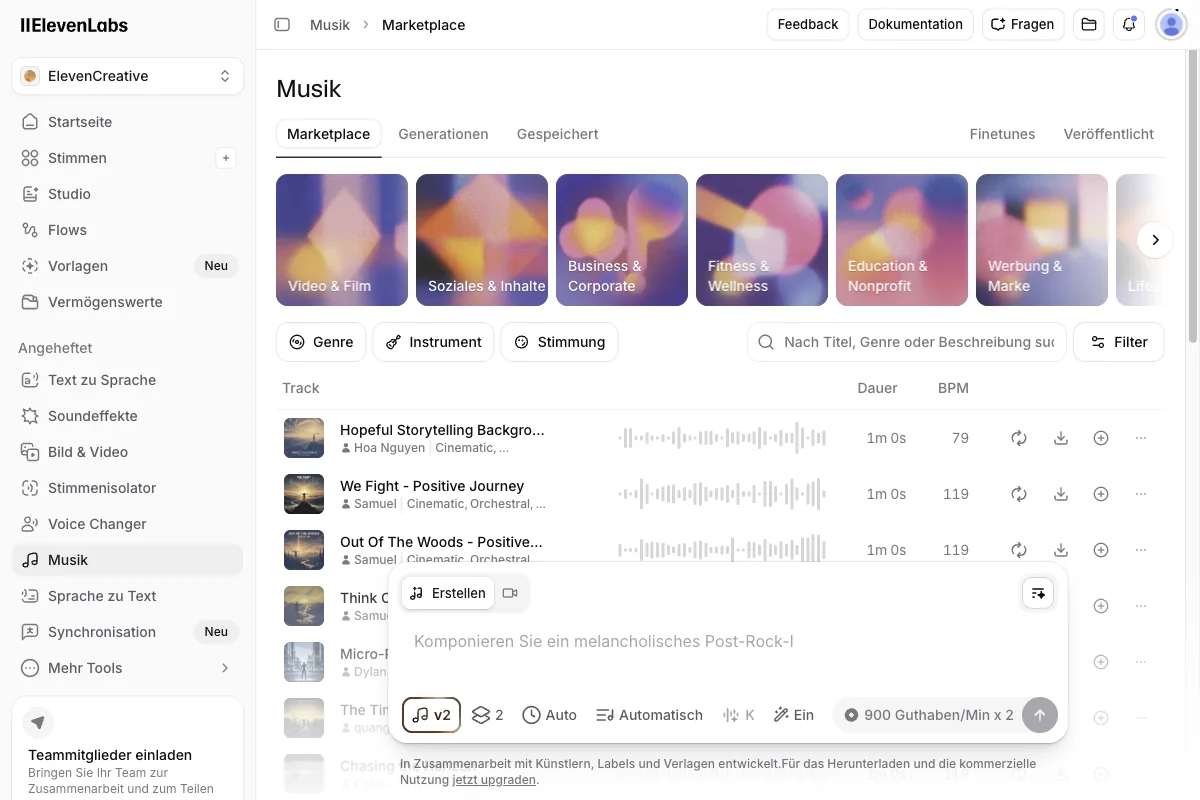
Most people know ElevenLabs as an AI voice provider. Text-to-speech, voice cloning, transcription, all at a high level, as I cover in detail in my ElevenLabs review. Music v2 is the musical side of that platform, and since the launch in late May 2026 it has grown up considerably.
At its core, Music v2 works like the voice features: you describe in words what you want, and you get a finished track. You don't need to read notes, operate a digital audio workstation, or play a single instrument. You type, for example, that you need calm lo-fi beats for a podcast background, and Music v2 generates exactly that.
Two features set version 2 apart from simple one-click generators.
1.1 Mid-track genre switching
Mid-track genre switching lets you change the style within a single piece. Picture an ad that starts calm and then builds toward the call to action. You begin with a relaxed ambient passage and have the track shift into a driving, energetic style in the second half. You no longer have to splice two songs together; Music v2 handles the transition inside the same track. That's how the product page sells it, at least. How far it carries in practice is something I measured in section 4.4.
1.2 Inpainting
You might know inpainting from AI image editing, where you regenerate a single section of an image. In Music v2, it works the same way, just with audio.
Here's what that means:
If you like a finished track 90% of the way but one specific spot misses, say a bridge or a transition, you mark exactly that passage and have it regenerated. The rest stays untouched. That saves a huge amount of time, because you don't have to generate a brand-new song just because eight seconds in the middle don't sit right.
1.3 Audio Reference and curated Finetunes
The current Music documentation also lists Audio Reference. You can provide a short reference of up to about 30 seconds. According to ElevenLabs, it is screened for rights and guides the sound, instrumentation, tempo, and mood. It is meant to guide the result, not copy or remix the source. This is documented functionality, but I did not run a separate test with my own audio reference in this review.
For a repeatable sonic identity, there are Music Finetunes. Curated Finetunes are pre-trained by the vendor and ready to use, so they do not require an upload. Custom Finetunes do require your own audio. ElevenLabs limits that for most users to fully original compositions without third-party samples or backing tracks. I did not create a custom Finetune in this test.
2. The deciding factor: the documented licensing strategy
Now we get to what really makes Music v2 special. The sound quality is good, but the thing that really sets it apart is the legal footing.
According to ElevenLabs, the music generator was built on licensed material. At launch it had deals with Merlin and Kobalt in place, and according to Kobalt the artists themselves decide via opt-in whether their music goes into the training set.
The result:
ElevenLabs describes Music as cleared for broad commercial use under certain plans and conditions. That is not a blanket permission for every publication. For Self-Serve plans, the current product page excludes, for example, film, television, and so-called studio games. The Music Terms add prohibitions and input rules.
2.1 Why this matters for you
Sounds like legal fine print, right? Do you really need it?
Yes, if you publish content, you do. Here are a few concrete scenarios:
- YouTube. With Content ID, YouTube has one of the sharpest music-detection systems out there. Upload music with unclear rights and you risk claims, demonetized videos, or, in the worst case, strikes. A documented license reduces that risk, but does not rule out automatic claims or disputes.
- Advertising. Paid advertising often has real money on the line, and brands are especially careful here. Before a campaign, check whether your industry, medium, and use case are covered by your plan and the Music Terms.
- Podcasts. You hear your intro in every single episode. If the music there has shaky licensing, you're building a problem that grows with every episode and, in the worst case, can only be fixed by re-scoring everything.
- Apps and games. Here music gets baked into a product you sell or distribute. Later legal disputes can't simply be solved by swapping out a file.
In short:
Anywhere your content is public and, in case of doubt, makes money, a traceable licensing foundation matters. It does not replace the need to review your use or your responsibility for prompts, lyrics, and uploaded references.
3. Music v2 compared to Suno and Udio

When you talk about AI music, you can't get around Suno and Udio. Both are technically impressive and can do more than just background music, namely complete songs with vocals and lyrics. So I'm not here to bash them; they have their place. But on the legal footing there's an important difference you should know about.
Suno (currently version 5.5) and Udio were at the center of lawsuits from major music labels.
The accusation:
The models were trained on copyrighted material. Several of those cases ended in settlements in 2025. Warner Music settled with Udio and then, days later, with Suno in November 2025, signing on as a licensing partner in the Suno deal, while Sony Music was still litigating at that point. That doesn't automatically mean every track from these tools is a problem. But it does mean the question of clean commercial use isn't fully settled there.
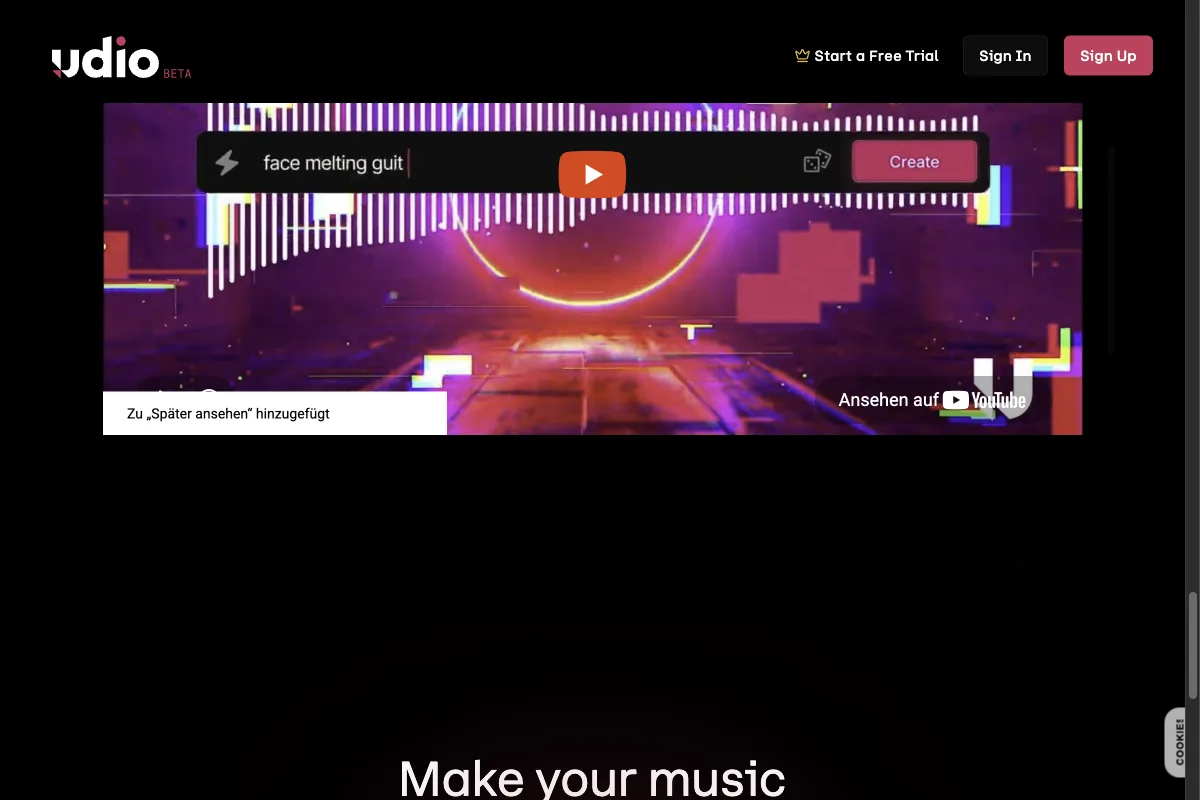
ElevenLabs counters with a publicly documented licensing strategy. Here's the direct comparison.
One limitation you should know about this table:
It compares the legal footing and the feature set, not the sound. I didn't set up a Suno account for this test, so there is deliberately no Suno listening sample here to hold my track against. Everything you hear in this article comes out of Music v2. If you're looking for a sonic head-to-head, this article won't give you one.
My take:
If you want finished songs with vocals for a creative project, Suno and Udio are currently more powerful. If a publicly documented licensing strategy matters to you, Music v2 has a clear edge. That is not a legal guarantee. You still must check whether your plan, industry, medium, prompt, lyrics, and other inputs cover your actual use case.
4. ElevenLabs Music v2: my test, step by step
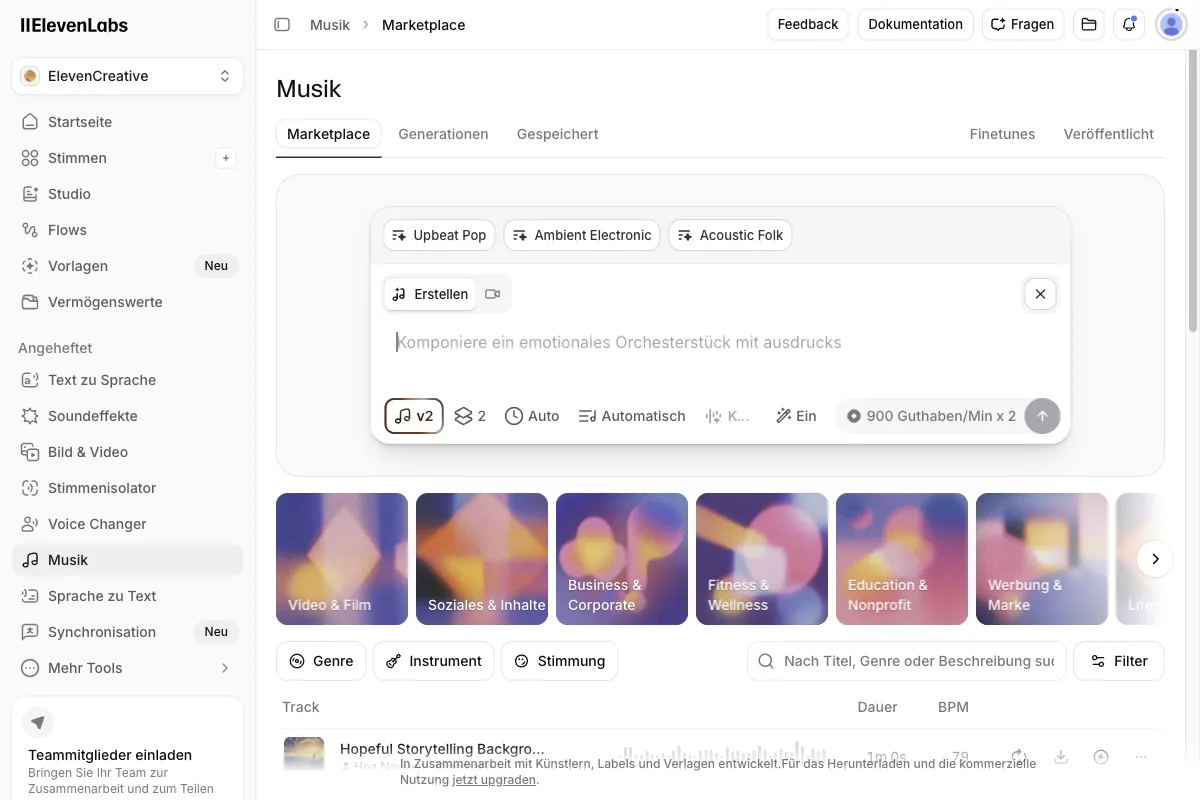
Enough theory; let's look at how you actually create a track. The process is refreshingly simple, precisely because you control everything through text. And I'm not showing you someone else's example, I'm showing you my own test.
4.1 Write the prompt
It all starts with the description. You type in words what you want to hear. The more specific, the better. Instead of just "relaxed music," go with "calm lo-fi beats with soft piano and subtle vinyl crackle, ideal as a background for a podcast."
For this article, I did exactly that and entered the following prompt into my Creator account:
"Relaxed lo-fi hip-hop with warm vinyl crackle and soft piano, calm background music for an explainer video."
Since the prompt is the only control surface in Music v2, here are all the prompts I actually submitted for this article, word for word, along with the genre tags Music v2 produced from them so you can see what the wording actually does. I ran my account in German, so these went in as German text and are reproduced with a translation. That in itself is useful to know: Music v2 takes instructions in German just fine. There are only three of them, because those are the three I ran, and I didn't want to pad the list with invented examples.
Prompt 1 (Creator account, full track)
Relaxed lo-fi hip-hop with warm vinyl crackle and soft piano, calm background
music for an explainer video.
[German original: "Entspannter Lo-Fi Hip-Hop mit warmem Vinyl-Knistern und
sanftem Piano, ruhige Hintergrundmusik für ein Erklärvideo."]
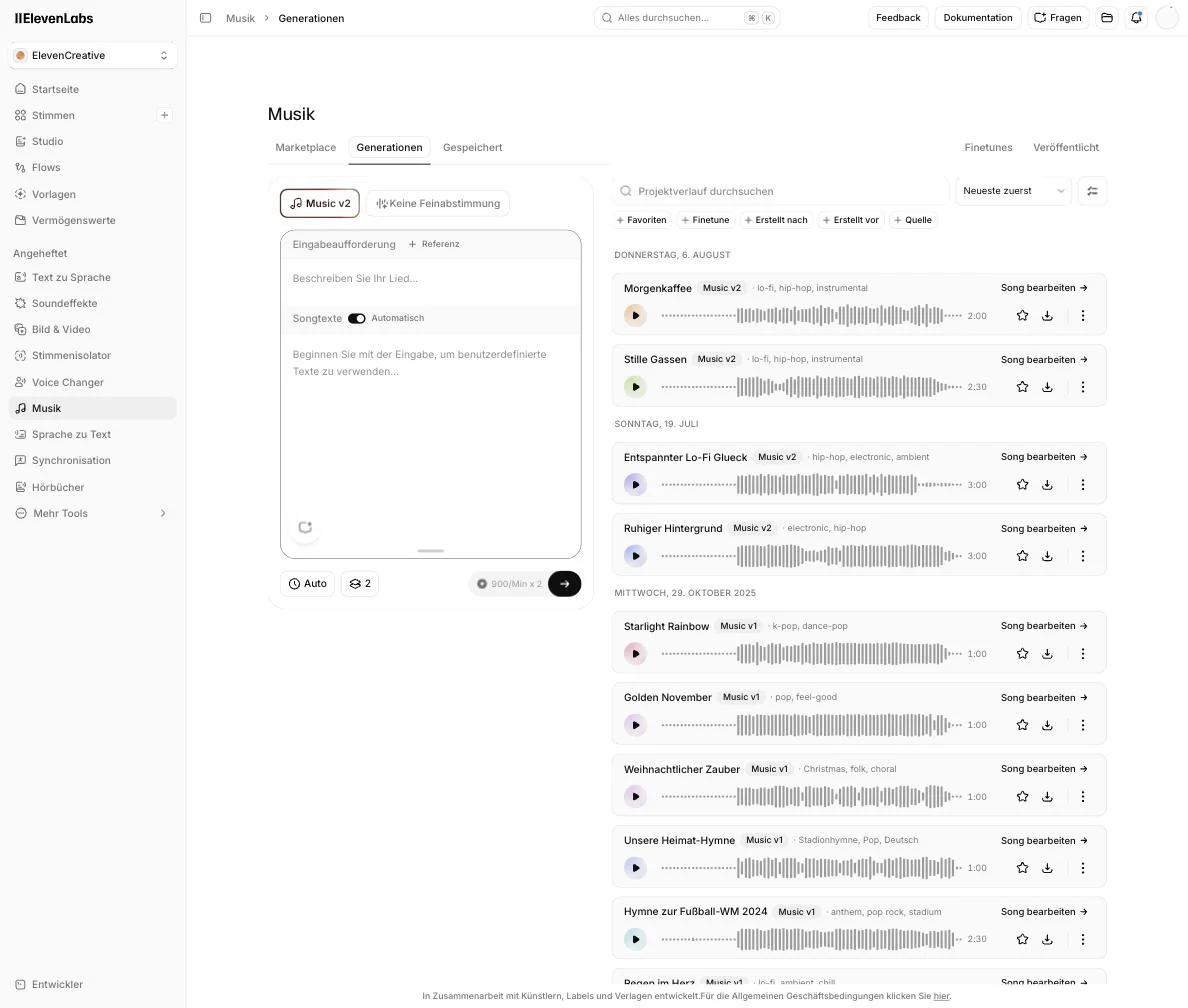
What it produced: tags hip-hop, electronic, ambient. Title "Entspannter Lo-Fi Glück".

Prompt 2 (Scale account, full track)
Relaxed lo-fi hip-hop beat with soft piano, warm bass, and subtle vinyl crackle.
Calm background music for a podcast intro. Instrumental, no vocals.
[German original: "Entspannter Lo-Fi-Hip-Hop-Beat mit weichem Klavier, warmem Bass
und dezentem Vinyl-Knistern. Ruhige Hintergrundmusik für ein Podcast-Intro.
Instrumental, kein Gesang."]
What it produced: tags lo-fi, hip-hop, instrumental. Titles "Morgenkaffee" (2:00)
and "Stille Gassen" (2:30).

Prompt 3 (instruction for a single section in the song editor)
Turn the outro into an energetic synthwave finale with a driving beat and bright
synthesizers
[German original: "Verwandle das Outro in ein energetisches Synthwave-Finale mit
treibendem Beat und hellen Synthesizern"]
What it produced: 140 BPM, energetic synthwave finale, driving four-on-the-floor
beat, punchy gated reverb snare, bright shimmering synth arpeggios, powerful
analog synth lead melody, pulsing bassline, 80s retro futuristic aesthetic,
wide stereo image.
Music v2 automatically detected the genres hip-hop, electronic, and ambient from my prompt and named the finished track "Entspannter Lo-Fi Glück" on its own. Here's what my generation list looked like afterward:
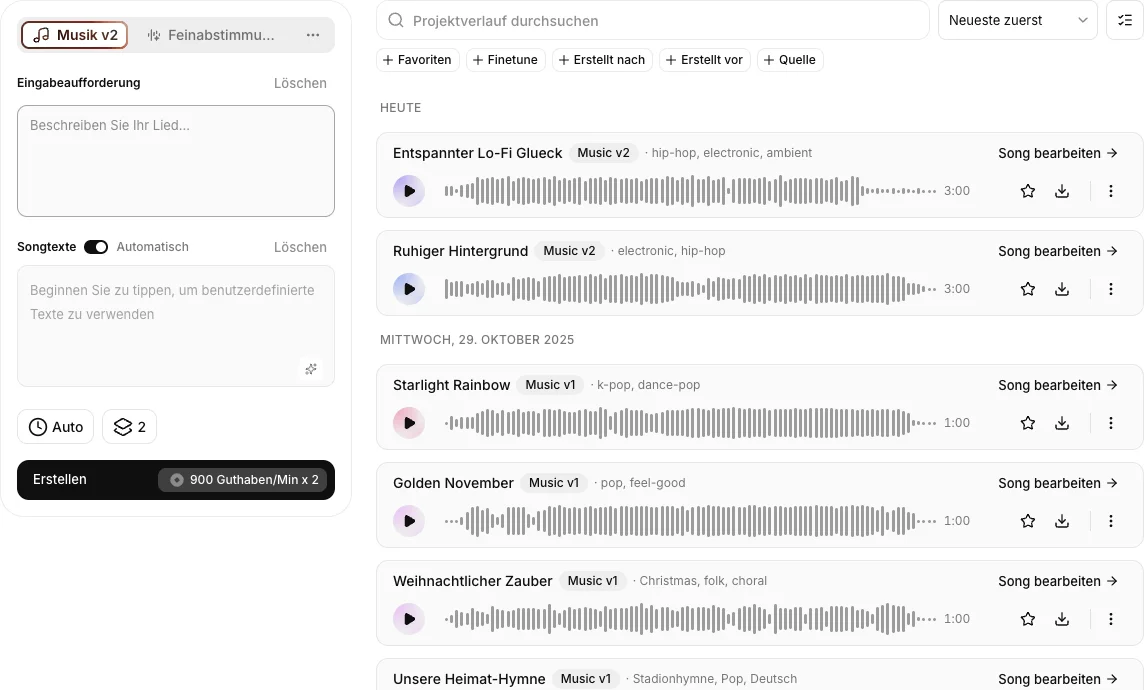
On the left you see the full create panel, with the prompt field, the lyrics toggle (set to "Automatic" for me), the "Auto" length setting, the variation count (2 in this screenshot), and, right above the create button, the cost: 900 credits per minute times the selected variation count. In the list on the right you can also see older Music v1 tracks still sitting in my account from earlier tests, the jump to v2 is obvious from the genre tags alone.
Here's the clip from my actual result, a 30-second excerpt from the full 3-minute track:
Music v2 track from my prompt: "Relaxed lo-fi hip-hop with warm vinyl crackle and soft piano, calm background music for an explainer video" (30-second excerpt)
4.2 Set the genre and mood
Music v2 covers a wide range, from lo-fi, ambient, and cinematic to pop, rock, and electronic, all the way to orchestral pieces. You pick the genre directly in the prompt, and Music v2 detects it automatically, as you can see above from my three tags: hip-hop, electronic, and ambient. If you're unsure, go ahead and generate two or three variations with slightly different descriptions and compare them.
4.3 Choose the length
Decide how long the track should be. A podcast intro often needs only 15 to 30 seconds, while for a YouTube background you'll want several minutes. Keep in mind that "Auto" picks the length of both variations for you, usually somewhere between two and three minutes, and that this shows up directly in your credit balance. For a cheap test, set the length manually to 15 to 30 seconds instead of Auto.
I didn't want to estimate how much that actually costs, so I measured it. On an ElevenLabs account on the Scale plan, which costs $299 a month for 1.8 million credits, I entered the same style of prompt again, this time asking for a calm lo-fi hip-hop beat with soft piano, warm bass, and subtle vinyl crackle as a podcast intro, instrumental and without vocals. With the length set to "Auto," Music v2 again produced two variations, this time with its own titles "Morgenkaffee" (2:00 minutes) and "Stille Gassen" (2:30 minutes), plus the automatically assigned tags lo-fi, hip-hop, and instrumental.
I read the credit balance immediately before and after: 1,840,607 credits before the generation, 1,836,492 after. That's 4,115 credits for both variations together, measured rather than estimated.
That lines up almost exactly with the advertised rate of 900 credits per minute per variation: 2:00 plus 2:30 minutes makes 4.5 minutes, times 900 credits works out to 4,050 credits on paper. The small overhang to the measured 4,115 credits is most likely the actual render length running past the round minute marks. For you that means the 900-credit formula isn't a rough ballpark, it holds in practice to within a couple of percent.
Here's "Morgenkaffee," the 2:00-minute variation from that second test:
Music v2 track "Morgenkaffee" from my second test on the Scale account, prompted for a calm lo-fi hip-hop beat with soft piano, warm bass, and subtle vinyl crackle as a podcast intro (30-second excerpt)
4.4 Use inpainting and genre switching
Now comes the part that sets Music v2 apart from simple one-click generators, and the part I inspected in full inside the song editor. Click "Edit song" on a finished track and you land in exactly this view:
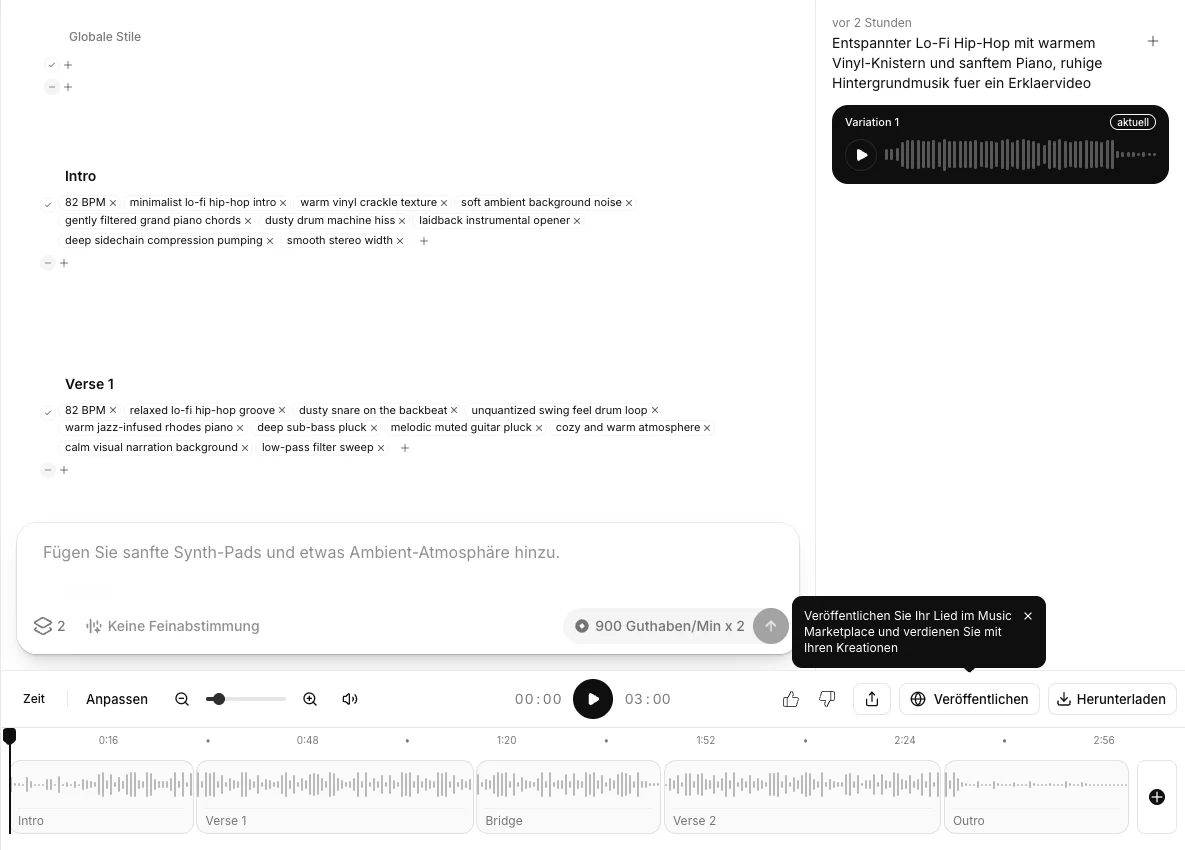
What you see here is my older track from the Creator account, which runs at 82 BPM. The Morgenkaffee track from the Scale test, the one coming up in a moment, has its own section layout and runs at 68 BPM, so don't mix the two up.
That Creator track is split into five sections, Intro, Verse 1, Bridge, Verse 2, and Outro, which you can see individually in the timeline at the bottom. Each section has its own style tags. My intro carries tags like "82 BPM," "minimalist lo-fi hip-hop intro," and "warm vinyl crackle texture," while Verse 1 has "relaxed lo-fi hip-hop groove," "dusty snare on the backbeat," and "warm jazz-infused rhodes piano." There are also "Global styles" that apply to the whole track.
That makes the mechanics behind both features concrete:
- Inpainting means you mark a single section, say the bridge, and have only that regenerated, either with its existing tags or with a short text instruction in the field below it (mine showed the placeholder "Add soft synth pads and some ambient atmosphere"). The rest of the track stays exactly as it is.
- Genre switching means you swap a section's style tags for different ones, say "laidback" for "energetic," or a dusty drum-machine hiss for a punchier beat, and have only that section regenerated. The transitions to the neighboring sections stay intact.
Both use the same rate as the full track. The relevant inputs are the marked duration and the selected variation count. One observed regeneration cost 1,350 credits.
So much for the theory. This is exactly the spot where my first test had nothing but a description, and a headline feature you can only describe isn't a feature. So I went back and did it.
The genre switch, run live
For that I opened the song editor for the Morgenkaffee track, so the 68 BPM piece from the Scale account, not the Creator track from further up. I marked the outro section and typed a single sentence into the instruction field:
"Turn the outro into an energetic synthwave finale with a driving beat and bright synthesizers"
That's it. No tags swapped by hand, no sliders touched.
Music v2 then rewrote the tags of that one section only. The outro's 68 BPM and lo-fi attributes turned into "140 BPM," "energetic synthwave finale," "driving four-on-the-floor beat," "punchy gated reverb snare," "bright shimmering synth arpeggios," "powerful analog synth lead melody," "pulsing bassline," "80s retro futuristic aesthetic," and "wide stereo image." Intro, Groove A, and Groove B stayed untouched at 68 BPM lo-fi:
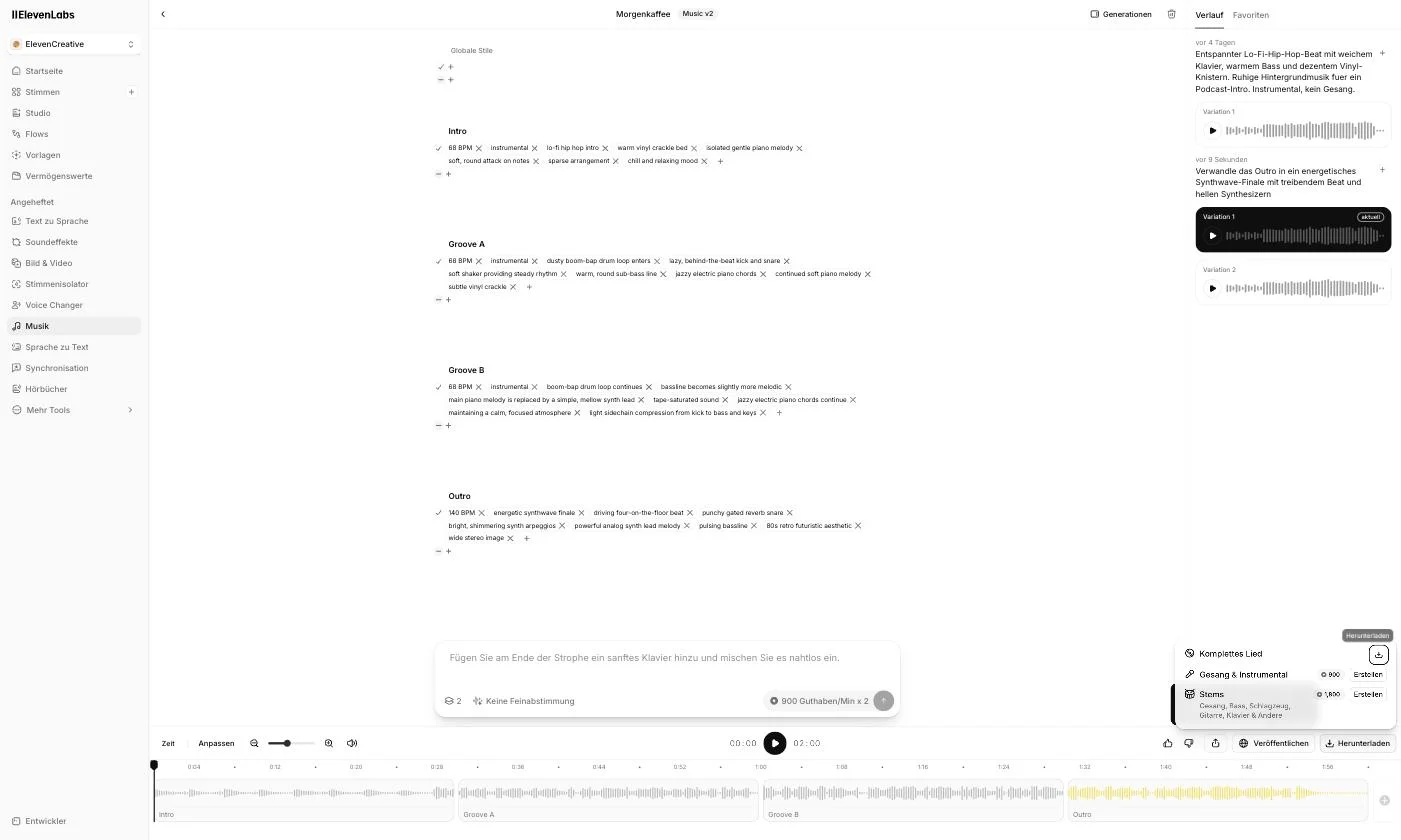
The contrast sits right there in the editor, three sections at 68 BPM above and the outro at 140 BPM below. In the timeline at the bottom, only the outro block is highlighted in yellow, so only that part was regenerated. On the right in the history you can see my instruction and the two variations Music v2 made from it.
And the section promise does hold up. I lined both versions of the track up against each other afterward, and the first 85 seconds match in the old and the new file. The only thing that changed is the ending. That's precisely the difference between inpainting and rolling the dice again.
Here are both versions across the same window, the last 30 seconds of the track:
Outro before the regeneration, last 30 seconds of "Morgenkaffee" (lo-fi tags, 68 BPM)
The same window after the regeneration, so with the new synthwave tags on the outro
And yes:
The tags promise more here than actually comes out of the speakers. So I measured both excerpts, and tempo, attack density, and timbre sit close together in both versions. The new outro is a different outro, but it isn't an audible break from lo-fi to synthwave.
I wasn't willing to leave it there. So I pushed further and ended up measuring three regenerations of the same section, coming from two separate instructions.
The second version was the other variation of the same instruction that Music v2 supplies anyway. It got its own tags at 120 BPM and behaved exactly the same way sonically.
For the second instruction, I then made it as blunt as it gets.
"Hard techno finale, 150 BPM, distorted kick drum on every quarter note, abrupt style change with no transition, no lo-fi whatsoever"
On the tag level, Music v2 nailed it. The section is now called "Techno Finale," the new tags match, and the tool even stripped out the old lo-fi markers on its own, meaning vinyl crackle, boom-bap drums, and piano. This version also diverges from the original earlier than the first two did.
The sound still doesn't do what the tags say. A distorted kick on every quarter note should show up as a clear, continuous pulse, and that's exactly what's missing. In the window that no longer contains any of the original, the reading comes to 0.085, while the original lo-fi groove holds its 68 BPM at 0.244. The timbre barely moves (971 versus 1,008 Hz) and the attack density only rises slightly, from 110 to 124 per minute.
What I take away from that:
Section regeneration follows your instruction reliably at the tag level and leaves the neighboring sections alone. Sonically, though, it stays much closer to the source material than the new tags promise. Coherence beats radicality, and for background music that's often exactly what you want. A real mid-track genre jump is something I could not produce across three measured regenerations from two separate instructions.
That leaves the question of what this cost.
Here too I read the credit balance immediately before and after. It dropped from 1,835,263 credits to 1,833,913. That observed regeneration therefore cost 1,350 credits.
 gradually.ai
I do not derive a general formula for section regenerations from that one value. Check the price that the interface shows before each edit.
There's one thing you shouldn't forget, though.
Every additional instruction costs credits again. My attempts on that one outro added up accordingly, though the only one I measured exactly was the first.
4.5 Export and use it
Once you're happy, you download the finished track and drop it into your project, video editor, podcast software, or app. The current Music documentation lists MP3 at 44.1 kHz and 128 to 192 kbps for the download. That describes the download container and encoding, not automatically the quality of an uncompressed source. A WAV container, if your account offers one, cannot turn an already lossy render into a lossless source after the fact. Before publishing, check that your plan and intended use are covered by the current Music Terms and that you hold the rights to your lyrics, references, and other source material.
4.6 Custom lyrics, vocals, and stems in practice
My first test produced instrumentals only, so I clarified the open question with a controlled second attempt. In the lyrics setting I chose "Custom," entered the original German four-line lyric below, set the variation count to 1, and selected a 30-second length.
[Verse]
Leise fällt das Licht ins alte Haus
Jede Seite trägt die Zeit hinaus

[Chorus]
Stimmen aus Papier, wir hören zu
Zwischen Staub und Sternen wächst die Ruh
The music prompt asked for a German chamber-pop ballad with warm baritone vocals, restrained piano, gentle strings, and clear pronunciation. Music v2 produced the 30-second song "Stimmen aus Papier". The generation cost exactly the 450 credits shown beforehand.
Sample "Stimmen aus Papier" from the supplied lyrics, 30 seconds
The text above is the lyrics supplied to the generator, not a verified transcription of the sung audio.
Stem separation is also available in the interface. For the same 30-second track, ElevenLabs showed 225 credits for vocals and instrumental, plus 450 credits for the full split into vocals, bass, drums, guitar, piano, and other. I started the full split, but my browser automation could not download the individual files, so I could not listen to them separately.
5. Use cases: where Music v2 is worth it
Music v2 is not a replacement for a human composer writing a custom piece for your film. ElevenLabs doesn't claim it is. But for the everyday music needs of creators, it's exactly the right tool.
So you don't have to guess which settings a use case needs and what it costs you, here are the four most common ones in a table:
Credits calculated at 900 credits per minute and variation. In my measurement, actual usage came in about 1.6% above that formula.
The prompt building blocks all follow the same trio of mood, genre, and purpose I showed you above. And the last column tells you immediately why the length setting is the most expensive decision in the whole tool. Between an ad spot and a YouTube background sits a factor of twelve.
If you want to see how Music v2 fits into the broader landscape, check out my roundup of the best AI music generators. And if you want to use ElevenLabs for voices too, you'll find all the details in my overview of the best AI voice generators.
6. Pricing and credits
Music v2 has no separate price; it runs on the regular ElevenLabs plans and the shared credit system. That's convenient because you pay for voice, transcription, dubbing, and music out of one pot.
Here's how the plan logic works (as of my live test in the account):
- Free ($0/month): Access to Music v2 to try it out. According to the current product page, commercial use is not included.
- Starter ($6/month): 30,000 credits, the cheap entry for commercial use where your plan, intended use, input rights, and the current Music Terms allow it.
- Creator ($22/month, my own plan): 121,000 credits, with additional pay-as-you-go credits available. New customers sometimes get a first-month discount (for example $11), check the current offer on the pricing page.
- Pro ($99/month): 600,000 credits.
- Scale ($299/month): 1.8 million credits.
Because Music v2 charges by duration and selected variation count, you can roughly work out how many tracks each plan gets you if you spent the entire budget on music alone. A 3-minute Auto track with two variations costs around 5,400 credits on paper. The table uses two variations as an example, not as a fixed rule.
In practice, you're sharing those credits with voice, dubbing, and transcription, so these numbers are more of a ceiling. Paying annually also saves you two months, you effectively pay for 10 months instead of 12. The final amount depends on factors such as location, tax status, and the current billing setup. For a more detailed breakdown of the plans, see my article on ElevenLabs pricing.
7. Where Music v2 hits its limits
Up to this point, almost everything in this article has worked. That's not because Music v2 has no weaknesses, it's because the interesting spots only surface once you work with it for longer than five minutes.
Here's what I ran into during the test:
- Auto length decides your costs, not you. With the length set to "Auto," Music v2 picks for you, and in my test that produced 2:00 and 2:30 minutes. I never asked for that, but I paid for it all the same, to the tune of 4,115 credits for a single generation.
- The tool initially assigns titles and genre tags. My tracks came out as "Morgenkaffee," "Stille Gassen," and "Entspannter Lo-Fi Glück" without me asking, and Music v2 set the tags lo-fi, hip-hop, and instrumental on its own. You can rename the title afterward in the editor, while the tags remain the automatic classification.
- Vocals need an explicit instruction. With the lyrics toggle on "Automatic" I only got instrumentals at first. With "Custom," my own German lyrics, and a clear vocal prompt, Music v2 produced a complete song with vocals.
- You can't set the section boundaries freely. Music v2 splits the track into sections, and you work with that split. The documentation says you can edit, add, or remove sections. Dropping your own marker at second 47 and regenerating from exactly there was not available in my editor.
- A real mid-track genre jump isn't happening. Section regeneration follows your instruction reliably at the tag level and leaves neighboring sections untouched, but sonically it stays much closer to the source material than the tags promise. Even an instruction specifying 150 BPM, a distorted kick, and explicitly no transition failed to produce a techno finale. I checked that across three measured regenerations from two separate instructions, with the numbers in section 4.4. For background music this coherence is often welcome, but as a genre-switch feature it's oversold.
- Stems cost extra. The complete song downloads for free. On my 30-second track, the interface showed 225 credits for splitting vocals and instrumental, and 450 credits for the individual stems (vocals, bass, drums, guitar, piano, and other).
None of this is a dealbreaker. But these are the points no product tour will show you, and the ones you should know before you plan out your monthly credit budget.
- The only one of the major AI music tools that publicly commits to licensing its training data
- Commercial use where your plan, intended use, input rights, and the Music Terms allow it
- Targeted regeneration of individual sections, 1,350 instead of 4,115 credits in my test
- Wide genre range according to the vendor, from lo-fi to orchestra
- Part of the ElevenLabs platform, no second subscription needed
- Free plan to try it out
8. My verdict
AI music is impressive, but most tools sell you the quick result and stay silent on the question that matters most in commercial use.
Am I even allowed to publish this?
That's exactly where ElevenLabs Music v2 comes in. It's not the tool with the most spectacular vocal tracks; Suno and Udio currently do that better. But it is a compelling option for YouTube, podcasts, ads, and apps when your plan, intended use, input rights, and the current Music Terms cover the project.
My own test confirms that. My prompt delivered a usable track in one pass, and inpainting left the audio before the selected section untouched. One observed outro regeneration cost 1,350 credits, while a complete Auto track cost 4,115 credits in another run. That compares my two operations, not a general savings guarantee.
On the sound, I'm more reserved. My lo-fi outro never became a synthwave finale despite the tags, and an explicitly requested 150 BPM techno finale stayed close to the rest of the track across three measured regenerations. The tool would rather hold its song together than tear it apart on command, and that's exactly the kind of detail you only pick up by doing it yourself instead of reading the product page.
That said:
The credit cost caught me off guard. 4,115 credits for a single Auto track with two variations is more than I expected, and if you regularly generate long tracks, it's worth doing the math on whether Creator is enough or you need Pro or Scale from the start.
And yes:
That's exactly why it pays to regenerate individual sections in the editor rather than whole tracks. Combined with ElevenLabs' documented licensing approach and the fact that everything lives inside the ElevenLabs platform, it's still a very convincing package for online business owners.
My advice:
Try it, but set the length manually to 15 to 30 seconds for your first attempts instead of Auto. That gives you a feel for the quality and the workflow without blowing through your credits.
And if you're not sure whether ElevenLabs as a whole, not just for music, is the right tool for you, take a look at my comparison of the best ElevenLabs alternatives first.
If you want to dive straight in, you can get to ElevenLabs here and start with the free plan.


