
I was a skeptic about AI voices for a long time.
Too robotic, too flat, too much like a train station announcement. Most of the tools I tried over the years sounded like a 2015 GPS unit. Fine for a demo, but nothing I'd seriously put on a YouTube channel or in an audiobook.
Then ElevenLabs kept coming up around me. Podcasters use it, dubbing studios talk about it, and in English-speaking AI circles it's been the reference point for years.
So for this review I took another close look, not just clicking around the free plan, but using my own Creator plan, real scripts, and, where it mattered, real numbers I could check myself.
In this review I'll walk you through what I tested, where ElevenLabs genuinely impressed me, where it falls short, and who it's actually worth it for. And who, honestly, would be fine with something cheaper.
- ElevenLabs now lists Eleven v4 as its flagship model. In my test, Eleven v3 delivered the most natural AI voice quality I've heard so far, and its audio tags like [whispers] and [laughs] let me steer emotion right inside the script
- I assessed nine core features and tested four additional tools: Voice Design, Voice Remixing, Flows, and Image & Video. I also tested Music v2 with my own German lyrics. Stem separation could be started, but I could not independently inspect its output files. Dubbing v2 produced no result in three attempts
- It's not just text-to-speech but a full audio platform with transparent credit billing (roughly 1 credit per character on v3), which can also get expensive fast under heavy use
1. My verdict up front
So you don't have to read the whole thing if you're in a hurry: ElevenLabs is, in my opinion, the best AI tool for voices on the market right now.
My grade: 9.3 out of 10.
It's the weighted result of nine individual scores that I lay out with evidence in section 3. Without the stumble on Dubbing v2, the one core tool with no result, it would be a 9.4. I document the failed Dubbing test in section 9.
The voice quality of Eleven v3 is at a level where I did a genuine double-take the first time I heard it. With the audio tags [whispers] and [laughs] I can steer emotion directly inside the script. I haven't had that with any other tool in my own testing, and you can hear the difference yourself further down.
On top of that comes the biggest day-to-day win. I get text-to-speech, voice cloning, Scribe, a music generator, and dubbing in a single account, instead of paying for a separate tool for every task.
That said:
It's not the cheapest tool, and the credit billing can get expensive fast under heavy use, especially with the music generator if you set the length to "Auto" (more on that below, it caught me off guard too). The free plan also has no voice cloning, and Dubbing v2 gave me no result in three attempts.
So if you only want to voice the odd blog post now and then, a leaner option usually does the job. But if you use voice seriously and regularly, there's barely any way around ElevenLabs right now.
Trying it costs you nothing, the free ElevenLabs plan is plenty for your first tests.
2. My test setup: what I actually did
For this review I didn't just poke around, I tested with real tasks on my own account.
My workspace is called "ElevenCreative" and runs on the Creator plan at $22/month, with the interface itself set to German.
When I ran the first part of this test, I had 16,748 of 131,000 credits used, with the allowance renewing on August 19. The Creator plan's base allowance is 121,000 credits a month, so the extra roughly 10,000 credits look like a promo or a rollover.
To make the audio samples comparable at all, I locked myself into a single test script before I started. It runs through text-to-speech, through the voice clone, through the Voice Changer, and finally through transcription, word for word identical every time.
The script is German on purpose, because I publish in German and because non-English output is where voices differ most, as section 4.1 shows:
Hallo, ich bin Finn. Gerade teste ich, wie natürlich diese KI-Stimme deutschen Text vorliest. Achte einmal auf die Betonung, das Sprechtempo und die kleinen Pausen zwischen den Sätzen.The conditions are fixed the same way, otherwise every sample would stand on its own.
- Model Eleven v3, except where I explicitly say otherwise. The Voice Changer and Studio run on Eleven Multilingual v2 at ElevenLabs.
- Voice Liam ("Energetic, Social Media Creator"), stability in the middle between Creative and Robust.
- Output as MP3 at 44.1 kHz and 128 kbps.
- Test window August 6 to August 29, 2026.
Specifically, I tested these nine core features:
- Text-to-speech with Eleven v3, including audio tags, with real generations and traceable credit usage.
- The same script again on the older Eleven Multilingual v2 model and with a German voice, as a straight listening comparison.
- Voice cloning: I built an Instant Voice Clone live and put the original and the clone side by side.
- The Voice Changer, which turned my finished TTS voice into a completely different voice.
- Scribe (speech-to-text), measured against my own TTS sample, where I know the source text word for word.
- Music v2, including the song editor with sections, inpainting, and genre switching.
- Studio, the long-form environment for audiobooks, with one narrated test paragraph.
- The sound effects, with an English prompt for rain and distant thunder.
- Dubbing v2 in three attempts (file upload, my own URL, and an official NASA YouTube video), and none produced a finished dub.
- ElevenAgents: I built a real customer support agent and ran a test conversation with measured costs.
For the nine core features I score, I document the audible results where possible from my own account. The add-on tests are documented with their actual status. Dubbing v2 produced no output in three attempts, and I explain why in section 9.
3. My test verdict in numbers
Before I walk through the tools one by one, here's my verdict at a glance. Every row names what I tested with and where the evidence sits in this article, so you can recheck my scores instead of taking my word for them.
So how do I get to an overall score from that?
I weight by how much each part matters day to day. Text-to-speech counts for 30% and voice cloning for 20%, because that's the core of the product. Scribe gets 15%, ElevenAgents and Music v2 10% each, Voice Changer and Studio 5% each, and the last 5% is split between sound effects and dubbing.
That works out to 9.275, so 9.3 after rounding. Without Dubbing v2 it would be a 9.4. I'm leaving the outlier in the math anyway, because a tool that fails three times belongs in the score, not in a footnote.
4. Text-to-speech: Eleven v3 and audio tags
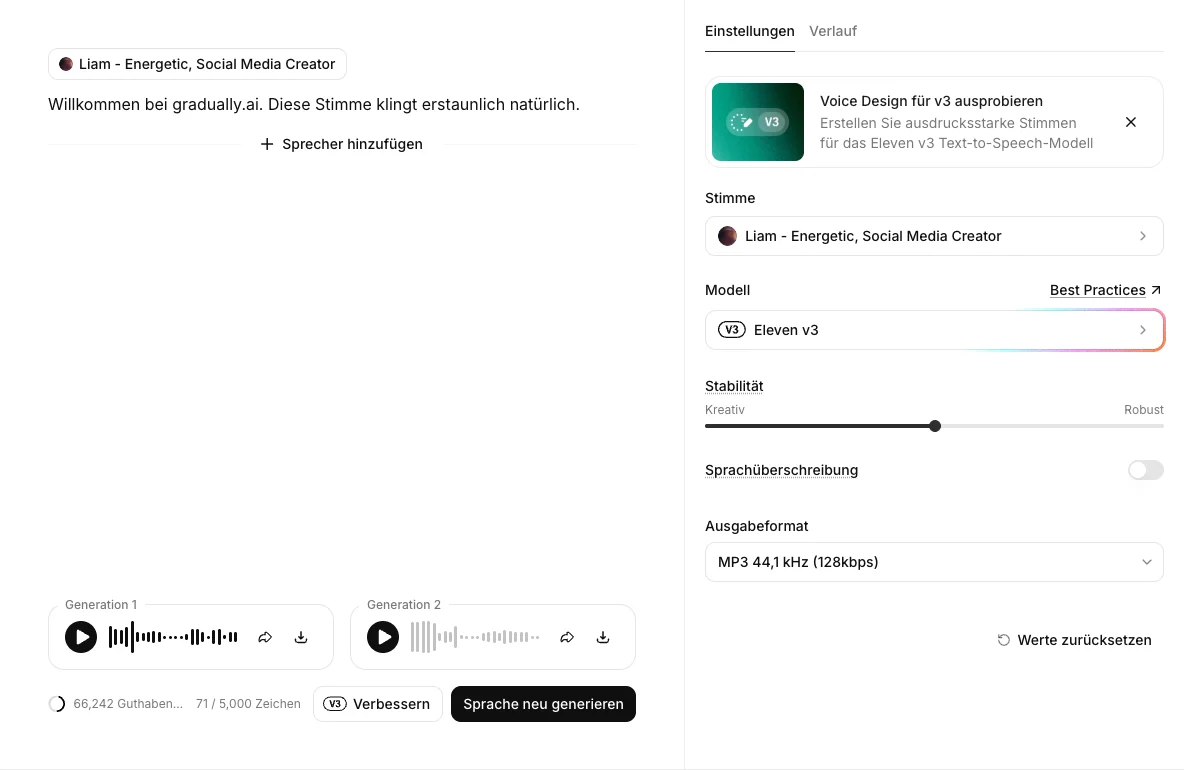
I used Eleven v3 for this review. The model supports 70+ languages and up to 5,000 characters per generation, according to ElevenLabs. In my test, it generated MP3 files at 44.1 kHz and 128 kbps by default; WAV and other formats were available to select. The editor returned two variants in my first comparison.
The company now lists Eleven v4 as its flagship model, with support for 90+ languages. The audio examples below remain results from my v3 test.
For the voice, I used "Liam, Energetic, Social Media Creator," freely selectable from the library, plus a stability slider between Creative and Robust.
First, I generated a plain read of my fixed test script from section 2, with no frills and not a single control instruction.
Audio sample: the fixed test script with Eleven v3 and the voice Liam, no audio tags (German audio)
To back this up, here's the credit math, because vague numbers annoy me too. I counted three generations. My test script is 184 characters, and afterward my balance was exactly 184 credits lower. A second run of 148 characters cost exactly 148 credits, and a third of 182 characters exactly 182.
So on Eleven v3, one character costs you almost exactly one credit, no discount and no markup. The full measurement series across every feature is further down in section 15.
Now for the part that genuinely impressed me.
Audio tags are small markers you write right into your script, and the voice acts on them. With [whispers] it whispers, with [laughs] it laughs.
The editor even highlights both tags in color inside the text, so you can see what it recognized before you generate anything. Since my fixed test script deliberately has no tags in it, I used a second, short script for this:
"[flüstert] Ich verrate dir ein Geheimnis. [lacht] Keine Sorge, nichts Schlimmes. Diese Stimme wurde komplett von einer KI erzeugt." In English: "I'll tell you a secret. Don't worry, nothing bad. This voice was generated entirely by an AI."
Worth noting for anyone working outside English: the tags work in German too. I wrote [flüstert] and [lacht] rather than [whispers] and [laughs], and the editor recognized and highlighted both.
Audio sample: the tag script with [flüstert] and [lacht], listen for the emotional difference (German audio)
The difference is obvious the moment you listen. The first sample reads the text, the second one performs it. No other text-to-speech tool I know offers this.
4.1 English voice versus German voice, same German script
Eleven v3 covers 70+ languages. That number tells you nothing about how native a single voice sounds, and that's exactly where non-English projects fall over. Liam is an English voice speaking German, Otto is a German studio voice. Both get the same script and the same model here.
English voice Liam on Eleven v3, fixed test script (11.8 seconds)
German voice Otto on Eleven v3, identical script (11.2 seconds)
On first listen both sound good, and that's the trap. The difference sits in how individual words come out. You hear it most clearly on "vorliest," which Liam slurs into something closer to "vollließt." Otto says the same word cleanly. There's a pace difference too: Liam takes 11.8 seconds for the identical text, Otto only 11.2.
So for content in a given language, pick a voice native to it, even when an English voice "kind of works" in your test. The effort is the same, the credits are the same, and the difference is obvious to exactly the listeners you're producing for.
4.2 Eleven v3 versus Eleven Multilingual v2
"The most natural AI voice I've heard" is a worthless claim as long as you only get to hear one recording. So I had Otto read my test script a second time, this time on the older Eleven Multilingual v2 model. Same voice, same 184 characters, only a different model underneath.
Otto on Eleven v3, fixed test script (11.2 seconds)
Otto on Eleven Multilingual v2, identical script (11.5 seconds)
My takeaway is more sobering than the version numbers suggest. Both models deliver the sentence cleanly and without a single wobble, with v3 a touch quicker (11.2 versus 11.5 seconds). The real difference isn't the sound of a plain sentence, it's what you get to control.
- Eleven v3: 70+ languages, audio tags, and two variants in my test, but only a single slider for stability.
- Eleven Multilingual v2: 29 languages, labeled "studio quality" by ElevenLabs itself, only one generation per run, but finer sliders for speed, stability, similarity, style exaggeration, and speaker boost.
- Flash v2.5: 32 languages, tuned for ultra-low latency and built for real-time conversation rather than produced audio.
And one detail in the editor argues against writing v2 off as "the old model."
For the best consistency with professional voice clones, ElevenLabs explicitly recommends Multilingual v2 over v3. Fittingly, the Voice Changer and Studio run on v2 as well. So if you produce regularly with a cloned narrator, the supposedly older model may serve you better.
Both generations cost me exactly the same, by the way: 184 credits for 184 characters. In the text-to-speech editor, v2 is not the budget option, so choosing between models is purely a question of quality and control.
5. Voice cloning: Instant vs Professional
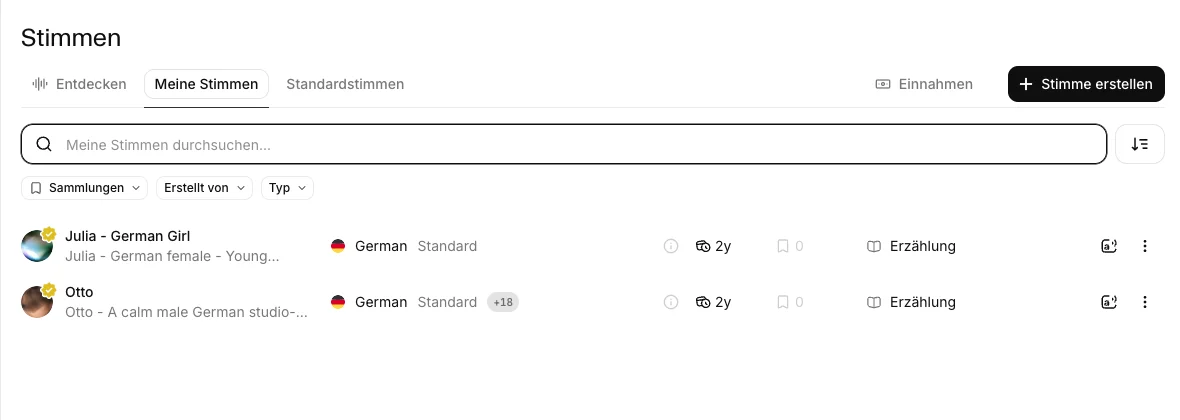
Voice cloning has changed quite a bit since I last took a close look. Under "Create voice," ElevenLabs now offers four routes: Voice Design (you describe a voice in text and get it in under a minute), Instant Voice Cloning, Professional Voice Cloning, and voice remixing.
I also tested Voice Design and voice remixing with a German historical narrator that I designed from scratch. The prompt explicitly excluded any real person. ElevenLabs returned three variants.
I saved one as a synthetic narrator, then had it remixed to sound younger, brighter, and more conversational. That is the sensible route if you want a historical mood. A public archive recording does not automatically give you the right to clone a recognisable deceased person's voice.
Audio sample of a freely designed synthetic narrator. The audio is in German.
English translation of the spoken text
“This is a synthetically designed historical narrator voice. It imitates no real person. Imagine an old lecture hall where every word is spoken with calm, weight, and a hint of a bygone time.”
The difference between Instant and Professional is the one that matters most for readers.
The Instant Voice Clone (IVC) accepts very short recordings, and processing took about two minutes in my test. ElevenLabs recommends one to two minutes of clean audio for a more reliable result. IVC is included in the cheapest paid plan from $6 and is enough for plenty of quick projects.
The Professional Voice Clone (PVC) needs a lot more, at least 30 minutes of clean recordings. ElevenLabs recommends one to three hours for stronger results, and says fine-tuning usually takes three to six hours, sometimes longer.
PVC only becomes available from the Creator plan at $22, and even there my account only gets exactly one reserved slot for it. Higher plans give you more, three on the Scale plan, for example.
On the free plan, by the way, there's no voice cloning at all, neither Instant nor Professional. My Creator account showed 0 of 30 voice slots used at the time, which is the overall capacity for your own and cloned voices on this plan, separate from the one dedicated PVC slot.
This time I didn't just describe the Instant Voice Clone, I built one live. The input was two synthetic samples of the ElevenLabs voice Liam totaling around 22 seconds, not recordings of my own voice. The “Remove background noise” option was on by default during upload. After roughly two minutes of processing, this test clone was available in the account.
There was one step ElevenLabs would not let me skip:
Before I could save the clone, I had to explicitly confirm with a checkbox that I had all the rights and permissions needed to upload and clone these voice samples, complete with a pointer to the terms of use, the prohibited-content policy, and privacy. PVC is stricter. It only permits your own voice and requires a live verification.
And now the actual test:
How close does a two-minute clone get to the original? The fixed script pays off again here, because both recordings speak the exact same 184 characters. Above you get the original voice Liam, directly below it my freshly built Instant clone.
Original: the ElevenLabs voice Liam with the fixed test script (German audio)
Instant Voice Clone: built from my uploaded samples, identical script (German audio)
My verdict: for two minutes of effort and around 22 seconds of source material, the resemblance is impressive. The clone nails the timbre and the way the voice carries, and for quick projects I'd use it without hesitation.
It isn't a perfect match for the original, and that last gap is exactly why the Professional Voice Clone, with its 30 minutes of material, exists in the first place.
I also prepared 34:14 minutes from my own Zoom coaching recordings for a Professional Voice Clone. I selected three continuous passages spoken only by me and made a 48 kHz mono file at 192 kbps. It has not been uploaded. A final listening check comes first, and I still have to complete the required live verification in my own voice.
One limit matters if you are planning around a subscription. You can download the audio you generate, but not the PVC model itself. The official PVC documentation says a clone stays on the account after a downgrade below Creator, but you cannot use it again until you upgrade.
6. Voice Changer: giving a recording a different voice
The Voice Changer does something different from cloning: it takes a finished recording and lays it onto another voice, without regenerating the content. ElevenLabs calls it speech-to-speech.
One detail plenty of people miss:
In my test, the Voice Changer didn't use the model I tested for text-to-speech, Eleven v3, but Eleven Multilingual v2. That's what the interface showed when I checked it. You upload audio up to 50 MB or record directly, then adjust stability, similarity, style exaggeration, background-noise removal, and speaker boost with sliders.
For the test, I took my finished TTS sample with the voice Liam, the same plain recording from further up, and turned it into the voice "Julia" (German Girl). The words stay identical, only the voice changes.
Audio sample: my Liam TTS clip, run through the Voice Changer into the voice Julia (Eleven Multilingual v2). The audio is in German, the point is the voice swap.
It cost me 197 credits for 12 seconds of audio, so roughly 985 credits per minute. That's clearly pricier per second than plain text-to-speech, but reasonable for what's happening.
The Voice Changer is handy whenever you already have a recording, your own speaking, an interview, or a finished take, and you only want to swap the voice on top of it instead of re-recording or regenerating everything.
7. Scribe: speech-to-text in 92 languages
ElevenLabs doesn't just turn text into voice, it works the other way too. Scribe v2 handles uploaded files, while Scribe v2 Realtime handles live audio streams. I tested the file-upload route here, not the real-time model.
In its live banner, ElevenLabs bills Scribe as "lightning-fast transcription with unmatched accuracy in 92 languages" and calls it the "industry-leading ASR model." Big words, but I can confirm the language count: 92 languages are genuinely available.
This time I measured Scribe myself, using a case where I know the truth in advance.
I had it transcribe my own TTS sample from further up. The source text is fixed word for word, 28 words, so every deviation can be pinned down exactly. Scribe detected the language correctly as German on its own.
Hallo, ich bin Finn. Grade(Gerade) teste ich, wie natürlich diese KI-Stimme deutschen Text vorliest. 8(Achte) einmal auf die Betonung, das Sprechtempo und die kleinen Pausen zwischen den Sätzen.Two deviations across 28 words give roughly 93% agreement in this simple word comparison. “Gerade” became “Grade,” and “Achte” became the digit “8.”
The hard test lives elsewhere. I already put ElevenLabs through my detailed comparison of AI transcription software against five other tools, recorded on an old MacBook's built-in microphone under deliberately imperfect conditions. There it hit 98.11% character accuracy and 90.26% word accuracy, taking first place out of six tools.
For my twelve-second clip, the batch upload took over two minutes. I have not measured the streaming route of Scribe v2 Realtime. If you plan to process larger file batches, check the wait with your own material.
I would not book Scribe for a real interview based on those 28 words alone. The Scribe documentation also lists keyterm prompting for specialist vocabulary, speaker diarization, and timestamps. Its No Verbatim mode can remove fillers and repetitions, so the result is deliberately not a word-for-word transcript. According to the subtitle guide, you can export subtitles as SRT or VTT.
I have not put those features through a hands-on test here. If you are processing a multi-speaker interview, add names and technical terms first, then listen back to the finished transcript.
What's practical for me is that I don't need a separate tool for transcription, I stay in the same account. If you transcribe a lot, though, it's worth looking at specialized providers like Sonix or Amberscript, which are built for exactly that job.
8. Music v2: the music generator
Since late May 2026, there's also a music generator called Music v2, currently the second model after an earlier version that's still visible in my generation history.
Here's the credit math again. Music v2 costs 900 credits per minute, per variant. In my first test with the length set to "Auto," the tool built two variants of 2:00 and 2:30 without asking. Measured against the balance before and after, that single generation cost 4,115 credits.
Later, I could choose just one variant for a 30-second song. Set both the length and the number of variants deliberately instead of assuming a fixed default.
For lyrics, you can choose between "Auto" (auto-lyrics) or your own text. ElevenLabs usually detects the genre automatically from your prompt, in my tests that meant hip-hop, electronic, and ambient. For downloads you get MP3, MP4, WAV, and an extended format.
I also went back and tested vocals with four lines of German lyrics I wrote myself. I generated a 30-second chamber-pop ballad with a warm baritone, piano, and strings, chose one variant, and paid 450 credits. Music v2 turned it into a finished song called “Stimmen aus Papier” with my supplied text.
The menu then offered to split the track into vocals and instrumental for 225 credits, or into vocals, bass, drums, guitar, piano, and other for 450 credits. I started the full split, but could not independently download and listen to each stem in my browser automation.
“Stimmen aus Papier”, 30 seconds from my vocal test with original lyrics. The song is in German.
Lyrics supplied for this test
„Leise fällt das Licht ins alte Haus. Jede Seite trägt die Zeit hinaus. Stimmen aus Papier, wir hören zu. Zwischen Staub und Sternen wächst die Ruh.“
Audio sample: 30 seconds from a lo-fi track I generated with Music v2
What impressed me most was the song editor. You work with a timeline of sections there, Intro, Verse, Bridge, and Outro. Each section has its own style tags and its own tempo, in my test for example "relaxed lo-fi hip-hop groove," "dusty snare," and 82 BPM.
This is exactly where inpainting lives, you can regenerate a single section without touching the rest of the song, or give it a different genre entirely through new style tags.
How far that genre switch actually carries is something I measured separately.
It reliably lands at tag level, so the selected section really does get new style and tempo tags while the neighboring sections stay untouched. Sonically, though, the switch stayed much closer to the original than the new tags promise. The measurements for that are in my Music guide, linked just below.
Every such regeneration costs another 900 credits per minute and variant, so you use it deliberately rather than at random. I looked closely at the interface and the full workflow, and for a still-young music feature, it feels surprisingly polished.
I wrote up exactly how inpainting, genre switching, and the song editor work, plus how Music v2 stacks up against Suno, in a dedicated ElevenLabs Music guide.
9. Dubbing v2: automatic video translation
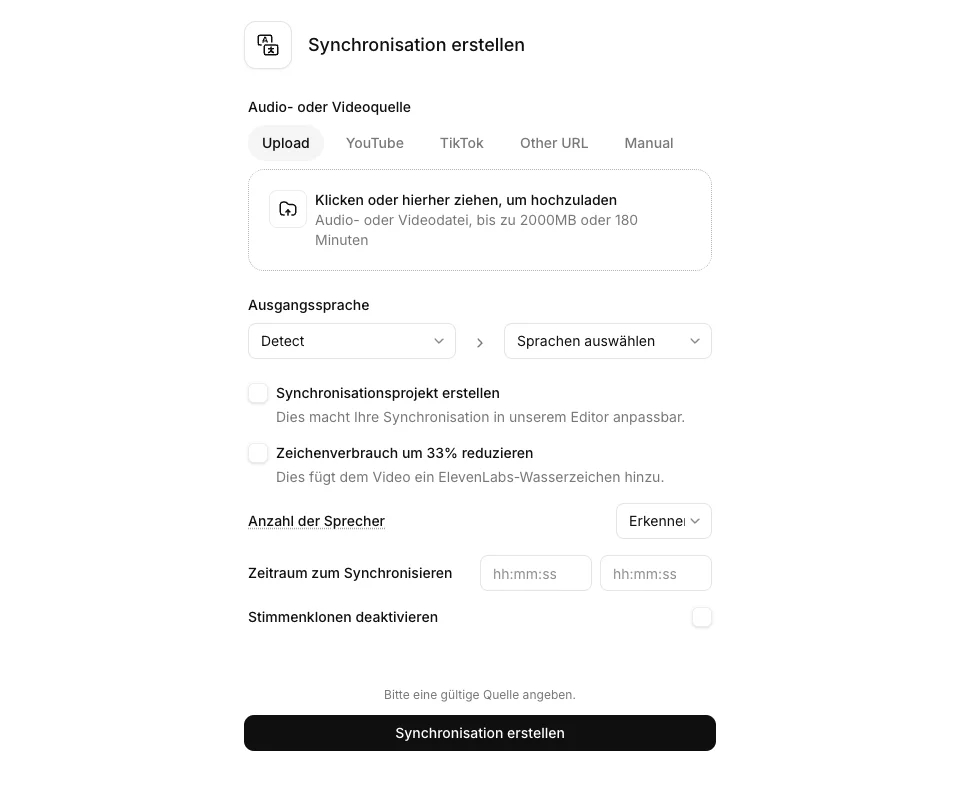
For video translation and dubbing, ElevenLabs has its own tool, currently labeled "Dubbing v2 (Alpha)."
In the intro modal, ElevenLabs makes three promises for Dubbing v2:
- The emotion and expression of the original speaker are preserved.
- The wording is adapted so the translation sounds natural in 92 languages.
- Voice cloning and syncing happen automatically.
On the upload screen, you upload a file or paste a URL directly. The current Dubbing documentation gives simultaneous browser limits of 2 GB and 180 minutes for v2. After that, you pick your target languages, with additional settings under Advanced.
Dubbing v2 is fully automatic and returns a lossless audio file, but it has no lip-sync or translation editor. For later text corrections, you need a Dubbing Studio project using the older v1 model. My AI dubbing guide explains that distinction and the documented exports. I have not verified a complete workflow here.
This is where my test ends. Dubbing v2 is the only one of the nine scored core tools that gave me no output. Section 12.1 separately identifies unfinished steps from the later extra tests.
On the first attempt I went through the file upload, with exactly the audio file I had already pushed through the Voice Changer and through Scribe. Both had accepted it without complaint. In Dubbing v2 the detected duration stayed stuck on "--," the spinner kept turning, and the generation could not be started.
On the second attempt a few days later I took the URL route and pasted a sample URL from gradually.ai. That failed too, this time with the message "Media from this URL could not be loaded."
I only half blame ElevenLabs for that one, since my own site's bot protection likely blocked the fetch.
On the third attempt I used an official NASA YouTube video. Dubbing v2 failed before generation again, so I still had no finished dub to assess.
The same file produced results in Voice Changer and Scribe in the same account, but not in Dubbing v2. The URL attempts show that my problem was not limited to one upload. Whether the input, the service, or my test environment caused it remains open.
From an earlier test, there's still a dubbing sample sitting in my account, an excerpt from Sebastian Fitzek's "Elternabend," though that one used the previous model, Dubbing v1.
10. ElevenAgents: voice bots
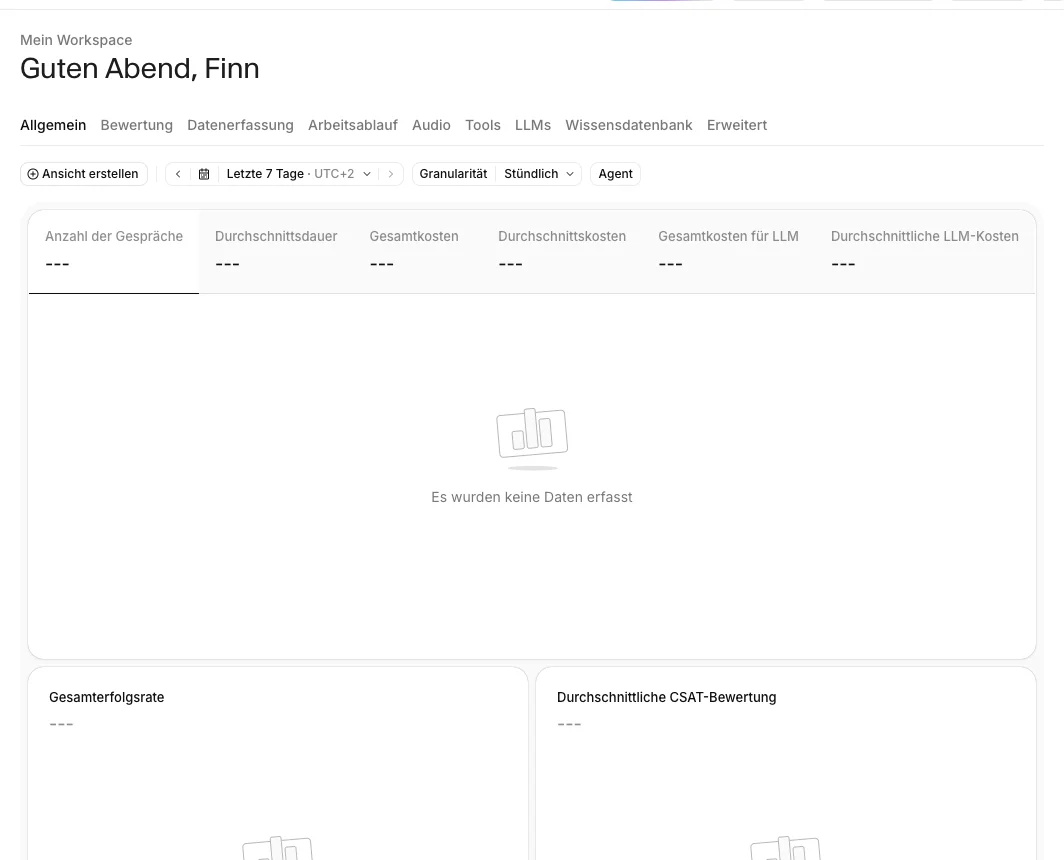
ElevenLabs also offers ElevenAgents, a builder for AI voice agents, bots that talk on the phone or in chat.
ElevenAgents is a big topic in its own right. I looked through the dashboard, and even there it's clear how extensive the builder is: phone numbers, WhatsApp, a knowledge base, tools, and the LLM configuration all live in one interface.
This time I didn't stop at looking, I built an agent and tested it.
You can use a five-step wizard (template, industry, use case, tools, create) or ready-made quick-start templates like Customer Support, Language Practice Tutor, or Front Desk Receptionist. I started with the "Customer Support" template.
It doesn't come empty, but with a complete system prompt (personality "Jamie, a calm, knowledgeable support engineer," plus environment and tone). On top of that sits a whole tools layer with your own tools like Zendesk or Salesforce via API key, and system tools like end call, detect language, transfer to a human agent, or update status.
One detail I liked as a developer:
When you publish, ElevenAgents shows a diff-review dialog, published versus current version, almost like Git, with a commit message. Version control for voice agents, cleanly done.
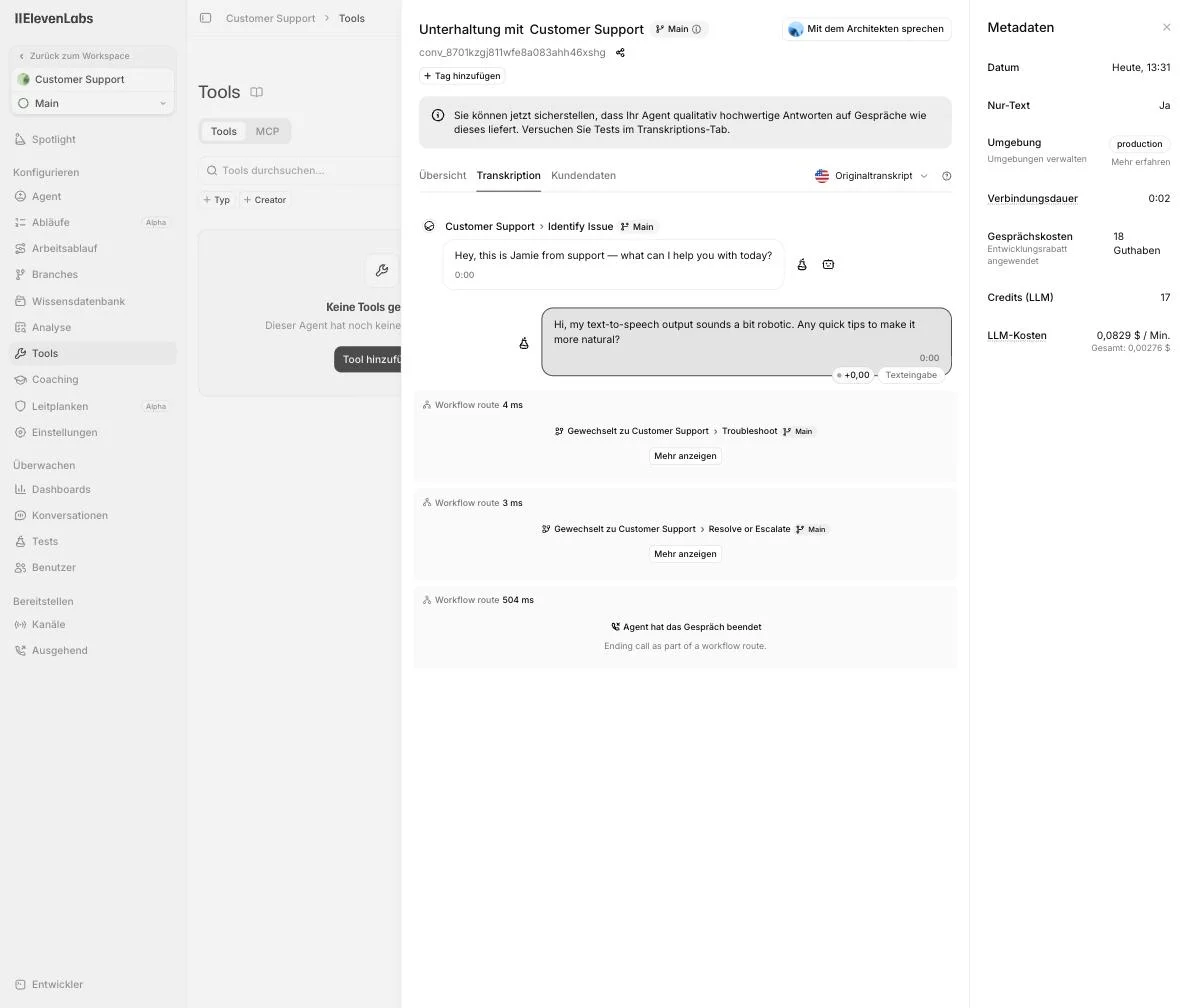
Then the actual test conversation. Through the text widget, the agent greeted me ("Hey, this is Jamie from support, what can I help you with today?"), took my question, and ran through a multi-step workflow: Identify Issue, then Troubleshoot, then Resolve or Escalate. So the "Customer Support" template isn't a simple prompt agent, it's a workflow agent with real branches.
And yes, I have to flag one catch:
In pure text test mode, the workflow cut off the final text answer at the end, because it jumped to "end call" as part of a workflow route. This agent is clearly built for voice, not for chat, and ElevenLabs' automatic conversation summary named exactly that itself.
What did impress me was the analysis afterward. Every conversation gets its own detail page with an AI-generated summary, a conversation status (mine was "Successful"), a sentiment analysis (neutral, no frustration), and the full word-level transcript with timestamps and the workflow routes it ran through.
The cost display showed 18 credits for my conversation with a developer discount, including 17 for the language model, and an LLM rate of $0.0829 per minute. Applied to two seconds, that rate gives about $0.00276 for the LLM component.
One point you should know before you picture a phone bot:
ElevenLabs doesn't sell its own phone numbers. You can only import a number from Twilio, from a SIP trunk, or from Exotel, each with an external account and credentials. So ElevenAgents is the voice and logic layer, and you bring the actual telephony from another provider. On top of that, the channels also include WhatsApp and outbound calls in batches.
For a first real test, ElevenAgents won me over. The templates take a lot of work off your hands, the analysis is first class, and the workflow logic is more than a simple chat prompt.
But if you want to get serious with it, you should test the agent in voice mode, not chat, and plan the telephony connection in from the start.
11. Studio: long form for audiobooks and long texts
Studio is the long-form environment for projects like audiobooks. You create an audio project, work in chapters and paragraphs, and assign each paragraph its own voice. I voiced a test paragraph with the German studio voice "Otto," which runs on Eleven Multilingual v2 there and cost about one credit per character, so 281 credits for my short paragraph.
Each paragraph has its own AI tools like improve text, Voice Changer, or remove background noise. Pure audiobooks have even moved into their own area outside of Studio.
According to ElevenLabs, the separate Audiobooks area can import EPUB and PDF manuscripts into chapters, detect speakers, and assign voices to characters. It also includes pronunciation dictionaries, paragraph-level changes, and chapter exports. That is a useful workflow for authors and publishers, though I have not tested it myself yet.
The Studio suite also lists GenFM, which creates a new podcast script from a source document, Actor Mode for guiding prosody and emotion from a reference recording, Video-to-Music, subtitles, and Studio Agent for video projects. I have not personally put these tools through their paces here.
If you are planning a podcast or audiobook, do not start with a whole book. Start with two short chapters, two voices, and names that will immediately expose a bad pronunciation.
For existing blog posts, Audio Native is more interesting than another Studio project. It adds a listening player to a website and ElevenLabs makes it available on Creator. I have not installed it on gradually.ai yet.
12. Sound effects
I also gave the sound effects a quick spin. From an English prompt like "gentle rain on a window with distant thunder," ElevenLabs generates four short variants at once, which you then refine through suggestions like "rain intensity" or "thunder detail."
The four clips ran about one second each in my test, too short to embed as a sample here. The roughly 17 credits were an estimate from the old interface, and I did not measure them against the balance. ElevenLabs currently lists 200 credits per sound-effect generation on its pricing page.
ElevenLabs' own guide allows effects of up to 30 seconds. I have not tested longer effects or seamless loops yet.
12.1 More tools in context
The following extra tests are from August 29, 2026. They do not retroactively change the weighted overall score in section 3. I also cover other documented features below and identify them as not yet tested hands-on.
Voice Design and voice remixing did exactly what they should in the extra test. A free-form synthetic narrator produced three variants. One of them then produced three previews that made it younger, brighter, and more conversational. For a historical feel, that is a much cleaner choice than cloning a real person.
In Image & Video, I used GPT Image 2 to create an empty lecture hall and Veo 3.1 Fast to turn it into a four-second camera move. In Flows, I could generate a German narration and library ambience. The composition node would not render without a video track.
Synthetic still image and a four-second camera move through an empty historical lecture hall by candlelight. The video has no audio.
I could not complete the Voice Isolator because the browser automation blocked the local upload. I also created a second speaker row and voice in Text to Dialogue, but could not fill the second editor field.
The browser UI for Scribe Realtime, the live Voice Changer, and ElevenAgents voice mode requires microphone access. The API can also receive real-time audio streams by other means. I have not tested latency, interruption handling, or voice quality for either route.
Developers may care about the API feature Forced Alignment, which maps spoken audio to a text at word level for uses such as karaoke-style subtitles or edited video.
Audio Detector and Avatars are on the product list, but not on my tested list. ElevenLabs presents the detector as a check for its own generated audio only. Avatars combine an image with a spoken script and lip-sync. According to the provider, they are available on paid plans.
ElevenLabs currently labels Ads Engine alpha and offers it from Pro, so it is not included in the Creator plan.
13. The strengths, from my point of view
After this review, these are the points where ElevenLabs clearly comes out ahead for me:
- Quality and naturalness: This is the most important one. Eleven v3 sounds closer to a real person than the other voices I compared in this test. With emotional or narrative scripts, the difference is obvious.
- Audio tags as a clear advantage: Writing [whispers] and [laughs] directly into the script and hearing exactly that in the result is something I have not found in this form in my own testing. It's not just a nice extra, it's why ElevenLabs sits so far ahead for demanding voice projects for me.
- One platform instead of many subscriptions: Text-to-speech, Scribe, voice cloning, Music v2, dubbing, and ElevenAgents in one account. That's the underrated day-to-day advantage for me, because I don't have to juggle multiple tools and multiple invoices.
- Traceable credit billing: On Eleven v3, one character costs almost exactly one credit, and I verified that down to the exact digit in this test. No hidden rounding, no surprise on the invoice.
14. The weaknesses
No tool is perfect, and I wouldn't be doing my job if I only gushed. These are the points you should know about:
- No voice cloning on the free plan: You can use voices for free, but you can't clone your own. Instant Voice Cloning only starts at Starter, Professional Voice Cloning only at Creator.
- Music v2 on "Auto" eats credits fast: A single generation cost me 4,115 credits, roughly 3.4% of a Creator monthly allowance for one attempt. If you're testing, cap the length manually.
- The price can climb with heavy use: ElevenLabs bills by credits. As long as you voice things occasionally, the cheap plans cover you fine. But if you produce long scripts or full audiobooks daily, you burn through credits quickly and end up on the higher plans.
- Dubbing v2 produced no result in my test: Three attempts, no finished dub. The file upload refused to validate, the URL fetch failed, and an official NASA YouTube video did not reach generation either. The cause remains open.
- USD billing and checkout taxes: The plans are listed in US dollars. Any added tax depends on your billing country and tax status, so do not rely on a flat conversion. Check the checkout instead.
- Higher latency with v3 for real time: Eleven v3 gives the best quality but takes a bit longer to generate. For pre-produced content that doesn't matter, but for a live voice bot, the latency is something you have to plan around.
- Most natural voice quality in my test (Eleven v3), especially for emotional scripts
- Audio tags like [whispers] and [laughs] for real emotion right inside the script
- Full audio platform: TTS, voice cloning, Scribe (92 languages), Music v2, dubbing, and ElevenAgents in one account
- Traceable credit billing, roughly 1 credit per character on v3
- Free plan to try it out, paid entry from $6/month
- Commercial use on paid plans, subject to the service-specific terms and your input rights
15. Pricing and plans
Before we get to the plans, here's the number that actually matters day to day.
I noted the balance before and after every single generation, and that's how this table came about, measured in the upgraded Scale account. I deliberately did not force the units into a common shape, because ElevenLabs bills per character, per minute, or per call minute depending on the feature.

The two Music values came from different observed runs. A complete Auto track cost 4,115 credits, while one outro regeneration cost 1,350. The interface shows the price that applies to each edit before you start it.
What ElevenLabs officially charges per feature and model is in my ElevenLabs pricing guide. The table above shows what actually came off the balance.
ElevenLabs has a free version and several paid plans. Here are the most important ones at a glance, with the numbers from my own account and the pricing page.
Extra minutes beyond your allowance cost between $0.36 (Free) and $0.17 (Pro and Scale) per minute, the cheaper the plan, the pricier the extra minute gets. On Creator, the extra minute costs $0.18, and if you run out of credits there, you can top up with pay-as-you-go.
Studio projects also differ by plan: 20 on Starter, 1,000 on Creator, 3,000 on Pro, and 9,000 on Scale. For very large teams there's also a Business plan. According to the pricing page, it runs $990 a month with 6,000,000 credits, so roughly 6,000 free minutes.
Pay annually instead of monthly, and ElevenLabs gives you two months free, so you effectively pay for 10 months instead of 12. ElevenLabs calculates tax at checkout. It depends on your billing country and tax status.
Many features share a credit pool but have different billing rates. Music, dubbing, and long Studio projects are not free extras. According to ElevenLabs' pricing page, unused paid subscription credits can roll over for up to two months while you keep a paid subscription. Remaining subscription credits expire at the end of the billing period when you cancel or downgrade.
For a more detailed breakdown of all seven plans, including the Business plan and checkout considerations, check out my dedicated ElevenLabs pricing guide.
16. When ElevenLabs is worth it, and when it isn't
The short answer is that it depends. But I don't like leaving you with a non-answer like that, so here's my clear take.
16.1 Who ElevenLabs is worth it for
ElevenLabs is worth it for you if you use voice seriously and regularly. Concretely, that means:
- You produce voice-overs for YouTube videos or explainer films and want them to sound professional, with real emphasis instead of flat narration.
- You create audiobooks or narrate longer texts and need a voice that carries emotion.
- You run a podcast and want to produce intros, trailers, or full episodes with AI voices, or transcribe interviews with Scribe.
- You want to clone your own voice and reuse it again and again without re-recording every time.
- You publish in multiple languages and need clean voices across many languages from one place.
In all of these cases, the mix of quality, audio tags, and platform depth is worth the price.
16.2 Who would be fine with something cheaper
Don't get me wrong:
ElevenLabs is excellent, but not everyone needs that. A leaner, cheaper option is probably enough for you if:
- you only want to voice the occasional blog post for listening.
- a solid but not perfect voice is enough because it's purely informational.
- you mostly transcribe and barely generate speech, in which case specialized transcription tools are often the better choice.
- you're on a very tight budget and the USD price plus VAT weighs on you.
In those cases, it's worth a look at the ElevenLabs alternatives, where I go into cheaper and specialized tools in detail.
17. My final word
I went into this review as a skeptic and came out a user.
ElevenLabs won me over because it delivers exactly what I'd long missed in AI voices, namely naturalness, emotion, and a depth that goes beyond plain narration. The audio tags [whispers] and [laughs] are the feature that makes the difference for me, and the platform genuinely saves me time day to day because I no longer switch between multiple tools.
Is it the cheapest tool? No. Is it worth it for everyone? Also no, and with Music v2 you need to watch the length setting, or your balance disappears faster than you'd expect, I learned that on my own account.
But for anyone who uses voice seriously, ElevenLabs is the first port of call right now. And you can try it for free before you spend a single cent.
If you want to test it yourself, you can head straight to ElevenLabs here and start with the free plan.
Frequently Asked Questions
On monthly billing, the regular prices are:
- Free: $0 for 10,000 credits
- Starter: $6 for 30,000 credits
- Creator: $22 for 121,000 credits
- Pro: $99 for 600,000 credits
- Scale: $299 for 1.8 million credits
- Business: $990 for 6 million credits
- Enterprise: custom pricing
Credits are shared across products and used differently by each feature, so they do not equal a fixed number of speech minutes. Starter includes Instant Voice Cloning and a commercial license; Creator adds Professional Voice Cloning. Prices exclude taxes. For plan details and cost caveats, see my ElevenLabs pricing guide.
For text-to-speech, compare Murf.ai, Lovo, and Amazon Polly. If you need transcription rather than speech generation, compare Sonix and Amberscript. Specific features, plans, and rights depend on the provider.
I cover them in detail in my guide to ElevenLabs alternatives and in my roundup of the best AI voice generators.




