Open source LLMs are one of the most important AI trends of 2026.
And for good reason:
Open source models were long significantly weaker than proprietary models. By fall 2026 they have almost completely caught up, especially thanks to Chinese labs:
DeepSeek V4 Pro, GLM-5.3 from Z.ai, and Kimi K3 from Moonshot AI are now only a few points behind Claude Opus 5 on SWE-bench Verified, the strongest model in the independent Vals AI measurement. The small Qwen3.8 27B even beats GPT-5.5 there.
In this article, you'll find a sortable, filterable directory of 211 open source LLMs, including benchmark scores, licenses, API prices, context windows, and capabilities.
The hardware check also shows you which of these models run on your PC or Mac and how fast they respond there.
Additionally, I'll show you how to easily and freely use open LLMs on your own computer (without needing to program or use the terminal).
- DeepSeek V4 Pro 0813, GLM-5.3, and Kimi K3 are less than 4 points behind Claude Opus 5 on SWE-bench Verified, as measured by Vals AI
- The best small model is Qwen3.8 27B under Apache 2.0. It fits on a 24 GB graphics card and even beats GPT-5.5 on SWE-bench Verified
- 211 open source LLMs in a filterable, sortable directory, from MIT and Apache 2.0 through to restricted research-only licenses. Columns like prices, context, and capabilities can be toggled individually
- Read the licenses carefully. GLM-5.3, Kimi K3, and MiniMax M3 have their own licenses with conditions, and MiniMax M2.7 is non-commercial only
- Local usage possible with tools like Ollama, LM Studio, or GPT4All, but the new top models need serious hardware. The hardware check shows which models run on your PC or Mac and how many tokens per second to expect
All Open Source LLMs at a Glance
The directory contains every open-weights model from the models.dev catalog plus curated classics, sorted by release date by default. Use "Columns" to reveal more data, such as modalities, knowledge cutoff, max output, or the number of API providers:
Showing 50 of 211 matches (211 models in total)
Benchmark values come from different tests and test setups. Values in the same column are therefore not directly comparable and cannot be sorted together.
| Knowledge | Math / Science | Code | ||||||||||
|---|---|---|---|---|---|---|---|---|---|---|---|---|
| Xiaomi | 309B (15B active) | 1M | – | – | 28.8%Terminal-Bench | MIT | $0.14 | $0.28 | Sep 2026 | |||
| Xiaomi | 1T (42B active) | 1M | – | – | 34.9%Terminal-Bench | MIT | $0.44 | $0.87 | Sep 2026 | |||
| Xiaomi | 1T (42B active) | 1M | – | – | – | MIT | $4.35 | $8.70 | Sep 2026 | |||
| DeepSeek | 552B (16B active) | 1M | – | – | 90.6%Terminal-Bench | MIT | $0.13 | $0.28 | Sep 2026 | |||
| openbmb | 2B | 128K | – | – | – | Apache 2.0 | $0.12 | $0.74 | Sep 2026 | |||
| Tencent | 770B (49B active) | 1M | – | – | – | Apache 2.0 | $0.67 | $2.00 | Aug 2026 | |||
| Alibaba | 125B (6B active) | 256K | – | – | 62.5%SWE-Bench Pro | Qwen Community License 1.0 | $0.15 | $0.47 | Aug 2026 | |||
| Z.ai | 320B (18B active) | 1M | – | – | 63.4%DeepSWE | MIT | $0.015 | $0.025 | Aug 2026 | |||
| DeepSeek | 305B | 1M | – | – | 83.9%Terminal-Bench | MIT | $0.080 | $0.20 | Aug 2026 | |||
| DeepReinforce | 35B (3B active) | 256K | – | – | – | MIT | $0.10 | $0.40 | Aug 2026 | |||
| Alibaba | 27B | 256K | – | – | 61.7%SWE-bench Pro | Apache 2.0 | $0.080 | $0.35 | Aug 2026 | |||
| Z.ai | 753B | 1M | – | – | 88.2%Terminal-Bench | GLM-5.3 License | $0.38 | $1.19 | Aug 2026 | |||
| Alibaba | 2.4T (95B active) | 256K | – | – | – | Qwen3.8-Max License | $1.95 | $5.95 | Aug 2026 | |||
| DeepSeek | 1.6T (49B active) | 1M | – | – | 87.9%Terminal-Bench | MIT | $0.26 | $0.79 | Aug 2026 | |||
Nemotron 3.5 Lightning 30B A3B | NVIDIA | 30B (3B active) | 256K | – | – | 51.6%SWE-Bench Verified | NVIDIA Open Model License | $0.050 | $0.15 | Aug 2026 | ||
| Meta | 30B | 128K | – | – | 76%SWE-Bench Verified | Apache 2.0 | $0.20 | $0.80 | Aug 2026 | |||
| motif-technologies | 314B (13.2B active) | 256K | – | – | – | MIT | $0.50 | $2.00 | Aug 2026 | |||
| DeepSeek | 284B (13B active) | 1M | – | – | 82.7%Terminal-Bench | MIT | $0.021 | $0.070 | Jul 2026 | |||
| thinkingmachines | 276B (12B active) | 1M | – | – | – | Apache 2.0 | $0.45 | $1.20 | Jul 2026 | |||
| Poolside | 118B (8B active) | 1M | – | – | – | OpenMDW-1.1 | $0.090 | $0.18 | Jul 2026 | |||
| Moonshot AI | 2.8T (104B active) | 1M | – | – | 88.3%Terminal-Bench | Kimi K3 License | $2.00 | $8.00 | Jul 2026 | |||
| thinkingmachines | 975B (41B active) | 1M | – | – | – | Apache 2.0 | $0.95 | $4.05 | Jul 2026 | |||
| Tencent | 295B (21B active) | 250K | – | – | 78%SWE-Bench Verified | Apache 2.0 | $0.066 | $0.26 | Jul 2026 | |||
| Poolside | 33B (3B active) | 256K | – | – | 70.9%SWE-Bench Verified | OpenMDW-1.1 | $0.060 | $0.12 | Jul 2026 | |||
Ornith 1.0 31B | DeepReinforce | 31B | 256K | – | – | – | MIT | – | – | Jun 2026 | ||
| DeepReinforce | 35B | 256K | – | – | 75.6%SWE-Bench Verified | MIT | – | – | Jun 2026 | |||
| DeepReinforce | 397B | 256K | – | – | 82.4%SWE-Bench Verified | MIT | – | – | Jun 2026 | |||
| DeepReinforce | 9B | 256K | – | – | 69.4%SWE-Bench Verified | MIT | – | – | Jun 2026 | |||
| Z.ai | 753B | 1M | – | 91.2%GPQA | 62.1%SWE-Bench Pro | MIT | $0.30 | $1.05 | Jun 2026 | |||
| Moonshot AI | 1T (32B active) | 256K | – | 89.6%GPQA | 67.4%Terminal-Bench | Modified MIT | $0.28 | $1.10 | Jun 2026 | |||
| Moonshot AI | 1T (32B active) | 256K | – | 89.6%GPQA | 67.4%Terminal-Bench | Modified MIT | $1.90 | $8.00 | Jun 2026 | |||
| Cohere | 30B (3B active) | 250K | – | – | 61%SWE-Bench Verified | Apache 2.0 | – | – | Jun 2026 | |||
| 12B | 256K | – | – | – | Apache 2.0 | $0.050 | $0.25 | Jun 2026 | ||||
| Xiaomi | 1T (42B active) | 1M | – | – | – | MIT | $1.31 | $2.61 | Jun 2026 | |||
Nemotron 3 Ultra 550B A55B | NVIDIA | 550B (55B active) | 1M | 86.8%MMLU-Pro | 87%GPQA | 89%LiveCodeBench | OpenMDW-1.1 | $0.10 | $0.10 | Jun 2026 | ||
| nex-agi | 397B (17B active) | 256K | – | – | – | Apache 2.0 | $0.50 | $2.50 | Jun 2026 | |||
| MiniMax | 428B (23B active) | 1M | – | 92.9%GPQA | 80.5%SWE-Bench Verified | MiniMax Community License | $0.23 | $0.90 | Jun 2026 | |||
| StepFun | 198B (11B active) | 250K | – | – | 76.5%SWE-Bench Verified | Apache 2.0 | $0.19 | $1.11 | May 2026 | |||
Command A Plus | Cohere | 218B (25B active) | 125K | – | – | – | CC BY-NC-4.0 | $0.30 | $1.50 | May 2026 | ||
| openbmb | 1B | 128K | – | – | – | Apache 2.0 | – | – | May 2026 | |||
| Mistral AI | 128B | 256K | – | – | 77.6%SWE-Bench Verified | Modified MIT (Mistral) | $1.50 | $6.90 | Apr 2026 | |||
Nemotron 3 Nano Omni 30B A3B Reasoning | NVIDIA | 30B (3B active) | 250K | 77.3%MMLU-Pro | 72.2%GPQA | 63.2%LiveCodeBench | NVIDIA Open Model License | $0.20 | $0.80 | Apr 2026 | ||
| Poolside | 225B (23B active) | 256K | – | – | 74.6%SWE-Bench Verified | Apache 2.0 | – | – | Apr 2026 | |||
| Poolside | 33B (3B active) | 256K | – | – | 69.9%SWE-Bench Verified | Apache 2.0 | – | – | Apr 2026 | |||
| DeepSeek | 284B (13B active) | 1M | 83%MMLU-Pro | 85%GPQA | 88%LiveCodeBench | MIT | $0.035 | $0.070 | Apr 2026 | |||
| DeepSeek | 1.6T (49B active) | 1M | 87.5%MMLU-Pro | 90.1%GPQA | 93.5%LiveCodeBench | MIT | $0.35 | $0.70 | Apr 2026 | |||
DeepSeek V4 Pro 0423 | DeepSeek | 1.6T (49B active) | 1M | – | – | – | MIT | $1.32 | $3.30 | Apr 2026 | ||
| Alibaba | 27B | 256K | 86.2%MMLU-Pro | 87.8%GPQA | 77.2%SWE-Bench Verified | Apache 2.0 | $0.20 | $0.60 | Apr 2026 | |||
| Xiaomi | 310B (15B active) | 1M | 86.3%MMLU | – | 56.1%SWE-Bench Pro | MIT | $0.14 | $0.28 | Apr 2026 | |||
| Xiaomi | 1T (42B active) | 1M | 89.4%MMLU | – | 78.9%SWE-Bench Verified | MIT | $0.40 | $0.80 | Apr 2026 |
1. Key Benchmarks Explained
A single score says little about a model. That's why the directory shows up to three values per model, one each for knowledge, math and science, and code.
The small label under each score tells you which benchmark a value comes from. These nine benchmarks appear there most often:
Some older tests are close to saturated by now. On HumanEval, for example, Kimi K2.5 reaches 99%. The harder benchmarks such as GPQA Diamond, LiveCodeBench, and SWE-bench Verified are more telling. If a model has no value, the directory shows "–".
How Close Open Models Are to the Top
On SWE-bench Verified, the gap to the proprietary frontier has almost disappeared. GLM-5.3 scores 95.4% at Vals AI, just ahead of Claude Fable 5. Only Claude Opus 5, GPT-5.6 Sol, and Grok 4.6 do better:
Open and proprietary models on SWE-bench Verified






It gets even closer with the final release of DeepSeek V4 Pro. Version 0813 reaches 96.4% in the same measurement, only 0.6 points behind Claude Opus 5. It's missing from the chart because it doesn't have its own model profile yet.
On price, the picture is more mixed than you might think. GLM-5.3-Flash reaches 92% for $0.15 per million input tokens. But OpenAI's GPT-5.6 Luna is almost level at 93% for $0.20:
The real advantage of open models lies elsewhere anyway. You can host them yourself, adapt them, and run them with any provider instead of being tied to a single API.
2. The Best Open Source LLMs in September 2026
Since July, the top of the field has been completely reshuffled. Kimi K3, GLM-5.3, and the final release of DeepSeek V4 Pro have clearly overtaken the spring models.
The six most important open models at a glance:
| Feature | DeepSeek V4 Pro 0813 | GLM-5.3 | Kimi K3 | GLM-5.3-Flash | MiMo-V2.6-Pro | Qwen3.8 27B |
|---|---|---|---|---|---|---|
| Developer | DeepSeek | Z.ai | Moonshot AI | Z.ai | Xiaomi | Alibaba |
| Released | Aug 2026 | Aug 2026 | Jul 2026 | Aug 2026 | Sep 2026 | Aug 2026 |
| Licensecheck the conditions in the license text | MIT | GLM-5.3 License | Kimi K3 License | MIT | MIT | Apache 2.0 |
| Parameterstotal (active per token) | 1.6T (49B) | 753B | 2.8T (104B) | 320B (18B) | 1.02T (42B) | 27B |
| Context window | 1M | 1M | 1M | 1M | 1M | 262K (up to 1M) |
| Input | Text | Text | Text, image, video | Text, image, video | Text, image, video, audio | Text, image, video |
| SWE-bench Verifiedmeasured independently by Vals AI | 96.4% | 95.4% | 93.4% | 92.0% | no score yet | 86.0% |
| Strength | Agentic coding | Software engineering | Coding, agents, vision | Multimodal and cheap | Omnimodal, agents | Runs on one 24 GB GPU |
DeepSeek V4 Pro 0813
In mid-August, DeepSeek replaced the V4 Pro preview with the final 0813 release. The architecture stays the same. According to DeepSeek, the biggest gains are in agentic capabilities in production use.
At 96.4% on SWE-bench Verified, it's the strongest open model in the Vals AI measurement. It also comes with the MIT license and no extra conditions.
GLM-5.3
Z.ai aims GLM-5.3 at software engineering and long agentic tasks. The context window holds 1 million tokens, and a single answer can be up to 128,000 tokens long.
The license has changed. Unlike GLM-5.2 and GLM-5.3-Flash, GLM-5.3 no longer uses MIT but its own GLM-5.3 License. It requires a security review by Z.ai, but only for Model-as-a-Service providers with more than $10 billion in annual revenue.
Kimi K3
With 2.8 trillion parameters, Kimi K3 is the largest model in the directory. Of those, 104 billion work on each token, plus a vision encoder for images and video.
Moonshot is surprisingly modest about it. According to its own blog, K3 still trails Claude Fable 5 and GPT-5.6 Sol, and the Vals measurement narrowly confirms that at 93.4%.
The Kimi K3 License allows commercial use, with two conditions for very large providers. Model-as-a-Service providers with more than $20 million in revenue over twelve months need a separate agreement. Above 100 million monthly users, "Kimi K3" has to be displayed prominently in the interface.
GLM-5.3-Flash
GLM-5.3-Flash is the first natively multimodal model in the GLM-5 series and understands images and video as well as text. With 18 billion active parameters, it's far leaner than GLM-5.3.
It still reaches 92% on SWE-bench Verified. The API costs $0.15 per million input tokens, and the weights are released under the standard MIT license.
MiMo-V2.6-Pro
Xiaomi introduced MiMo-V2.6-Pro on September 22, which makes it the newest model in this selection. It handles text, images, video, and audio in a single model and uses the MIT license.
There are no independent measurements yet. Xiaomi itself reports 89.9 on Terminal-Bench 2.1, but with its own test setup.
Qwen3.8 27B
The best small model comes from Alibaba. Qwen3.8 27B is a classic dense model with 27 billion parameters and reaches 86% on SWE-bench Verified. That puts it ahead of GPT-5.5 and Gemini 3.1 Pro.
With Q5_K_M quantization, it fits on a graphics card with 24 GB, such as an RTX 4090. The hardware check in section 4 shows how fast it runs there. The license is Apache 2.0.
Other Strong Models
These models are also worth a look:
- DeepSeek V4.1 Flash (September, MIT): a multimodal MoE with 552 billion parameters, 16 billion of which are active while generating. DeepSeek calls it the smallest model of its new architecture.
- Qwen3.8 2.4T-A95B (August, Qwen3.8-Max License): the open version of Alibaba's flagship Qwen3.8-Max. It handles text only and always runs in thinking mode.
- Tencent Hy4 preview (August, Apache 2.0): 770 billion parameters, 49 billion of them active, focused on software engineering and office work.
- Inkling and Inkling Small (July, Apache 2.0): two multimodal models from Thinking Machines Lab. Inkling Small reaches 82.2% on SWE-bench Verified with only 12 billion active parameters.
- Qwen 3.8 Flash Next (August, Qwen Community License 1.0): the architecture preview for Qwen4 with only 6 billion active parameters. On QwenCloud, it runs under the name "qwen3.8-flash".
- MiniMax M3 (June, MiniMax Community License): multimodal with a 1 million token context. For commercial use, the license requires the notice "Built with MiniMax M3".
- Nemotron 3 Ultra (June, OpenMDW 1.1): NVIDIA's largest Nemotron model with 550 billion parameters, built for long agent runs.
- Gemma 4 12B (June, Apache 2.0): Google's model for local agents. According to Google, it runs on laptops with 16 GB of VRAM or unified memory.
The spring models such as DeepSeek V4 Pro (April), Kimi K2.6, and GPT-OSS-120B remain usable, but clearly trail the new frontier.
3. LLM Licenses Explained
Here's an overview of the most commonly used licenses for open source LLMs.
MIT License
A very permissive open source license, similar to Apache 2.0. It allows unrestricted use, modification, and distribution of the LLM, including in proprietary programs, as long as the copyright notice is retained. DeepSeek V3 uses MIT with some restrictions for military use.
Llama 2 Community / Llama 3 Community
Meta released Llama 2 and Llama 3 under these licenses. They allow free use of the LLMs for research and commercial applications with up to 700 million monthly active users. The source code and model weights are freely available.
Qwen License / Qianwen LICENSE
Qwen models are released under various licenses. While smaller models are often licensed under Apache 2.0, larger models like Qwen2.5-72B have special license terms that allow commercial use with certain restrictions.
Apache 2.0
A very permissive open source license with minimal restrictions. It allows use, modification, and distribution of the LLM, including in proprietary programs, as long as the copyright notice is retained. It contains no copyleft clause.
CC BY-NC-4.0
A Creative Commons license that allows editing and sharing the LLM in any form, but not for commercial purposes. The author's name must be credited.
CC BY-NC-SA-4.0
Similar to CC BY-NC-4.0, but with the additional Share-Alike condition. This means forks or modified versions of an LLM must be distributed under the same conditions.
Non-Commercial
Here, using the LLM for commercial purposes is prohibited. However, what exactly counts as "commercial" is not always clearly defined or delimited.
Usually, "non-commercial" models are only released for research purposes or private use.
4. Which Open Source LLMs Run on Your Computer?
The strongest open source LLM is useless if it doesn't fit on your computer.
And that is exactly the sticking point with local models. A model has to fit completely into the memory of your graphics card or your Mac. Otherwise it won't start at all or crawls along at a snail's pace.
The hardware check below tells you in a few seconds which models from the directory run on your hardware. You pick your device, use case, and context length, and for every model you get the right quantization, the memory it needs, the estimated speed, and a recommendation score:
Available for models: 11.2 GB of fast memory at 504 GB/s, plus 24 GB of system RAM for offloading.
109 of 198 models run on this computer, 44 of them match your filters.
Model | Fit and memory | Quantization | Speed | Score |
|---|---|---|---|---|
| Fits8.2 GB · 73% used | Q6_K | 54 tokens/sFluent | 90 | |
| Fits22.1 GB · 63% usedpartly in RAM | Q4_K_M | 27 tokens/sUsable | 90 | |
| Fits8.2 GB · 73% used | Q6_K | 54 tokens/sFluent | 89 | |
| Fits22.1 GB · 63% usedpartly in RAM | Q4_K_M | 27 tokens/sUsable | 89 | |
| Fits22.1 GB · 63% usedpartly in RAM | Q4_K_M | 27 tokens/sUsable | 89 | |
| Fits8.3 GB · 74% used | Q4_K_M | 53 tokens/sFluent | 89 | |
| Fits21.1 GB · 60% usedpartly in RAM | Q4_K_M | 27 tokens/sUsable | 89 | |
| Fits16.8 GB · 48% usedpartly in RAM | Q4_K_M | 26 tokens/sUsable | 89 | |
Nemotron 3.5 Lightning 30B A3BNVIDIA · 30B (3B active) | Fits21 GB · 60% usedpartly in RAM | Q4_K_M | 25 tokens/sUsable | 89 |
| Fits8.2 GB · 73% used | Q6_K | 54 tokens/sFluent | 89 | |
| Fits8.7 GB · 78% used | Q4_K_M | 51 tokens/sFluent | 88 | |
| Fits21.1 GB · 60% usedpartly in RAM | Q4_K_M | 27 tokens/sUsable | 88 | |
| Fits21 GB · 60% usedpartly in RAM | Q4_K_M | 25 tokens/sUsable | 88 | |
| Fits8.1 GB · 73% used | Q6_K | 57 tokens/sFluent | 88 | |
| Fits8.2 GB · 73% used | Q6_K | 57 tokens/sFluent | 88 | |
| Fits19.7 GB · 56% usedpartly in RAM | Q4_K_M | 28 tokens/sUsable | 87 | |
| Fits19.7 GB · 56% usedpartly in RAM | Q4_K_M | 28 tokens/sUsable | 87 | |
Nemotron Cascade 2 30B A3BNVIDIA · 30B (3B active) | Fits21 GB · 60% usedpartly in RAM | Q4_K_M | 25 tokens/sUsable | 87 |
| Fits19.3 GB · 55% usedpartly in RAM | Q4_K_M | 29 tokens/sUsable | 87 | |
Nemotron 3 Nano Omni 30B A3B ReasoningNVIDIA · 30B (3B active) | Fits21 GB · 60% usedpartly in RAM | Q4_K_M | 25 tokens/sUsable | 87 |
| Fits16.6 GB · 47% usedpartly in RAM | Q4_K_M | 35 tokens/sFluent | 87 | |
| Fits13.6 GB · 39% usedpartly in RAM | Q4_K_M | 42 tokens/sFluent | 87 | |
Nemotron Nano 12B v2 VLNVIDIA · 12B | Fits8.7 GB · 78% used | Q4_K_M | 52 tokens/sFluent | 87 |
Nemotron 3 Nano 30B A3BNVIDIA · 30B (3B active) | Fits21 GB · 60% usedpartly in RAM | Q4_K_M | 25 tokens/sUsable | 86 |
| Fits7.5 GB · 67% used | Q6_K | 60 tokens/sFluent | 86 |
The next step with more memory:
Estimate for llama.cpp-based tools such as LM Studio and Ollama with GGUF files. Output speed is based on the average KV cache state during a chat. Full-attention layers use 50% of the context length used for the estimate, while sliding-window layers are averaged separately. The result is an average, not the speed at every moment in a chat. Reading long prompts takes extra time. Fit levels, quantization choice, and the score follow the open source tool llmfit by Alex Jones.
In Chrome and Edge, the check detects your chip or graphics card automatically. You set the memory yourself, because the browser doesn't reveal it.
The small arrow in front of each model opens the details. There you can see how the memory needs and the score come together and what to watch out for. By default, the check hides older models and everything below 10 tokens per second; you can turn off both filters.
How the Hardware Check Calculates
The principle behind it is simpler than it sounds. For every new token, an LLM has to read its weights from memory once. Speed therefore depends mainly on memory bandwidth, meaning how many gigabytes per second your chip can pull from memory.
According to its spec sheet, an RTX 4090 has 1,008 GB/s, while a Mac with an M4 gets 120 GB/s. That's why the same model runs several times faster on the graphics card.
Five more factors go into the calculation:
- Quantization: The weights are stored with fewer bits, just under 4.9 instead of 16 bits for Q4_K_M. An 8B model shrinks from 16 to about 5 GB and gets faster accordingly. The stronger the quantization, however, the less accurate the answers become. That's why the check tries every level from Q8_0 to Q4_K_M for each model and picks the one with the best score. Q3_K_M and Q2_K only come into play when nothing else fits.
- KV cache: For every token in the context, the model stores intermediate results, and their size varies a lot between architectures. The check calculates this exactly for 173 models from their configuration file on Hugging Face. For every new token, the model reads its currently occupied KV cache. The estimated speed therefore uses the average cache state during a chat. Full-attention layers use 50% of the context length used for the estimate, while sliding-window layers are averaged separately. A quantized KV cache (Q8_0 or Q4_0) roughly halves or quarters both the memory and the reads.
- Mixture of Experts: In MoE models like Qwen3.6 35B-A3B, only 3 of the 35 billion parameters work on each token. The model needs room for all weights but responds almost as fast as a small model.
- System RAM as a backup: On a PC, part of the model can spill over into regular system RAM. That works, but it slows things down a lot, because DDR5 memory has only a fraction of a graphics card's bandwidth. On a Mac, CPU and GPU share the same fast memory. By default, though, macOS assigns only about two thirds of it to the graphics unit (about three quarters from 48 GB), and that's the value the check uses.
- Fit: Up to 60% memory use, a model counts as "Roomy", up to 85% as "Fits", and up to 98% as "Tight". The last 2% stay free, because completely full memory doesn't load in practice. If the space isn't enough, the check keeps halving the context length until the model fits (down to 2K).
How the Recommendation Score Comes Together
The score from 0 to 100 combines four sub-scores. Quality comes from a model's size, age, quantization, and benchmark results, plus speed, fit, and context.
How much each sub-score counts depends on the use case:
The basic idea comes from the open source tool llmfit by Alex Jones. In some places, the check calculates more finely. It rates size and speed on a continuous scale so that tiny models don't win automatically on small machines, and benchmarks count relative to the median of all models in the directory.
The formula is matched against 21 published measurements from the llama.cpp benchmark threads, from the RTX 3060 through several M chips to the DGX Spark. For classic models, the estimate stays within 15% of the measured value there, for MoE models within 30%.
That said:
It's still an estimate. Your actual speed also depends on the tool, your drivers, and the length of your chat. The model also has to read long prompts and documents before it answers, and that waiting time isn't part of the calculation. Models without a published parameter count are missing from the check, because their memory needs can't be calculated.
For some MoE models, the developer only publishes the total parameter count, for example MiniMax M2.5 or GLM-5.2. The check then plays it safe and calculates as if all parameters were active. In practice, these models usually respond much faster than the table shows.
5. Using Open Source LLMs Locally on Your Own Computer
Using open source LLMs locally on your own computer is easier than you might think:
1. Download LM Studio
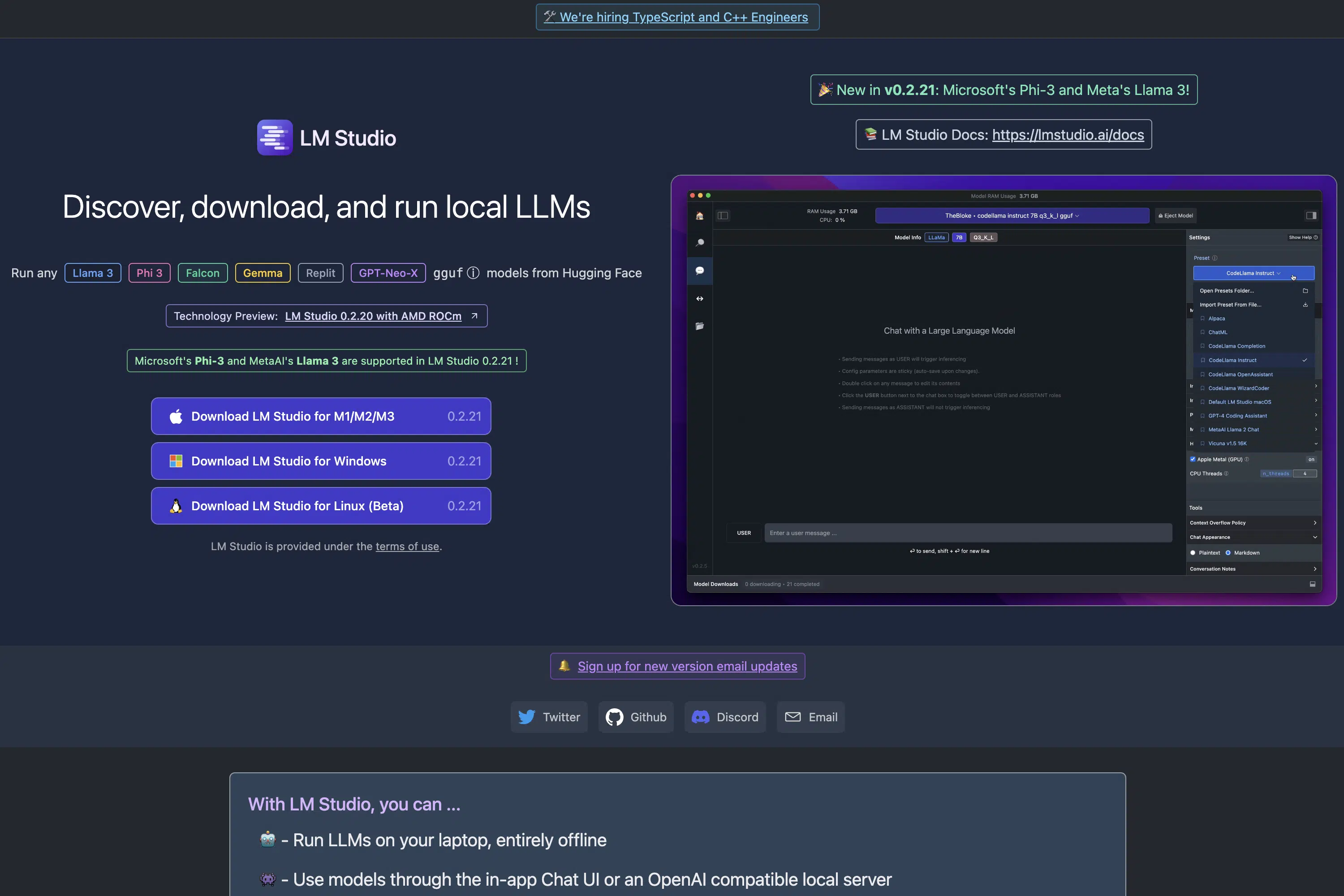
Download LM Studio from the website. It's free and available for Mac, Windows, and Linux:
2. Install and Open LM Studio
Next, install LM Studio on your computer and open it.
3. Download Your Desired Open Source LLMs
Now you need to download the open source LLMs you want to use in LM Studio.
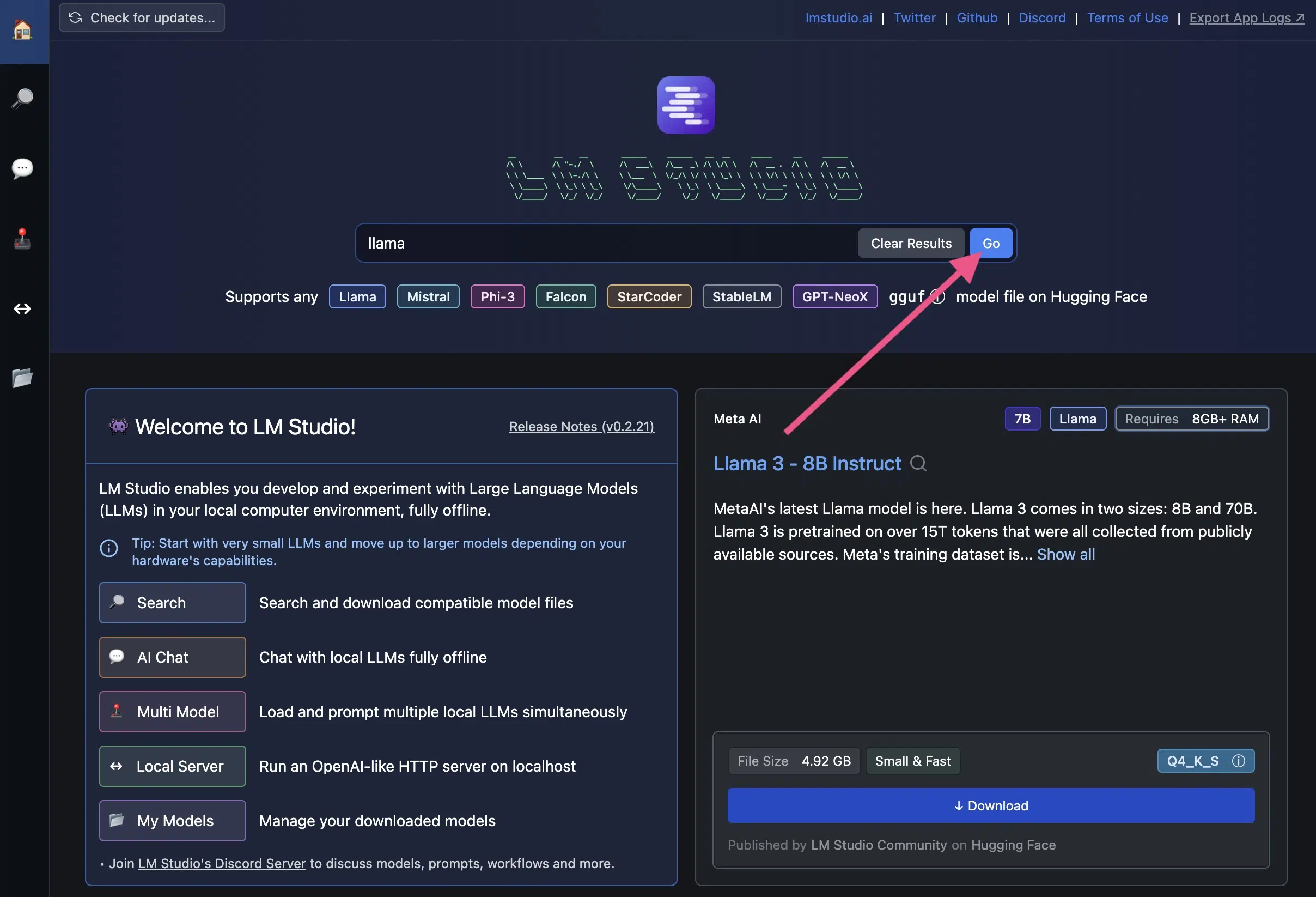
Many popular LLMs are already on the home screen. To download an LLM, simply click the blue download button:
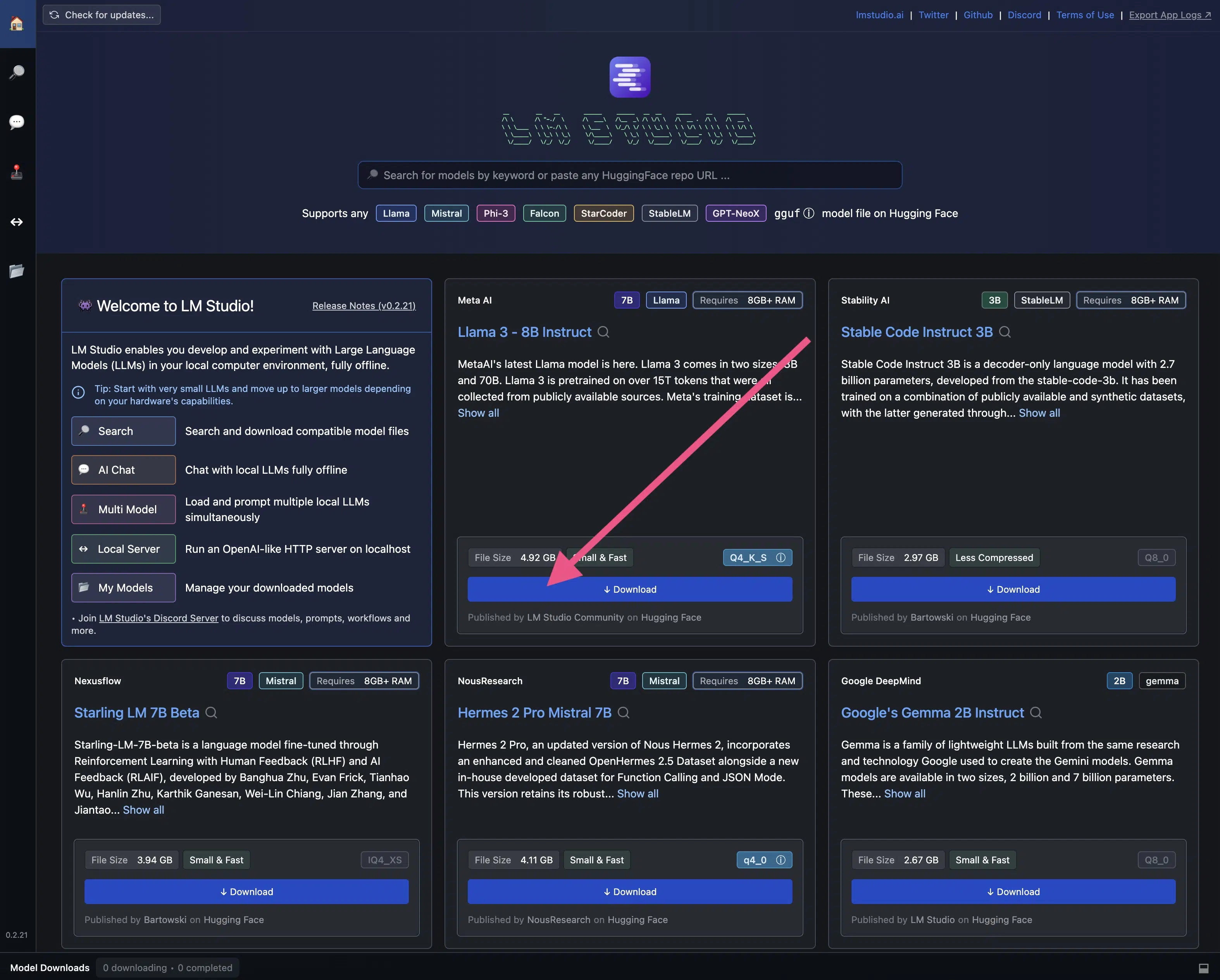
To find specific open source LLMs, you can also use the search function:
4. Important: Check System Requirements Before Downloading
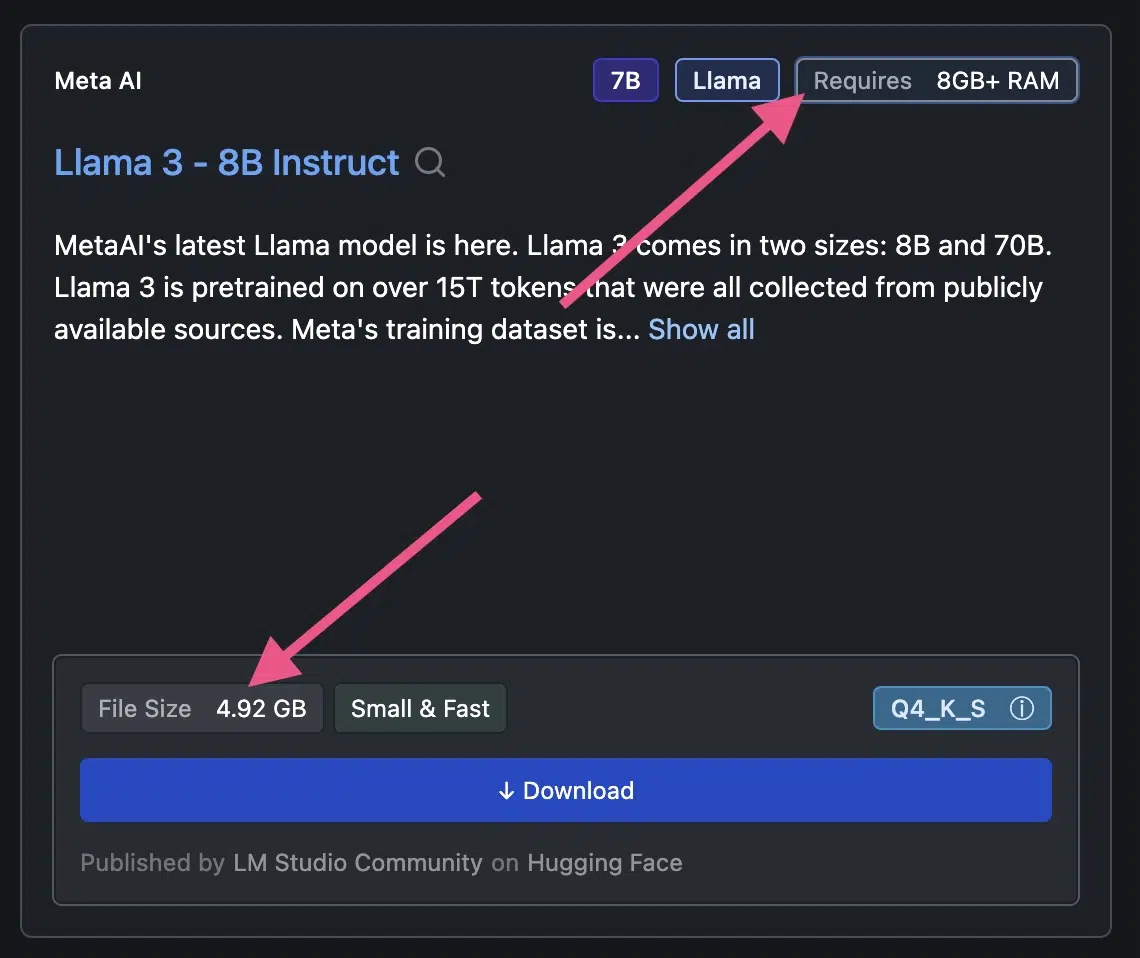
Before downloading an LLM, you should check the system requirements.
The hardware check in section 4 shows whether a model fits on your computer at all. LM Studio also displays the requirements right at download.
Llama 3, for example, requires more than 8 GB RAM and 4.92 GB of free storage:
5. Chat with the Open Source LLM
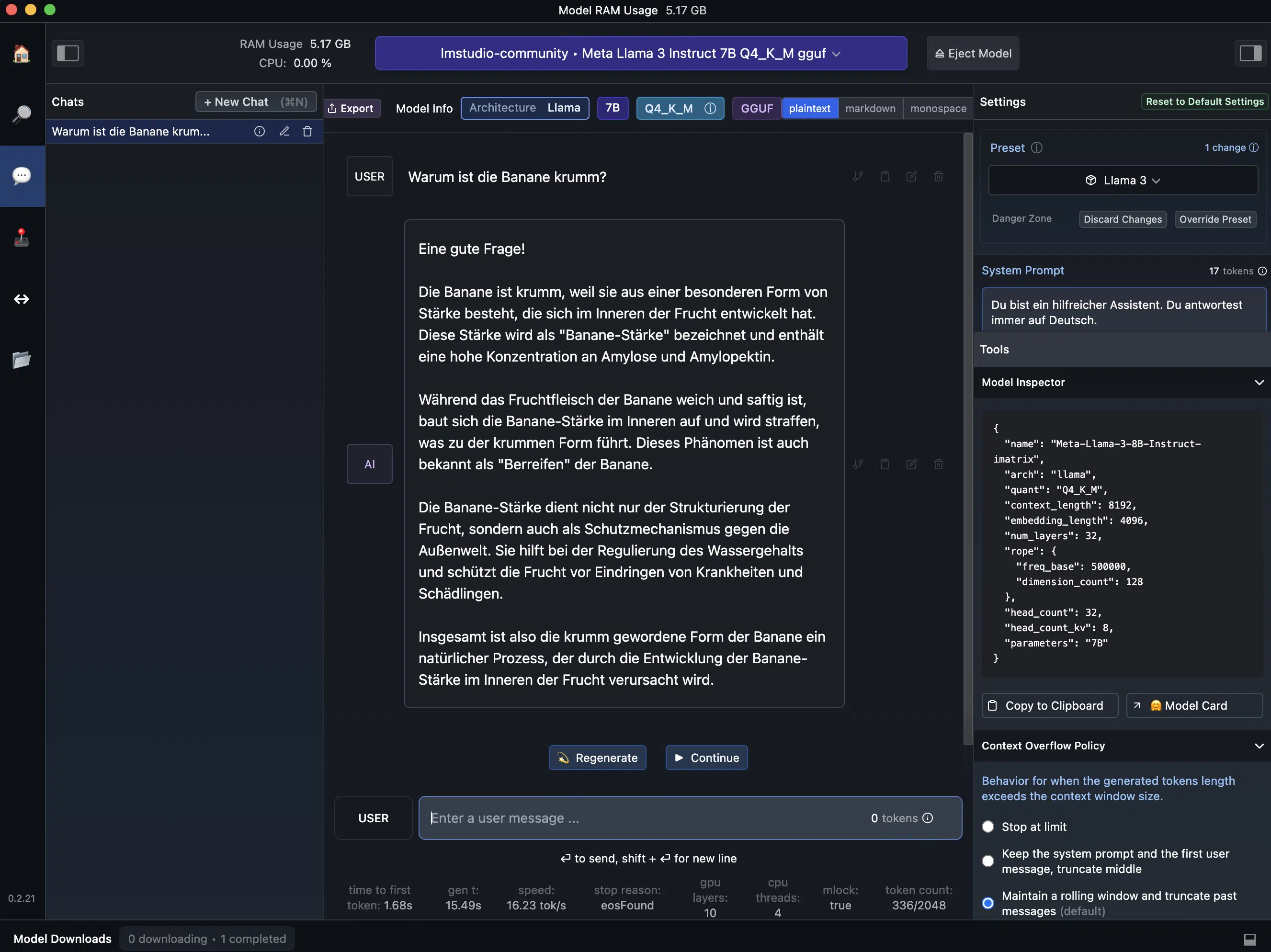
After downloading an open source LLM, you can use it directly in LM Studio.
Simply click on the speech bubble icon (?) in the left sidebar.
The user interface and settings options are reminiscent of the OpenAI Playground:
Frequently Asked Questions About Open Source LLMs
Several user-friendly tools significantly simplify local LLM usage:
- Ollama: Easiest installation, supports all common models
- LM Studio: Graphical user interface, ideal for beginners
- GPT4All: Lightweight solution for consumer hardware
- Jan: Open source ChatGPT alternative with local execution
- vLLM: High-performance solution for production environments