You want Claude to review a contract. Or summarize a file and help with a task. Asking whether Anthropic trains on chats does not answer the whole privacy question. The route matters.
You may use a personal plan, an organization workspace, Education, the direct API (application programming interface), or a cloud provider.
The feature matters too. A deleted chat, saved Memory, Project knowledge, and an Artifact are separate things. A desktop app does not tell you where the model runs or whether another copy remains.
This guide separates Claude chat, settings, files, Cowork, the API, and Claude Code. You can then check which agreement, setting, and storage rule applies to the access you actually use. A data processing addendum (DPA) governs processing on your behalf.
- Claude Free, Pro, and Max have different training rules from Team, Enterprise, Education, and the direct API.
- Training, chat history, Memory, Projects, Artifacts, and deletion are separate questions. A retention period applies only to the data path its source describes.
- Identify your access and feature first. Then check the relevant setting, agreement, recipients, and deletion rule. Zero Data Retention (ZDR) requires approval and applies only to eligible features.
What the privacy answer means for your Claude access
The short answer to “Claude privacy” is that there is no single rule for every Claude interaction. Personal accounts, organization workspaces, API requests, and access through AWS or Google have different contract and storage paths. Within one account, chat, Memory, Project knowledge, feedback, and Artifacts can also be separate data objects.
| Feature | Free, Pro, Max | Team, Enterprise | Education | Direct API | Bedrock, Google Cloud |
|---|---|---|---|---|---|
| TrainingFeedback and safety cases are separate | Check account setting | Off by default | Check university agreement | Off by default | Check contract and provider |
| StorageFeature and data type matter | Chat, Memory, files differ | History until deletion or org rule | University and account rules | 30 days for ordinary inputs and outputs | Check cloud configuration |
| Agreement | Consumer terms | Commercial Terms and DPA | University agreement | Commercial Terms and DPA | Check provider and model terms |
| Region | Check account and feature | Check agreement and feature | Check university terms | Inference global or US | Choose model and region |
| Next check | Privacy setting | Owner and DPA | Ask Primary Owner | Workspace and ZDR | Project, logs, and route |
“No training by default” does not say how long a chat remains visible or whether a connected service stores its own copy. A retention period, in turn, does not mean content is necessarily used for training. Keep those questions separate.
If you use Claude personally, start with your account settings and the data you choose to submit. If you handle customer or employee data, check the actual agreement and your use case too. Anthropic, AWS, and Google may be responsible for different processing steps.
Claude app, API, Cowork, and Code are separate offers
Your Claude access determines which agreement applies. AVV is the German term for a data processing agreement. Anthropic calls its agreement a Data Processing Addendum (DPA), which sets terms for personal data processed on your behalf.
An API (application programming interface) lets you connect Claude to your own software. API use has its own contract and retention rules.
Free, Pro, and Max are personal Claude plans. Team and Enterprise are commercial organization plans. Claude for Education is managed through the relationship between Anthropic and a university.
An organization API key belongs to a direct Platform account. Claude Code can connect through several of these routes. The interface name alone does not tell you which contract applies.
The desktop app is local software. That does not mean every task is processed locally. In local Cowork mode, the agent runs on your computer, but it still sends the input it needs to Anthropic for a model response. Since October 6, 2026, new Cowork tasks on Pro and Max run in the cloud by default.
Cloud routing through AWS Bedrock or Google Cloud also does not reduce the contracts to one provider. AWS’s terms incorporate Anthropic Commercial Terms for Anthropic’s Bedrock offer. For Claude on Google Cloud, Google’s documentation points to the rules for “Separate Offerings” in the AI/ML Services section of its Service Specific Terms and to separate terms in the relevant model card. Check those documents and the agreement that applies to your Google Cloud route.
When Anthropic may use private chats for training
For Free, Pro, and Max, Anthropic describes model improvement as a setting with exceptions. Its specific training help says Anthropic may use chats and Claude Code sessions for future model improvement when you allow the feature, separately opt in, or a conversation is flagged for safety review.
A separate current Privacy Policy uses broader wording. The documents do not establish one starting setting for every account.
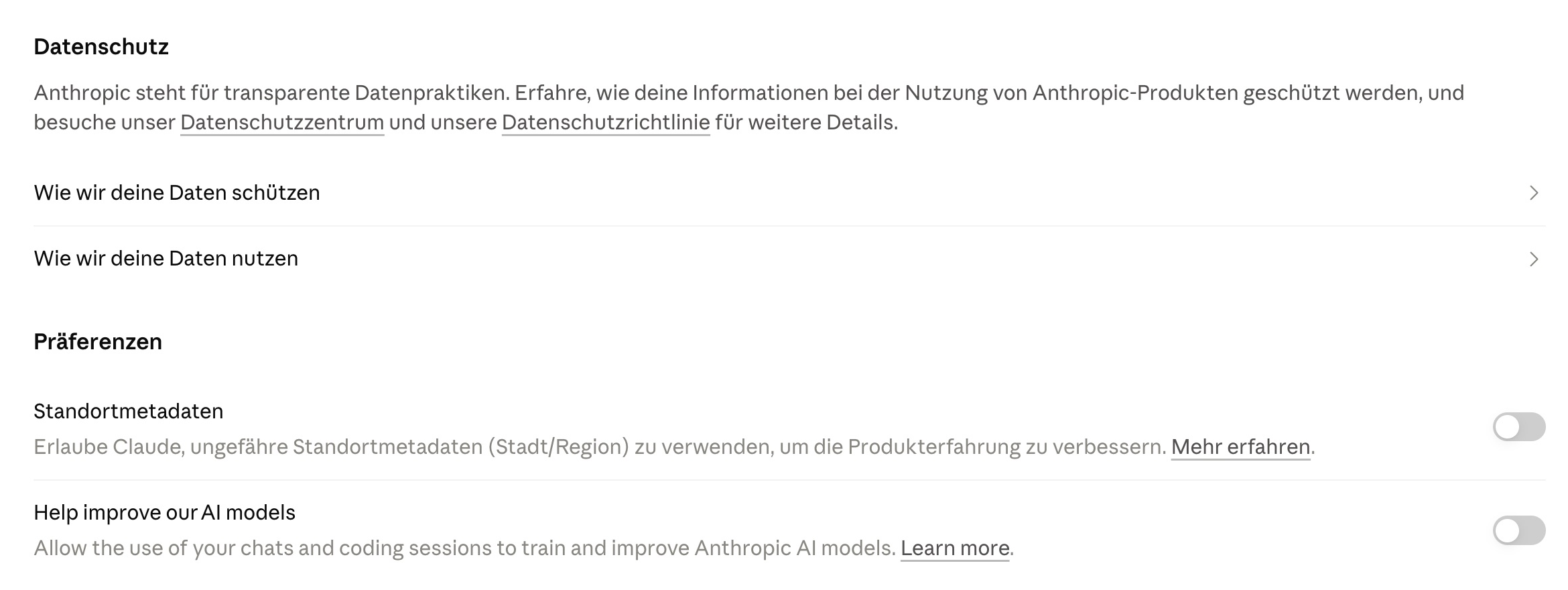
Check your account under Settings > Privacy > Help Improve our AI models. This is the documented route for model improvement, not chat deletion or every other form of storage. A change affects future use; it does not retrieve data from a training run already under way or completed.
Feedback and safety exceptions
Anthropic may still use conversations flagged for safety review for internal safety models, policy enforcement, or safety research. That is a narrower exception than ordinary training of a general model. It does not cancel the setting altogether, but “off” does not mean Anthropic stops processing everything.
A thumbs up or down rating can preserve the entire related conversation for up to five years and let Anthropic use it for analysis or model improvement, according to its training and feedback policy. Other feedback or bug reports may preserve the content actually submitted for up to five years, which may not include a full chat.
In the personal-account training context, content from Claude in Chrome may also be included. Raw content from connected Google Drive and local or remote Model Context Protocol (MCP) servers is generally excluded unless you copy it directly into the chat, according to Anthropic’s training help. That does not rule out processing in model context or storage by the connected provider.
For Team, Enterprise, and the direct API, Anthropic says it does not use Customer Content to train generative models by default. Explicit participation in improvement programs and submitted feedback are separate cases. A DPA or training opt-out does not determine whether your use is otherwise lawful.
Why 30 days and five years refer to different things
Anthropic’s retention statements have different triggers and apply to different data. The number alone does not tell you whether a chat remains in your history, whether a separate feedback record exists, or whether a safety exception applies.
- Ordinary private chat: Current public help does not set a blanket 30-day deletion period for every chat you have not deleted. A conversation may stay in your history until you remove it or another account rule applies.
- Deleted private chat: Anthropic says it disappears from history immediately and is removed from backend storage within 30 days. Legal duties and some safety or abuse cases may be exceptions.
- Model improvement: Content that enters a training pipeline after an active opt-in may remain there for up to five years in a form separated from your user identity. This does not mean every raw chat is kept for five years.
- Feedback: A thumbs rating may preserve the entire related conversation for up to five years. Other feedback or bug reports may preserve the submitted content for up to five years, which may not include a full chat. Remove confidential material before sending it.
- Safety case: If a violation is flagged, inputs and outputs may be kept for up to two years and classification scores for up to seven years.
For Team, Enterprise, and the API, check each stored object and the event that starts its retention period.
Organization chats and API objects have their own rules
For Team and Enterprise, saved chats generally stay in history until you delete them or an organization rule applies. Enterprise can configure custom retention. Backend deletion after a chat is deleted is generally expected within 30 days, with exceptions.
Anthropic’s commercial retention guide distinguishes this from ordinary direct API inputs and outputs, which are automatically deleted within 30 days. Compliance transcripts, API files, batches, feedback, safety data, and local files have separate rules.
Thirty days is not a universal limit for all Claude data. The personal-account retention guide and API retention guide distinguish these cases.
What Incognito, chat deletion, and account deletion do
According to Anthropic, an Incognito chat is not saved in your ordinary history or Claude Memory and is not used for model improvement. It is also excluded from search across past conversations. Anthropic still lists a 30-day default retention period. Team and Enterprise may add organization retention rules or exports.
One point remains unclear. The Incognito help page says those chats are not used for training. The general safety policy also permits longer use of flagged conversations for internal safety models.
Public documents do not clearly reconcile those statements. Do not read Incognito as zero storage or Zero Data Retention.
When you delete an ordinary conversation, it disappears from your view immediately. Backend deletion is supposed to complete within 30 days. That action does not automatically delete your account, Project knowledge, Artifact data, submitted feedback records, or copies held by a connected service. Memory depends on the version: entries from deleted chats remain in the new experience unless removed separately, while the legacy summary follows its source chats’ retention rules.
Account deletion is permanent and removes your access to conversations. Anthropic does not publish one complete deadline for deleting every associated record. Export anything you need first. If you use an organization account, check the agreement and ask the administrator who manages its data.
The documented German route for a chat is Chats und Aufgaben > ⋮ > Löschen. Deleting is different from archiving or using Incognito.
What Memory may keep across chats
In the new Memory experience, Claude saves individual topics as you chat. Each Project also has its own memory space and Project summary. This version is on by default for Free, Pro, and Max on web, desktop, and mobile.
For Team and Enterprise, owners control whether members can use the new Memory feature, and each member enables it for their own account. Organizations with HIPAA, public-sector status, or custom data retention agreements cannot use the feature.
A small number of Team and Enterprise organizations still have the legacy version, shown under Settings > Capabilities rather than Settings > Memory. It creates a summary from chats. Anthropic says the summary updates after underlying chats are deleted or expire, according to the applicable retention rules.
In the new version, you can view, edit, or delete topics. Pausing keeps existing Memory data, while Reset permanently deletes all Memory, including Project Memory. Anthropic says an owner who turns Memory off for the whole organization immediately deletes all existing entries.
In the new Memory experience, you can turn Memory off for one chat before its first message. The chat stays in your history. Claude can find it from other chats through its past-chat search if that feature is available for your paid plan (Pro, Max, Team, or Enterprise). Once rolled out to your account, it is on by default and can be disabled in Memory settings. This is separate from the ordinary search in the chat interface.
Unlike an Incognito chat, this conversation remains in your history.
In the new Memory experience, deleting or expiring a source chat does not automatically remove its Memory entries, according to Anthropic. Delete affected topics separately. Do not apply that rule automatically to the legacy summary version, which Anthropic ties to the retention rules for its underlying chats. Both versions may appear in data exports. Some sensitive topics are off by default, and other categories have additional restrictions.
In the new Memory experience, Claude Cowork in the cloud can use the same Memory as chat. Locally running Cowork sessions do not. Anthropic says the legacy version is not available in Cowork.
Do not turn off Memory expecting that to delete chat history, Project knowledge, or Cowork files. The Memory help page describes the current settings and limits.
This German desktop view shows two separate controls under Settings > Memory. Past-chat search is on; memory generation from chats is off. Labels and available controls depend on your Memory version:

Projects and Artifacts can keep separate copies
Current Claude help lists Projects on all plans. Free accounts can create up to five. Files and other Project knowledge can be used by chats in that Project.
Team and Enterprise organizations can share Projects internally if the administrator allows it. Features and interface may vary by account.
Archiving is not deletion. An archived Project keeps its conversations, knowledge, and sharing permissions. To delete it, unarchive it first, then start deletion.
Anthropic does not publish a general backend deletion period for Project knowledge that you can derive from the 30-day rule for deleted one-off chats. Under Enterprise custom retention, Project rules take precedence and Project data can remain indefinitely unless a separate policy is configured.
Artifacts are not simply chat messages either. All plans can create them. Apps, connections, and storage between sessions are paid-plan features, and Team or Enterprise administrators can control them.
Depending on the Artifact, data may be personal or shared. Other users may be able to see or use shared data.
Before an upload or share, check what the Artifact stores, who can access it, and whether a public link is active. A shared chat is a snapshot with different sharing rules from a shared Artifact.
Deleting a chat or withdrawing a link does not guarantee that every stored or previously exported copy disappears. The Artifact guide and sharing guide describe separate features, but not one universal retention period for all Artifact data.
Cloud code and network access
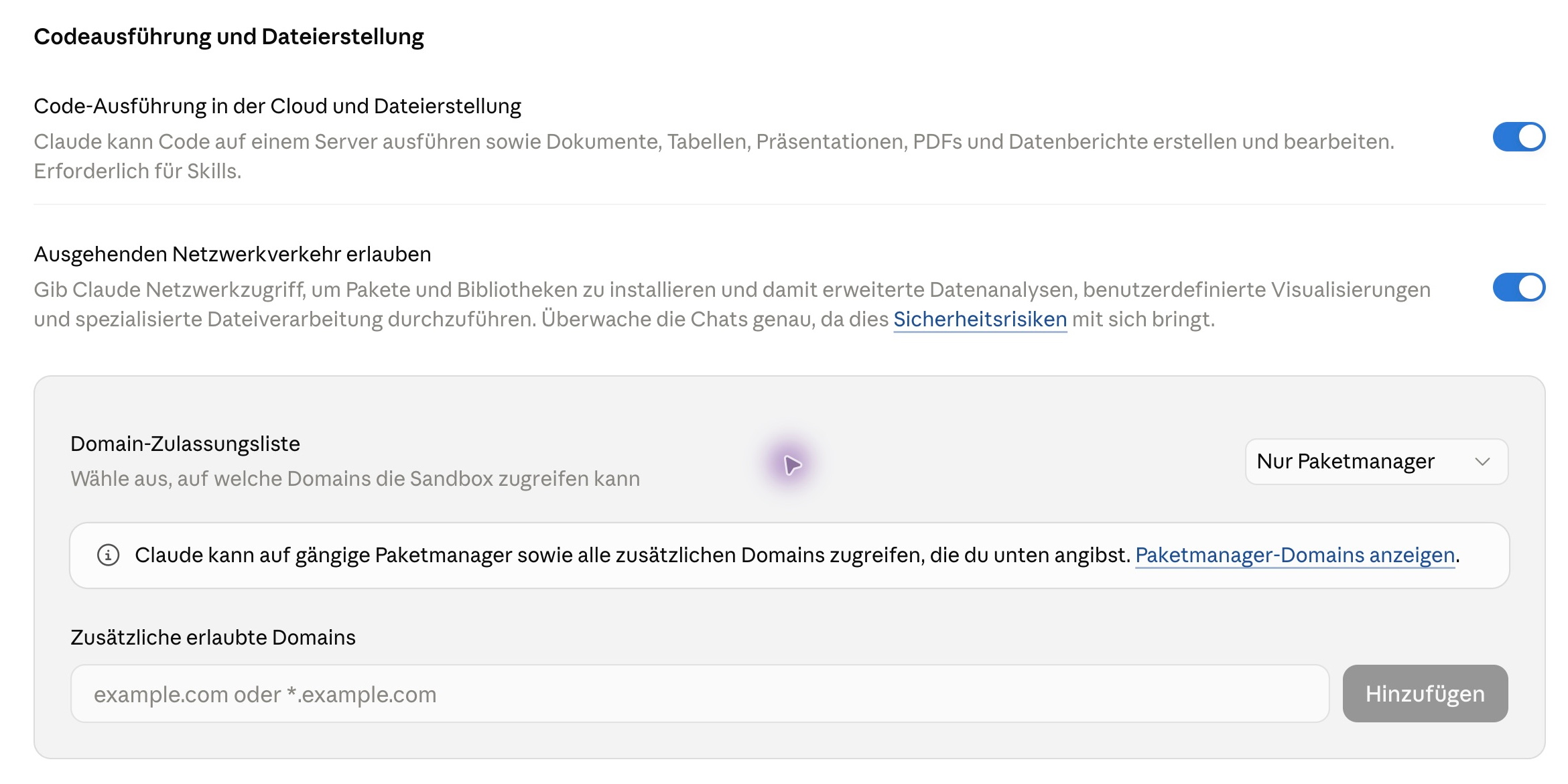
In this desktop version, the general cloud-code controls are under Settings > Capabilities. This German-language capture has code execution and outbound network access enabled. The domain allowlist is set to package managers only, with no additional domains entered:
What changes when Cowork runs locally or in the cloud
Cowork’s execution route depends on your plan and organization settings. Since October 6, 2026, new tasks on Pro and Max run in the cloud by default, whether you start them in Desktop, web, or mobile. Those plans no longer offer a local choice for new tasks. Tasks that were already started locally may continue there.
Team has cloud execution enabled by default. Enterprise has it disabled by default. Authorized admins can change the setting, and organizations retain a local Cowork option. The interface is rolling out in stages, so check what your account actually shows.
In local Cowork, the agent itself runs on your device. Shell commands and executed code run in an isolated Linux virtual machine (VM); file operations, WebFetch, and local plugin MCP processes run natively. That is how Anthropic describes the Cowork architecture.
Prompts and content needed for model processing still go to Anthropic. Tasks, uploads, and outputs may also remain in local Cowork folders. Their cleanup does not automatically delete Memory, plugins, Project folders, or connected files.
Cloud execution can create additional copies
In a cloud session, the execution environment is discarded at the end. The session and related files may remain in your Claude account. If Cowork needs a local file, it can fetch a copy into the cloud environment.
The original stays in its existing location. Deleting a VM therefore does not delete every account record. Anthropic’s Cowork guide describes account storage and the available execution modes.
The word Desktop does not tell you the privacy route either. A cloud task may use selected folders or a browser through the Desktop app. Browser content, screenshots, or file excerpts that Claude processes can enter the model context.
The VM network filter does not automatically control browser traffic, web search, or MCP. Local execution may help keep tools on your device, but you still need to check what is sent to the model.
Enterprise Compliance capture creates another storage path. Captured local Cowork transcripts are retained for six years by default or for the organization’s configured period; with HIPAA readiness, the limit is 30 days. Captured cloud sessions are retained for six years unless the user deletes them sooner. These Compliance API rules apply to captured organization sessions, not to every Cowork account.
Which integrations add other recipients
A connector receives access to a linked service, usually through an OAuth grant. Read the permissions it requests. A read-only connector can retrieve data; a connector with write access may change something in the linked account.
The connector provider or MCP server may also be involved. Check its terms and what you let Claude retrieve.
A local MCP server or Desktop extension runs as a normal process on your computer and may use your operating-system account’s permissions. A remote MCP server runs elsewhere.
Cowork may call a remote connector from Anthropic’s cloud. Local task execution does not mean every integration stays local. Claude receives the context an actual tool call returns and the task uses.
Plugins can bundle Skills, connectors, and other tools. A Skill is instruction text, not evidence that a task is processed only locally. Check whether it reads files, runs shell commands, opens URLs, or calls MCP tools.
Workspace admin approval does not replace a review of the actual service. Browser or computer access may give Claude screenshots of visible pages or allow it to operate controls. That permission is not a complete security barrier between Claude and the apps you have open.
Use a separate browser profile for customer accounts. Do not open private or confidential tabs in a session you do not intend to share with Claude. Anthropic says Claude in Chrome does not support ZDR. Computer Use features also vary by plan, surface, and rollout.
Claude in Excel, PowerPoint, and other Office apps
An Office add-in can process data directly from your work file. Claude in Excel can read and edit workbooks; in PowerPoint, it can use and change slide content. With cross-app collaboration enabled, content can also move between open Excel, PowerPoint, Word, and Outlook apps. Check the file, recipients, and permissions before you start.
Cross-app collaboration requires a direct Claude account. It is on by default for Pro and Max and off by default for Team and Enterprise. Admin controls and device settings can restrict access. AWS Bedrock, Google Vertex AI, Azure AI Foundry, and LLM gateways do not support this connection.
The Excel privacy documentation and PowerPoint documentation say backend deletion for inputs and outputs occurs within 30 days of receipt or generation, with exceptions. Short-lived caches may remain for a few hours after deletion. The add-in chat history is stored separately in the browser’s local IndexedDB and does not automatically sync to other devices. Review and clear that copy separately.
Office sessions do not automatically inherit organization-wide custom retention or ordinary Enterprise audit logs. If enabled for an eligible Enterprise organization, the Compliance API can capture these sessions; Anthropic documents this support as a public beta.
The Excel and PowerPoint pages do not state their own training rule. Check the terms you accepted and confirm the data route. For Bedrock, Vertex AI, Azure AI Foundry, or an LLM gateway, verify that provider’s training and retention rules instead of assuming Anthropic’s direct-service claims apply.
Installing an add-in locally does not mean model processing is local.
What applies to the Claude API, ZDR, and data residency
For your own application, use the rules for API access. Check the agreement, retention, and processing region separately.
Direct API and agreement
The direct Anthropic API is separate from claude.ai. For organizations in the European Economic Area (EEA), Switzerland, and the United Kingdom, Anthropic names Anthropic Ireland Limited as the contracting entity. For other customers, it names Anthropic, PBC. The DPA is incorporated into the Commercial Terms.
For personal Customer Content, you are responsible for your purposes and Anthropic describes itself as processor when handling it on your instructions. That does not decide whether your own legal basis or data selection is appropriate.
Anthropic says it does not use Customer Content from commercial services for model training by default. A thumbs rating may preserve the entire related conversation for up to five years. Data associated with other feedback or bug reports is also retained for five years under its commercial retention policy; that does not automatically mean the whole chat was submitted. Submitted feedback or bug data may also be used for model improvement.
Keep those submissions separate from ordinary API requests. Anthropic’s commercial training and feedback policy describes their scope.
Storage features and Zero Data Retention
Anthropic says ordinary direct API inputs and outputs are deleted automatically within 30 days. That is not a limit for every API object. Files API objects stay until you delete them or their configured expiration. You can set that period at upload from one hour to 90 days.
Expiration stops API access, but it does not guarantee immediate final deletion. Content may remain temporarily for safety review, and metadata may stay visible for up to 30 days after expiration. Check the deletion path as well as the expiration setting.
Files are not ZDR-eligible. Message batches may remain for up to 29 days from creation and are not ZDR-eligible either. The Skills API is excluded too; Anthropic does not state a separate fixed period for Skills.
Prompt caching is ZDR-eligible on the direct API when the rest of the request is eligible. Anthropic describes cached data as held in memory, with a standard five-minute or extended one-hour duration. This does not make every other data path in the workspace storage-free.
Zero Data Retention (ZDR) means Anthropic does not store eligible API inputs and outputs at rest after returning a response. Anthropic must activate it for the organization. It applies only to eligible models, endpoints, and features. The Console and Playground, along with stateful features, are excluded.
Some models can also require retention. Check the current model and feature list before relying on ZDR for a production request. Telemetry, abuse review, safety classifications, support, compliance exports, local copies, and cloud providers are not automatically covered.
Even with ZDR, Anthropic may retain data longer when required by law or on legal hold. Inputs and outputs flagged for policy violations may be kept for up to two years. The exclusions are not exhaustive: Managed Agents, server-side code execution, and other features are also not ZDR-eligible. Check the current API retention matrix.
Region and cloud providers
The direct API currently offers global and us inference regions. There is no EU region. Workspace storage is US-only.
inference_geo controls where an eligible request is processed. workspace_geo concerns data at rest. An inference region does not automatically cover support data, logs, or every metadata field.
For Bedrock, AWS is responsible for certain processing. AWS’s terms for Anthropic models incorporate Anthropic Commercial Terms and the DPA; AWS terms and data-processing commitments also apply. Invocation logging is off by default. If you enable it, requests and responses are copied to the S3 or CloudWatch storage you select.
Removing the logging configuration stops future capture; it does not delete existing objects or logs. Set separate retention, lifecycle, or deletion rules for those copies. Cross-Region Inference follows a geography and depends on the model profile.
Google’s documentation for Claude on the Gemini Enterprise Agent Platform points to the rules for “Separate Offerings” in the AI/ML Services section of its Service Specific Terms and to separate terms in the relevant model card. Check those documents for your route. Optional request-response logs, general abuse monitoring, and Advanced AI Monitoring are different controls with different periods.
The eu region is an EU multiregion, not a single-country region. Check the right project, model, and processing route. A Google Cloud agreement or EU region does not mean Anthropic’s direct API retention or ZDR rules automatically apply.
Compliance and support data have separate rules. The Compliance API captures eligible local Claude Code sessions for six years by default or for the organization’s configured period; with HIPAA readiness, retention is at most 30 days.
Active ZDR excludes those sessions. This applies only to eligible Enterprise sessions. It is not a retention period for every API request or all support logs.
For the volatile feature and model list, use the Anthropic API retention guide, the data residency guide, Anthropic’s Bedrock terms, and Google’s Claude offering on Gemini Enterprise Agent Platform.
What you still need to check under GDPR
A suitable agreement and a training opt-out are useful safeguards. They do not automatically answer whether you may use personal data for your purpose. Check these points for the actual processing operation.
- Household exemption: Processing that is purely personal or domestic may fall outside the GDPR’s material scope. That does not automatically remove Anthropic’s or another provider’s own privacy duties.
- Purpose and legal basis: Decide why you process the data, what information is necessary, and which Article 6 legal basis applies. General agreement to use AI does not settle that question.
- Roles and DPA: The controller determines purposes and essential means. If you process data for another controller, check the Article 28 DPA and obtain required authorization for subprocessors. Roles follow the actual operation, not just the contract label.
- Special categories: Health data, biometric data used to identify someone, and other special categories need an additional Article 9 condition. A provider agreement is not blanket permission to submit them.
- Notices and rights: Give the information required by Articles 13 or 14. Decide how you will handle access and deletion requests and keep Article 30 records when they apply to you.
- Security and impact: Use appropriate access controls, training, and technical safeguards under Article 32. Assess whether the planned processing is likely to create high risk and needs a Data Protection Impact Assessment (DPIA) under Article 35.
- International access: Check recipients outside the EEA, other providers, and remote access. An EU storage region does not rule out processing or access from elsewhere. Transfers need an applicable mechanism, and Standard Contractual Clauses (SCCs) require an assessment of safeguards.
When AI output influences a decision about a person, also check who makes that decision and what effect it has.
Automated decisions and human review
Article 22 applies to decisions based solely on automated processing that have legal or similarly significant effects. Human review counts only when the person has the competence and authority to change the outcome. The EDPB Opinion 28/2024 and German data protection authorities’ AI guidance explain relevant checks.
A DPIA is not automatically required for every AI task. It is needed when the planned processing is likely to result in high risk to people’s rights and freedoms. This guide is not legal advice for your specific situation.
Claude Code: Files, tools, and permissions
Claude Code can read project files and run commands. What becomes model context depends on the task, tools, and permissions.
I’ve been using Claude Code since mid-2025. In more than 800 hours, I’ve built hundreds of apps, scripts, and websites with it. Code you own can still contain personal data or secrets; ownership does not settle privacy obligations.
Client projects may have names in test data, credentials in .env files, and real orders in logs. If the agent includes them in model context, they go to the selected provider.
Is that allowed under GDPR? And if so, on which plan?
My Claude Code guide explains the tools. The sections below focus on their separate privacy routes.
Claude Code privacy at a glance
With Claude Code, the software doesn’t decide your privacy terms. The account you sign in with does. The same CLI can run under different terms depending on which account you sign in with:
| Feature | Free, Pro, Max | Team, Enterprise | API direct | Bedrock, Google Cloud |
|---|---|---|---|---|
| AgreementDepends on route and processing | Consumer terms | Commercial Terms and DPA | Commercial Terms and DPA | Check provider and model terms |
| Model trainingFeedback and safety cases differ | check setting | off by default | off by default | check contract and provider |
| StorageCode/API records; exceptions apply | check account and data path | usually up to 30 days | usually up to 30 days | check cloud setup |
| ZDR | No | eligible Enterprise organizations | on request for eligible features | provider-specific rules |
| Region | check account and feature | check agreement and feature | inference global or US | choose model and region |
| Next check | privacy setting | owner and DPA | workspace and ZDR | project, logs, and route |
Bedrock and Google Cloud have their own cloud terms for their processing. AWS’s terms for Anthropic’s Bedrock offering also incorporate Anthropic Commercial Terms and its DPA.
For Claude on Google Cloud, Google’s documentation points to the rules for “Separate Offerings” in the AI/ML Services section of its Service Specific Terms and separate terms in the relevant model card. Which terms cover which processing depends on the route and customer contract. Do not automatically apply direct API retention or ZDR rules to a cloud provider.
For personal use, start with the account setting and the data you submit. For client projects, also check the actual agreement and processing route before you choose a plan.
1. Pick a plan that includes a DPA
A more expensive subscription does not automatically become a business plan. Free, Pro, and Max remain consumer plans. The Claude Code documentation separates consumer and commercial data rules:
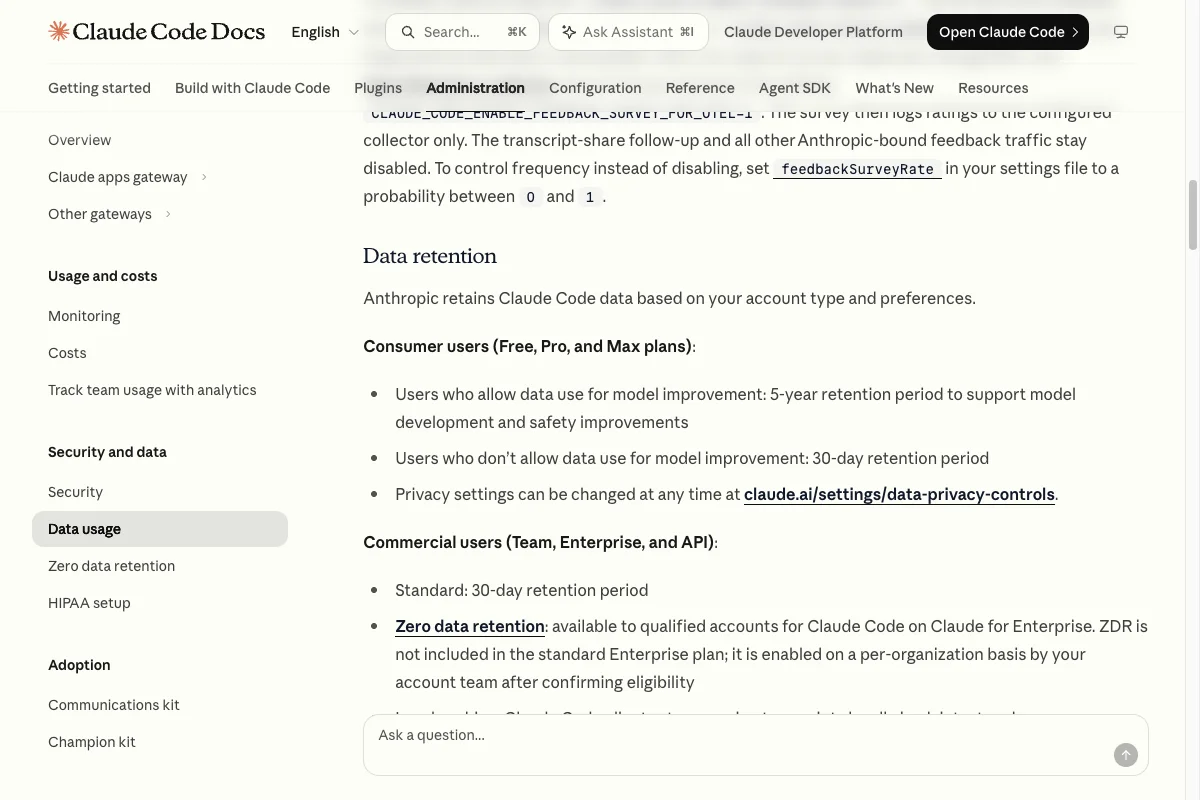
Anthropic’s Data Processing Addendum only comes with the Commercial Terms. Those cover Team, Enterprise, and the API, not Free, Pro, or Max. The DPA also includes the EU Standard Contractual Clauses for transfers to the US.
Under the Commercial Terms, Anthropic does not use content for training by default. Voluntary sharing, such as the Development Partner Program, and safety reviews need separate consideration.
Ordinary direct API and commercial Claude Code inputs and outputs follow the described 30-day rule; this does not create a deletion period for every record or limit how long a chat remains in your product history.
If Anthropic will process personal data on your behalf, assess a Team or Enterprise workspace or an organizational API key as the contractual route. Not all code has personal data; client agreements and confidentiality still matter. My Claude Code pricing guide covers prices.
There’s one catch on Enterprise. If enabled, the Compliance API can capture Claude Code sessions, including files Claude read.
Captured local sessions are retained for six years by default or the configured organization period; with HIPAA readiness, the limit is 30 days. This capture covers only eligible Enterprise sessions. Ask your admin whether it’s enabled.
Anthropic must enable Claude Code ZDR separately for each eligible Enterprise organization. It covers qualifying inference calls authenticated into that organization. It does not cover Claude chats, Cowork, or third-party services.
Cloud sessions, Remote Control, and feedback are blocked under ZDR. Legal obligations and safety cases remain exceptions. A personal login or a key from another organization does not inherit the commitment.
2. Turn off model improvement on Pro and Max
Maybe you’ll keep Pro or Max for your own projects. The model improvement switch governs ordinary training use and retention; assess feedback, safety cases, and other data routes separately.
Open your profile menu on claude.ai, choose settings, and open the privacy tab, labeled “Datenschutz” in the German interface shown below. Turn off “Help improve our AI models”. Anthropic’s model improvement help confirms that this also covers Claude Code when you sign in with that account.
The real account-setting capture appears in the general training section above.
Anthropic says data that enters a model-improvement pipeline may be kept in a form separated from your user identity for up to five years when model improvement is on.
The 30 days also describes backend deletion after you delete a chat. It is not a general period for every visible or undeleted chat. Anthropic does not state one starting setting for every account, so check your own setting.
There’s one exception even with the switch off. If Anthropic flags a conversation for safety review, it can use it to train its safety models.
Training aside, Claude Code also sends diagnostic data to Anthropic. You turn that off right in your terminal.
3. Turn off telemetry, error reports, and feedback
On direct Anthropic access, Pro and Max error reporting defaults to on from 2.1.198, with exceptions such as ZDR and HIPAA readiness. Bedrock and Google have different defaults for metrics, error reporting, and /feedback. Surveys and WebFetch checks are separate routes. The data usage docs list the details.
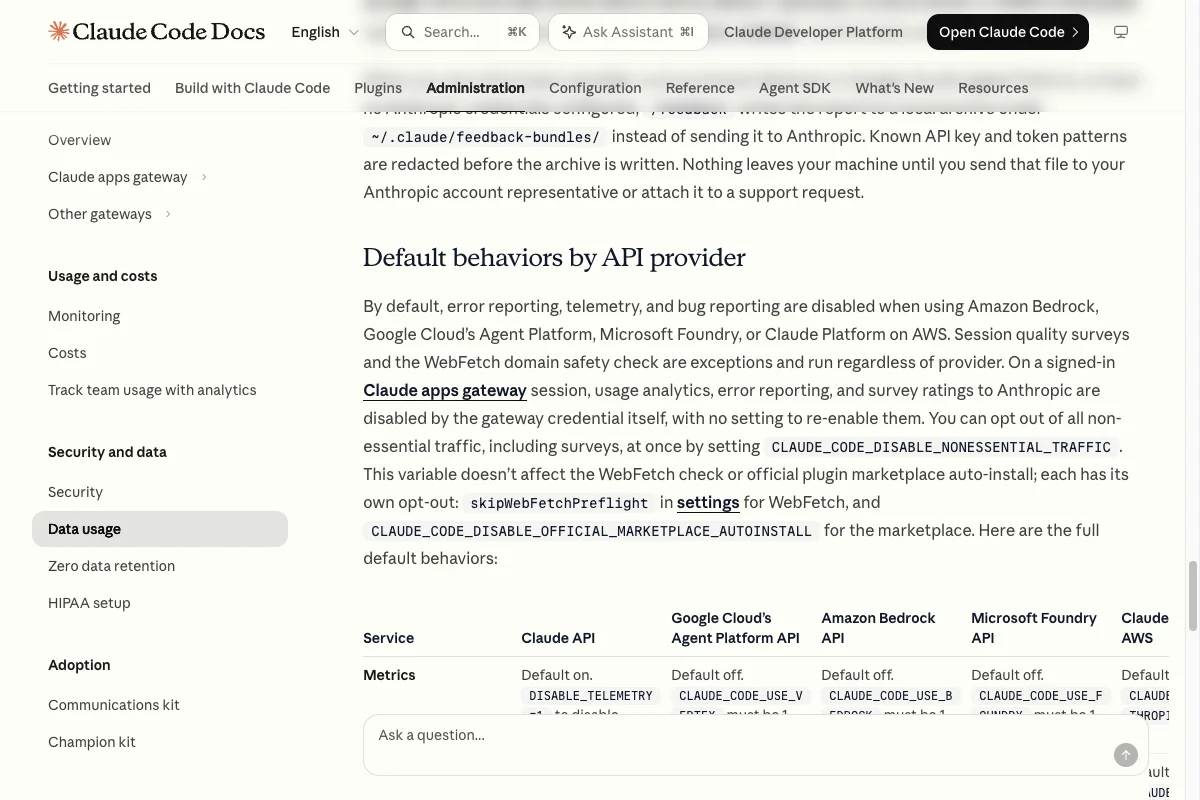
Set these four environment variables before you start Claude Code:
export DISABLE_TELEMETRY=1
export DISABLE_ERROR_REPORTING=1
export DISABLE_FEEDBACK_COMMAND=1
export CLAUDE_CODE_DISABLE_FEEDBACK_SURVEY=1
claude
Set like this, they only apply to the current terminal window. To make them stick, put them in the env block of your settings.json or, for a whole team, in managed settings.
Sending /feedback, /bug, or /share is a separate submission and may include the related transcript. Anthropic gives a retention period of up to five years. A survey rating is different. Only if you explicitly agree to share the conversation will its transcript be uploaded; Anthropic says it may remain for up to six months.
Some API-key patterns are detected, but file and source-code contents are not generally removed. With Bedrock, Vertex, Microsoft Foundry, Claude Apps Gateway, or sessions without Anthropic credentials, an approved feedback bundle stays local until you forward or attach it yourself.
According to Anthropic, telemetry contains no prompts or code. I’d still turn it off.
There’s also a master switch called CLAUDE_CODE_DISABLE_NONESSENTIAL_TRAFFIC=1. It shuts off everything nonessential at once, including Remote Control and automatic updates. If you use it, you need another way to get security updates.
skipWebFetchPreflight in settings turns off. Automatic plugin installs need CLAUDE_CODE_DISABLE_OFFICIAL_MARKETPLACE_AUTOINSTALL=1.These switches close particular additional routes. Model requests remain necessary; tools, hooks, and integrations may open others. Check what Claude Code can read and pass on too.
4. Lock secrets away from the Read tool and the sandbox
A prompt like “don’t read the .env file” is a polite request. You draw a real boundary in the .claude/settings.json file inside your project:
{
  "permissions": {
    "blockReadsOutsideWorkingDirectories": true,
    "deny": [
      "Read(./**/.env)",
      "Read(./**/.env.*)"
    ]
  },
  "sandbox": {
    "enabled": true,
    "failIfUnavailable": true,
    "allowUnsandboxedCommands": false,
    "filesystem": {
      "denyRead": ["~/", "./**/.env", "./**/.env.*"],
      "allowRead": ["."]
    }
  }
}
Both blocks are needed for the Read tool and sandboxed shell commands. denyRead alone does not restrict the Read tool.
In project settings, . means the project root; in ~/.claude/settings.json it means ~/.claude, according to the sandbox docs. Do not copy this unchanged into global settings. Also check existing excludedCommands, which run matching commands outside the sandbox.
With failIfUnavailable, Claude Code refuses to start when the sandbox is missing. That happens on native Windows because the sandbox only runs on macOS, Linux, and Windows Subsystem for Linux 2 (WSL2).
Project files can be changed locally. Binding rules require managed settings with appropriate administrative locks, not just a distributed copy. For boundaries covering other processes, assess a separate VM or container with restricted mounts, network, and credentials.
The sandbox limits files and network for covered commands. It does not determine model location or data routes outside its scope.
In Claude Desktop, open Settings > Claude Code and find the local sandbox and strict sandbox switches, labeled “Lokale Sandbox” and “Strikter Sandbox-Modus” in the German interface below. For a configuration like the example above, enable both and start a new session. You still need the file restrictions in your project configuration.

5. Decide whether you need EU processing
Anthropic’s direct API runs inference in the US or globally. The data residency docs don’t list an EU option:
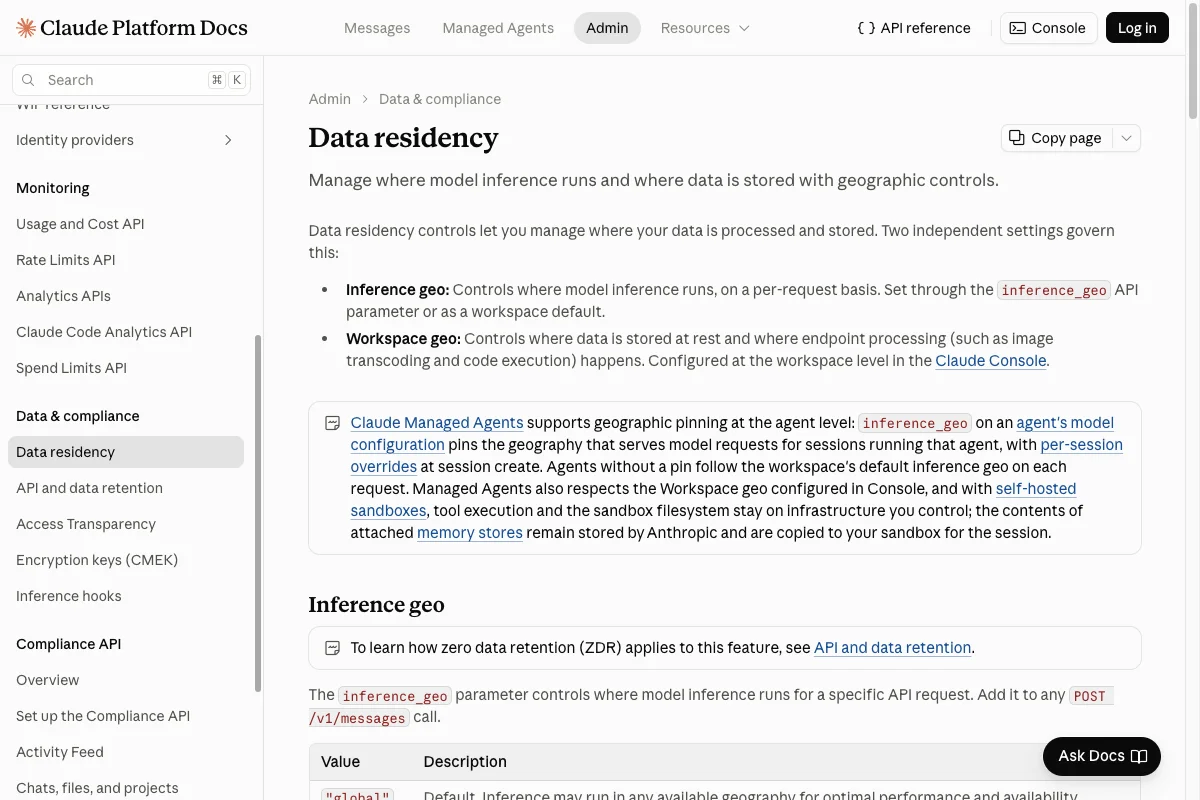
For supported Claude 4.6+ models, inference_geo offers global or us. The US option costs 1.1 times the standard price; older models do not support this setting.
Workspace data is stored in the US only.
If your client needs processing inside the EU, you’ll have to go through a cloud provider. Bedrock offers EU inference profiles, and Vertex has an “eu” region.
Switching is one variable. CLAUDE_CODE_USE_BEDROCK=1 sends Claude Code through Amazon Bedrock, and CLAUDE_CODE_USE_VERTEX=1 through Google Vertex AI.
Which models are available in the EU changes all the time. This is the one point you really do have to check for your model and your account.
The provider switches alone do not select an EU region. Configure the account, endpoint, and a regionally suitable model or inference profile too. Exclude unauthorized regions and fallbacks, and verify the actual route.
EUrouter advertises a Claude Code integration with EU routing. That provider claim does not establish the route of a particular model. Check its DPA, downstream recipients, actual inference region, and fallbacks. A gateway adds a vendor; for client projects I’d first assess the direct AWS or Google options.
An EU model doesn’t keep everything in the EU, however. Three features open up their own routes.
6. Approve Remote Control, cloud sessions, and MCP servers one by one
With Remote Control, tools stay on your computer while prompts, responses, and tool activity also reach Anthropic. You need a supported Claude.ai subscription login. API keys, setup-token, CLAUDE_CODE_OAUTH_TOKEN, Bedrock, Google Cloud Agent Platform, Microsoft Foundry, Claude Apps Gateway, and non-Anthropic gateways are unsupported.
Since Claude Code 2.1.283, DISABLE_TELEMETRY alone does not block Remote Control unless your organization requires Trusted Devices. CLAUDE_CODE_DISABLE_NONESSENTIAL_TRAFFIC, ZDR, and disableRemoteControl block it. The transcript remains separately stored by Anthropic; ZDR and HIPAA configuration are not available for it.
Anthropic-hosted cloud sessions run in isolated VMs by default; Team and Enterprise organizations can enable the public beta for self-hosted sessions. Runner, checkout, and build files then stay in your infrastructure, while the control plane, session transcript, and model processing remain connected to Anthropic.
Local uploads can include the full Git history and committed secrets. On macOS, Linux, and WSL, upload filters cover certain uncommitted changes to credential-like files. Native Windows lacks that filename filter. Review every upload yourself.
MCP servers connect Claude Code to other services like databases, calendars, or ticketing systems. A remote MCP server receives everything the agent sends it, and Anthropic’s DPA doesn’t cover it.
For a client project, I’d switch all three off to start with. Then approve only what the project really needs, and note who receives the data for each one.
7. Test your boundaries with fake data
A setting you haven’t tested is a guess. Create a test folder with made-up customer data and a blocked .env file, then work through these five checks:
- Start Claude Code exactly the way you will in the project, with the same account.
- Ask Claude Code to read the blocked
.envfile. The Read tool should refuse. - Ask it to print the file with
cat. The sandbox should refuse. - Repeat the attempt for every hook and MCP server you’ve approved.
- Finally, confirm that
/feedbackis disabled and no Remote Control session is running.
If a block fails, the project stays off-limits until you’ve fixed the setting and tested again. An extra line in your prompt won’t fix a sandbox.
The CLI stores plaintext transcripts in ~/.claude/projects. Local cleanup is set to 30 days by default (cleanupPeriodDays). It excludes transcripts of sessions started or last resumed in Desktop or Cowork.
Those can have a separate desktop retention setting; Managed settings and certain HIPAA configurations change the default. This is not a deletion period for Cowork files or sessions in your Claude account. Check local copies and backups separately.
Put the results into your company AI policy. That way everyone on the team works within the same limits.
What GDPR expects from you
The steps reduce particular risks. For personal data, assess the whole processing operation. These five points help you do that.
- Roles: A controller determines purposes and essential means. Processing solely on instructions points to a processor role. If you are a processor, additional subprocessors need the controller’s prior specific or general written authorization under Art. 28(2) GDPR. Assess the provider’s own purposes separately.
- Legal basis and DPA: Personal data needs an applicable basis under Art. 6. Processing on your behalf additionally requires an Art. 28 DPA. It replaces neither the legal basis nor assessment of the actual operation.
- International transfers: Check recipients outside the EEA, including other providers and their remote access. You need an applicable mechanism, such as a relevant adequacy decision or Art. 46 safeguards. When using SCCs, assess and document the protection level and necessary supplementary measures. If adequate protection cannot be achieved, the transfer must not take place.
- Special categories: Health data or biometrics used to uniquely identify a person additionally need an Art. 9(2) exception. Provider terms may still prohibit them. Do not give them to the agent without a separate legal and contractual assessment.
- DPIA: Likely high risk to individuals’ rights and freedoms requires a DPIA before processing under Art. 35. Volume alone does not decide it. Check statutory cases and supervisory authority lists too. If the DPIA identifies high risk you cannot sufficiently mitigate, consult the supervisory authority before processing under Art. 36.
The EDPB recommendations on international transfers show you how to assess the transfer. For everything else, I recommend the EDPB guidelines on controllers and processors and the German data protection authorities’ guidance on AI (in German).
You also need documented purpose limitation, minimization, access controls, deletion, and individual rights procedures. Inform individuals under Arts. 13 and 14 and keep processing records where required.
General rules apply across tools; agreements and permitted data categories differ. Anthropic’s standard DPA lists no special categories. Do not treat that as authorization to submit them.
Claude Code vs. Codex vs. Cursor on privacy
If you’re weighing Claude Code against Codex and Cursor, this overview helps. On privacy, they mainly differ in which plan gets you a DPA and how you turn off training:
| Feature | Claude Code | Codex | Cursor |
|---|---|---|---|
| DPA from plan | Team, Enterprise, API | Business, Enterprise, API | Teams, Enterprise |
| No business trainingExceptions apply | by default | by default | with Privacy Mode |
| No personal training | after opt-out | after opt-out | with Privacy Mode |
| RetentionBy data and feature | Code/API inputs and outputs; features vary | API logs up to 30 days | editor and cloud separate |
| European optionsLimited scope | e.g. AWS or Google | eligible Enterprise, Edu, API configuration | inference on request |
| Key switch | Help improve our AI models | Improve the model for everyone | Privacy Mode |
OpenAI publishes a separate Student Data Privacy Agreement for Edu. Check it alongside the Order Form and your institution’s terms. The retention figures in the table describe Code or API data where noted, with exceptions; stored chats follow separate deletion rules.
My Codex GDPR guide walks you through the Codex settings. For Cursor, everything is in my Cursor GDPR guide.
Check Claude Code’s file boundaries
A suitable DPA, limited data routes, and tested restrictions are building blocks for lawful processing on instructions. They do not replace assessment of the actual use case.
Start step 4 in a test project with a fake .env file. Test the Read tool and shell separately. This demonstrates those accesses only; assess other features and platforms too. Model calls may incur costs.
This article isn’t legal advice, so talk to your data protection officer or a lawyer about your specific project.
Your next step
Identify your access route and the feature you actually use. Then check the training setting, stored object, recipient, and agreement separately. Until contract and transfer questions are resolved, do not use real customer data as a test.
For code tasks, use made-up data to test whether Read and shell access follow the intended restrictions. That test does not answer questions about chat, Cowork, Memory, or connected services.
For a specific legal question, talk with your data protection officer or a lawyer. This guide is not an assessment of your situation.