One ChatGPT conversation can leave traces in several places. A chat, a saved memory, a Library file, a voice clip, a connected app, and an API response can each have different controls and retention rules.
I have spent more than 300 hours systematically testing ChatGPT since November 2022. That helps me explain how the product behaves.
This guide separates personal ChatGPT, organization workspaces, API (application programming interface) features, and Codex. Check the product-specific help and your contract before sending personal or confidential information.
- ChatGPT’s training, deletion, Memory, Library, sharing, and app controls do different jobs. Turning off model improvement does not delete data or stop processing needed to provide the service.
- Business and Enterprise have a standard Data Processing Addendum (DPA) route. Edu has a separate Student Data Privacy Agreement (SDPA). The API has its own contract, billing, and retention rules, even when it uses the same OpenAI login.
- Check retention, deletion, recipients, and terms for each chat, file, app, API request, or Codex task. Zero Data Retention (ZDR) and regional controls need approval and have feature-specific limits. No setting alone guarantees GDPR compliance.
Personal ChatGPT, workspaces, and API use are different
Start with the account and the task, not just the product name. A personal chat, a managed workspace, a connected app, Codex Cloud, and an API request can use different terms and data paths.
| Feature | Personal ChatGPT | Business / Enterprise | Edu | API |
|---|---|---|---|---|
| Contract route | Personal Terms and Privacy Policy | Standard DPA route | Student Data Privacy Agreement | Standard DPA route |
| Model training by default | Personal control applies | No | No | No |
| RetentionBy feature and setting | Chat, Memory, files, voice | Workspace policy and feature | Workspace policy and feature | Logs and endpoint state differ |
| Admin access | No workspace admin | Role and policy dependent | Role and policy dependent | Project and organization controls |
For work, match your account to your organization’s actual signed terms.
Which agreement covers your workspace?
OpenAI lists a standard DPA for Business, Enterprise, and API customers. For Edu, it points to a separate Student Data Privacy Agreement.
That public distinction does not prove an institution cannot have additional Article 28 terms. Check the signed agreement, order form, named entity, and processing scope in OpenAI’s Enterprise privacy overview, standard DPA, and Edu agreement.
A DPA only covers processing within its scope. Whether a provider acts as your processor depends on the actual task, instructions, and contract, not only the contract label. The consumer privacy notice describes other processing by OpenAI in its own role.
A DPA is not your legal basis and does not approve every data category or use.
Personal Free, Go, Plus, and Pro workspaces follow consumer terms and controls. A paid personal plan is not, by itself, an organizational DPA. In Business, other members do not automatically see private chats, and Usage Analytics does not expose full transcripts.
Depending on role, workspace settings, and applicable law, administrators may be able to access, export, manage, or delete content in a managed account. Enterprise and Edu Compliance Logs cover supported events, not every file operation or individual Agent action.
When a member leaves Business, chats, files, and Canvas documents may remain indefinitely and can be restored if the member is added again; Enterprise and Edu retention can be configured. Review the current Business privacy guidance, managed-account access rules, member-removal retention rules, and Work admin FAQ.
ChatGPT and the API are separate products with separate settings, contracts, and billing. You can use the same OpenAI login for both. A ChatGPT subscription does not include API usage, and an API key does not inherit ChatGPT workspace controls. OpenAI documents the separate billing systems.
Model improvement and feedback are separate controls
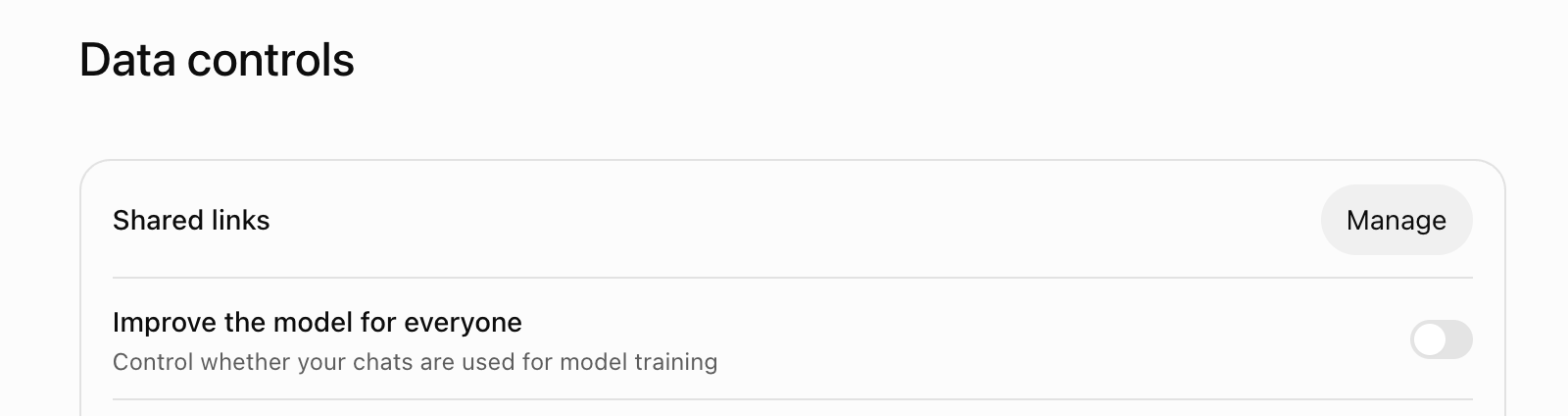
For personal accounts, “Improve the model for everyone” applies to new conversations where available. OpenAI says personal content may be used to improve models when the setting is on. Switch it off under Settings > Data controls to opt out of that use.
In this browser view, “Improve the model for everyone” is off under Settings > Data controls:
OpenAI says data sharing is on by default for personal Free, Plus, and Pro workspaces. Its current help does not establish the default for Go. See the personal-workspace training guidance.
This setting does not delete a chat, prevent processing needed to answer you, or switch off all safety, service, and legal processing described in OpenAI’s Europe Privacy Policy. If you submit feedback, OpenAI says the associated conversation may still be used for improvement even after opt-out.
Business, Enterprise, Edu, and API content is not used for training by default. Explicit feedback or data-sharing choices can create a separate route, with controls that vary by product and organization. A parent or guardian’s linked account controls may override a teen account’s opt-out. Check approvals and settings at the workspace level too.
Temporary Chat, archiving, and deletion are not the same
Where Temporary Chat is available, it does not appear in chat history and OpenAI says it is not used for model improvement while it remains temporary. A safety copy may be retained for up to 30 days. This is not zero storage.
Eligible Enterprise customers can access Temporary Chats through the Compliance API for 30 days, even when the workspace has a different custom retention period. OpenAI also describes rare safety cases where limited context from earlier conversations may be used despite Memory being disabled. See the Temporary Chat help.
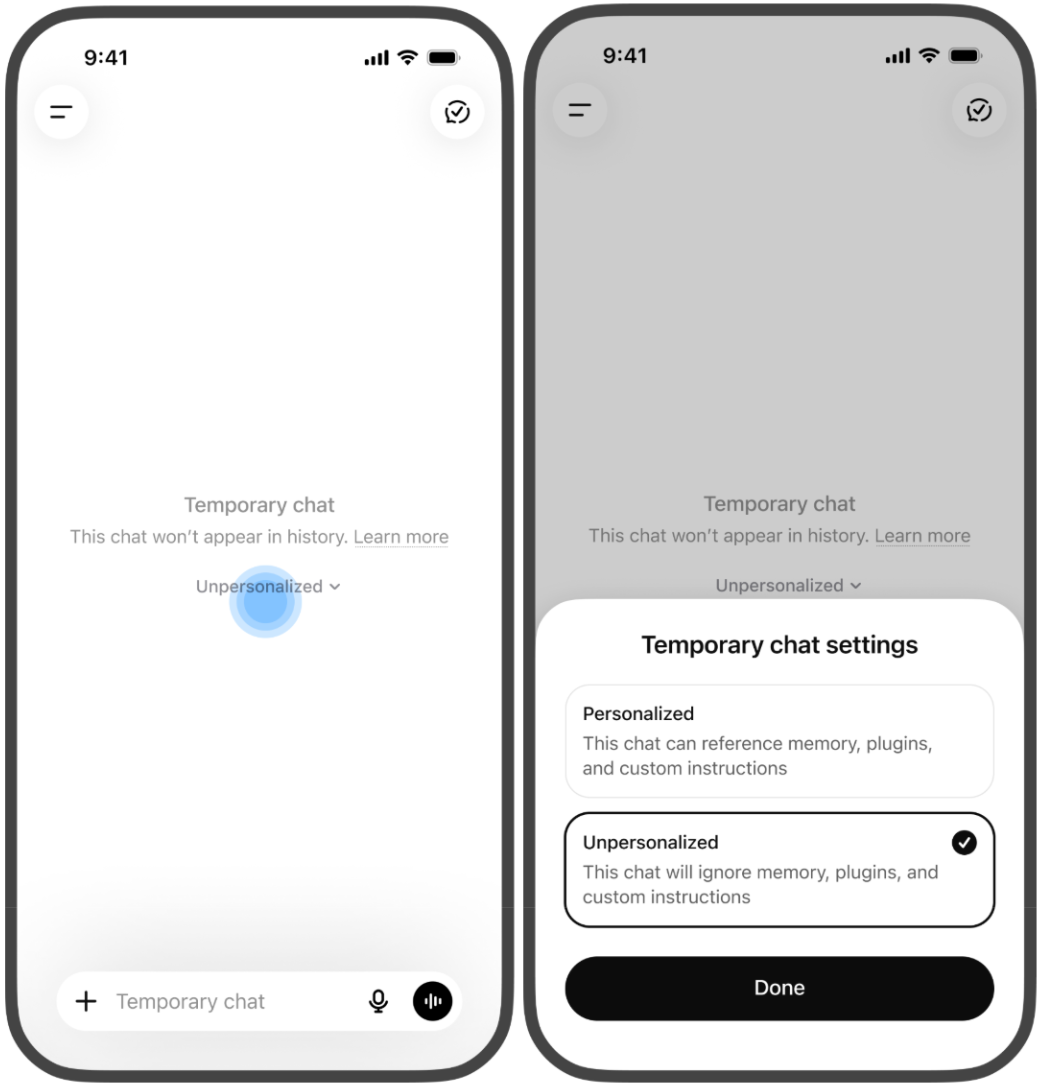
The current Temporary Chat help offers Personalized and Unpersonalized modes. Personalized can use existing saved memories, custom instructions, and plugins. Unpersonalized does not draw on those sources. Neither mode creates or updates memories.
The OpenAI guide shows this choice on mobile. This official example has “Unpersonalized” selected. The interface may vary by account and platform:
Saving a temporary conversation turns it into an ordinary chat. A connected GPT action or other recipient has separate terms and retention. The Temporary Chat page does not clarify whether the general feedback exception applies to a still-temporary chat.
Archiving hides a chat but keeps it. Deleting a chat schedules removal within 30 days in the usual case, subject to legal or security requirements and data already de-identified or disassociated from your account. See the current chat and file retention guide.
Exporting account data is separate from deletion. Signed-in Free, Go, Plus, and Pro users can request an export; OpenAI says it may take up to seven days, and the download link expires after 24 hours. It is a copy, not a way to restore deleted chats.
Account deletion is irreversible. OpenAI says it deletes account data within 30 days, except limited data retained longer where required or permitted by law. If Apple or Google bills your subscription, cancel it in that store first. See the export guide and account deletion instructions.
Memory and chat history need separate cleanup
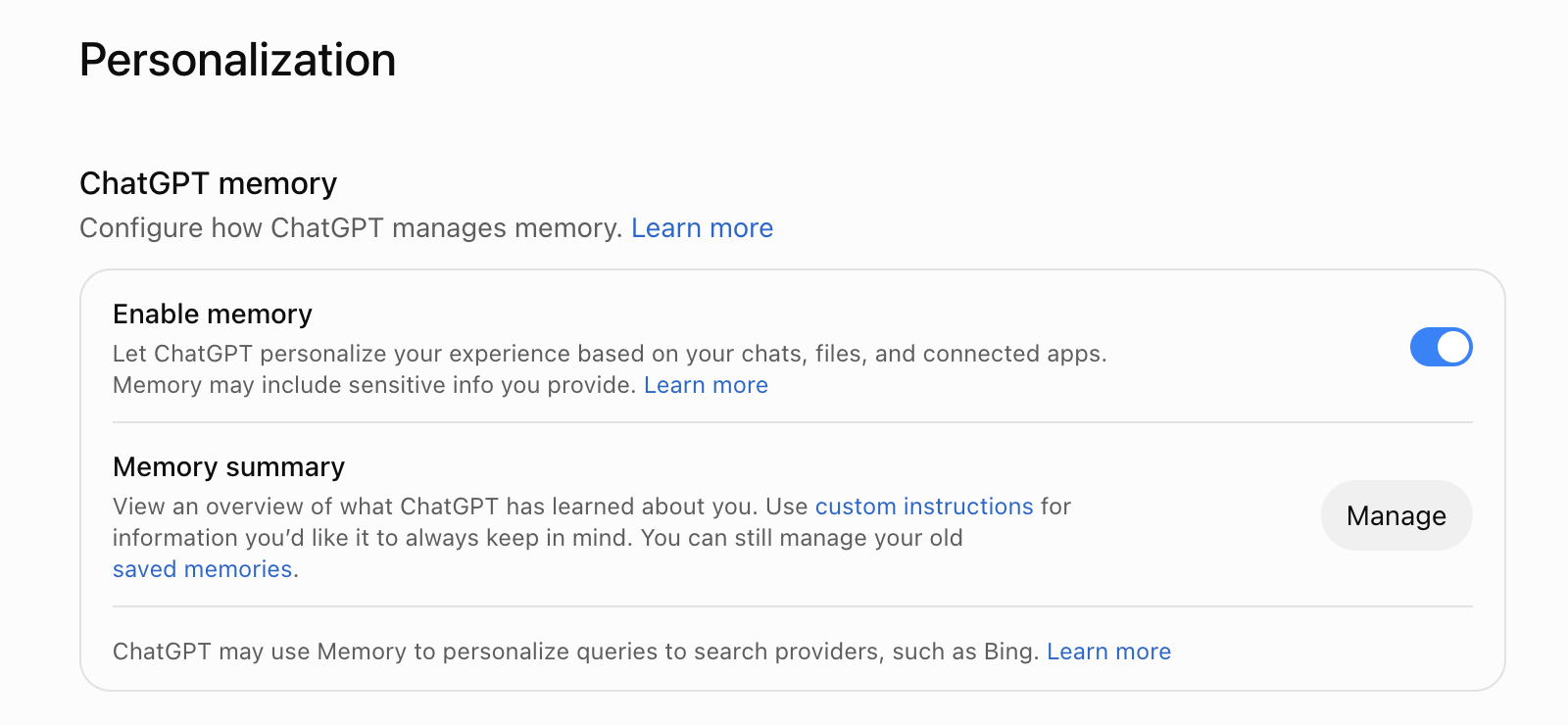
ChatGPT can use context from past chats, saved memories, custom instructions, Library files, and connected apps. Depending on your account, the Memory controls include a Memory summary or the earlier saved-memory and chat-history settings. A summary does not display every remembered detail or source.
This browser view shows “Enable memory” switched on under Settings > Personalization, with “Manage” for the Memory summary below:
Where the earlier controls are available, turning off Reference chat history schedules deletion of information remembered from past chats within 30 days, not the original conversations. Turning off Reference saved memories also turns off Reference chat history, but does not delete stored memories.
If your account offers a Memory summary, “Delete and turn off memory” removes the remembered information shown in it, not its source chats. “Don’t mention this again” is not a deletion control.
This mobile example shows how to correct highlighted text in a Memory summary. The image comes from OpenAI’s Memory guide:
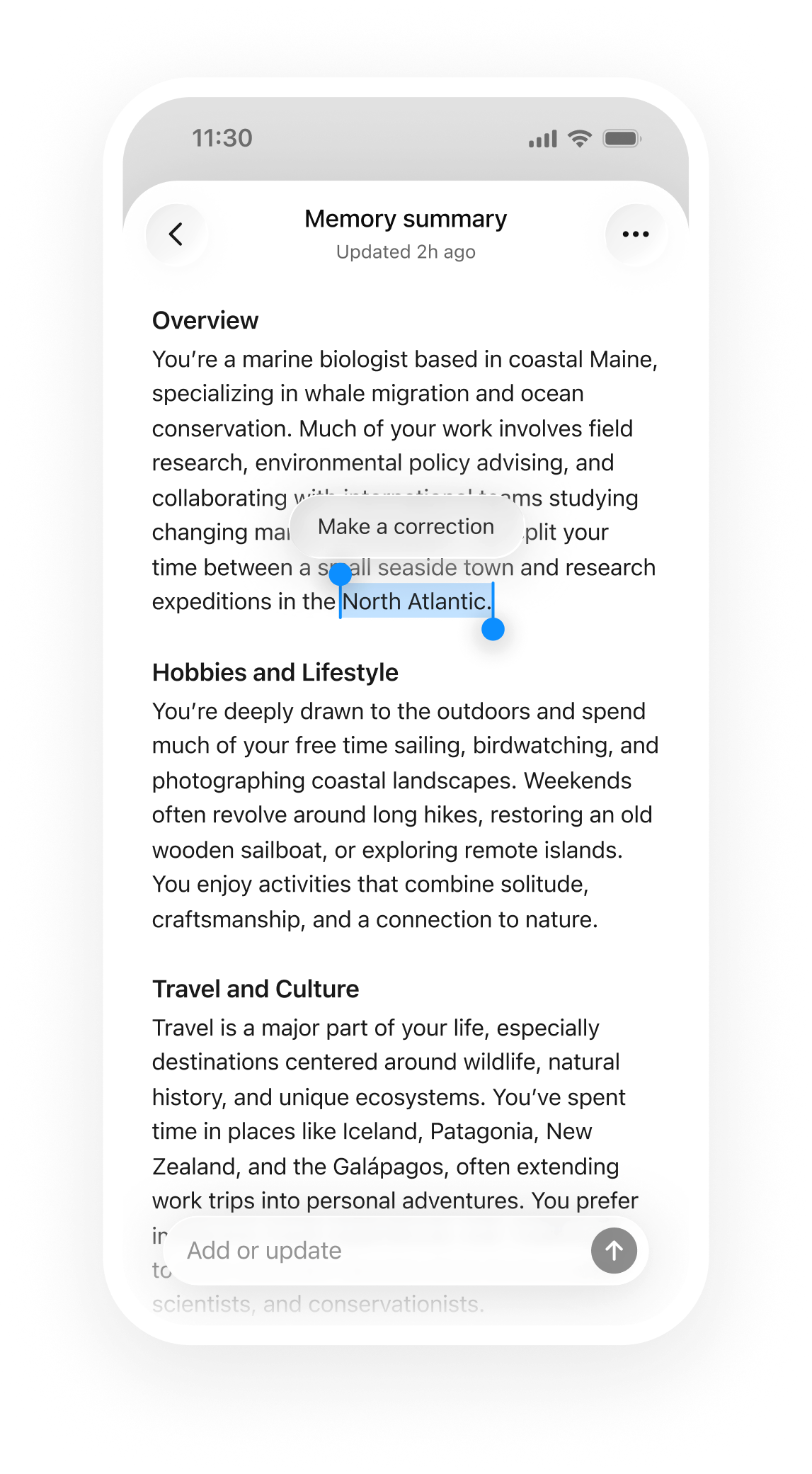
For fuller removal, remove the information from every relevant source, including the summary, saved memories, regular and archived source chats, Library files, custom instructions, and connected apps where applicable. Deleting a chat does not automatically remove a separately saved memory. Disconnecting an app prevents future access but does not delete content already copied into chats or Memory.
OpenAI may retain deleted-memory logs for up to 30 days for safety or debugging. Feature availability and labels vary. See the Memory guide.
Library files, voice, apps, and links follow different rules
Library, Projects, and GPT files
A Library file can outlive the chat where it was uploaded, so delete the file separately. Projects and GPTs can hold files under their own controls. A connected Drive file may remain in the source service rather than becoming a Library copy. Storage and model improvement are separate.
Read the Library guide and file-retention rules.
Voice and Record
Standard voice audio is deleted after transcription unless you choose to share it for audio training. Its transcript remains with the conversation and may follow the general model-improvement setting. Live and Advanced Voice audio clips and Advanced Voice video clips are retained for 30 days. The transcript and chat follow their separate conversation-retention rules.
Deleting the chat schedules clip deletion within 30 days, subject to legal or security requirements and clips already disassociated after prior training sharing. The Voice help documents clip-sharing controls for personal Free, Plus, and Pro accounts; it does not establish the same control for Go.
Business, Enterprise, and Edu workspaces cannot share voice clips for training. See the Voice documentation for these separate paths.
ChatGPT Record is documented for Plus, Pro, Business, Enterprise, and Edu on macOS. The raw recording is used for transcription and then deleted, and is not used for training. Transcripts and canvas documents follow conversation retention and may be used for model improvement under the applicable settings.
A separate training FAQ names Free, Plus, and Pro for transcript and canvas sharing controls. That does not prove Record is available on Free or Go, or that organization settings work the same way. Check the current Record help.
Apps, GPT actions, and shared conversations
Connected apps may search, supply sources to Deep Research, sync selected content in advance, or take actions. An app or action may send relevant parts of your input or chat context to a third party. Admin-managed sync is a separate workspace indexing feature, not a property of every live app connection.
App access, action approvals, training, Memory, and retention are separate controls. Disconnecting an app stops future access but does not delete saved chats or memories that already contain its data. See OpenAI’s connected-app guide and permission guide.
Directly accessed Google-app data is excluded from generalized model training even when the main setting is on. Exceptions include feedback, content you manually copy, paste, or upload, and information included in ChatGPT’s response. Read the Google-app data controls FAQ.
GPT builders cannot view individual user conversations, according to current help. An action can still send relevant input to its provider. Anyone who receives a personal conversation link, directly or by forwarding, can view it. Workspace links are limited to eligible members.
Links have no configurable expiry, and deleting one does not remove copies already saved by recipients. See the sharing guidance.
Work, browser tools, and the former Agent have separate rules
OpenAI now describes ChatGPT Agent as no longer available and points to ChatGPT Work. The same help page still contains earlier plan and operating instructions. It does not establish current availability for every account.
For the former Agent, OpenAI describes cloud-based app and browser interaction, Enterprise and Edu admin controls, and conversation logs that do not record individual actions. An admin-managed synced app index was not directly searchable there, although chat or Deep Research could access the same source. These statements do not automatically apply to Work.
The Agent help says former Agent chats, associated browsing history, and screenshots were retained until deletion. Deleted chats and screenshots are removed from OpenAI’s systems within 90 days according to that page. Do not apply this period to Work or ordinary ChatGPT conversations.
The Work Cloud Browser runs on a separate remote computer with its own cookies and sessions. It does not inherit local tabs or sign-ins. Allowing a website is different from confirming a booking, submission, or payment. Desktop Computer Use can view your local screen and operate apps.
Screen content and screenshots may become ChatGPT context. Local execution does not make model inference or transmitted context local. See the Cloud Browser guide and Computer Use documentation.
Chrome browser control can use a selected, signed-in browser and permitted sites. OpenAI says it does not keep a separate complete record of every browser action. Text, screenshots, tool calls, or summaries brought into ChatGPT context remain data to assess. Deep Research uses read actions from supported apps, not write actions.
Eligibility depends on plan, region, role, workspace, and provider permissions. See the Chrome guide and Deep Research help.
Atlas has its own data controls
OpenAI announced an Atlas transition with a planned end date of August 9, 2026. Its Enterprise help still describes Atlas as early access. These statements establish neither uniform current availability nor that every installation has shut down.
If you still use Atlas, review its own data controls. Browser Memory is independent of ChatGPT Memory. Include web browsing controls training use of visited pages. However, with general model improvement enabled, Atlas chats including attached page content may still be used for training. Help improve browsing & search controls diagnostic logs and is a separate setting.
In the documented Enterprise early access, workspace retention, the Compliance API, and regional commitments do not cover every Atlas data category. The Enterprise help identifies browsing history, Browser Memory, and Agent activity as having a different protection scope. Check Atlas-specific terms before relying on a general Enterprise commitment.
Work Cloud and local computer access
With local computer access in Work Cloud, the task remains cloud-coordinated and does not provide strict Zero Data Retention. A task can continue in a cloud environment when the computer is unavailable; local execution policies are not automatically carried over.
Work conversations follow workspace retention. Execution state and snapshots have their own lifecycle; ending a task or deleting its chat does not immediately remove every artifact. Work audit logs do not capture every individual action. Check cloud-browser permissions, network access, apps, and regional commitments for the enabled feature.
API retention and regional processing are separate
ChatGPT and API use can share an OpenAI login, but their product terms, billing, settings, and retention are separate. API content is not used for training by default. Standard abuse-monitoring logs may contain prompts, responses, and related metadata for up to 30 days, with limited legal or safety exceptions.
Responses are stored for at least 30 days by default unless an endpoint’s storage control, such as store=false, changes that behavior. Conversation objects and items have no general 30-day expiry and can remain until deleted. Files, Vector Stores, and Batches may also persist until deletion or an applicable expiry.
OpenAI’s API data controls and Conversation state guide distinguish those records.
Zero Data Retention and Modified Abuse Monitoring require prior approval and eligibility. ZDR excludes Customer Content from abuse-monitoring logs in normal operation, subject to safety and security exceptions. It does not remove every endpoint’s application state, file, or feature storage. Check the live endpoint and model matrix.
Do not use “ZDR” as a blanket promise for ChatGPT workspaces or every API feature.
OpenAI defines Europe as the European Economic Area (EEA) plus Switzerland, not the EU alone. API regional storage requires an eligible project and endpoint. Regional processing on a Global project does not change its storage region. Non-US regions require approved abuse-monitoring controls and an executed Modified Retention amendment.
ChatGPT workspace residency is separately listed for eligible new Enterprise and Edu workspaces, not Business. Inference Residency covers supported GPU processing, while CPU steps, system data, and external services may remain elsewhere. Check the current API region matrix and ChatGPT residency guidance.
What you need to assess under the GDPR
There is no universal “GDPR-compliant ChatGPT” answer. The household exemption may apply to your own purely personal activity, but does not erase the provider’s obligations. Work use needs a purpose-specific assessment under the GDPR.
For each operation, identify your controller, joint-controller, or processor role from what you actually decide and do. A contract label alone does not settle it. Choose a lawful basis under Article 6. If special-category data is involved, Article 9 requires an additional applicable condition.
Check whether the DPA covers processing on your behalf. It does not replace your legal basis, notices, or assessment of the provider’s own processing. See the European Data Protection Board (EDPB) controller and processor guidance.
Risk, automated decisions, and international transfers
Depending on the processing, check transparency under GDPR Articles 13 and 14, privacy by design under Article 25, records under Article 30, and security under Article 32. A Data Protection Impact Assessment (DPIA) under Article 35 is required where processing is likely to result in high risk.
AI use may often reach that threshold, but a chatbot does not make a DPIA automatic in every case. If the DPIA shows high risk that you cannot sufficiently mitigate, Article 36 requires consultation with the supervisory authority before processing. Article 22 is narrower. It concerns solely automated decisions with legal or similarly significant effects, subject to statutory exceptions and safeguards.
Human involvement must be able to affect the result when required.
For international transfers, check the mechanism that applies to the exporter and the actual recipients, subprocessors, features, and onward transfers. An EEA transfer may rely on an adequacy decision or suitable safeguards under Article 46, assessed for the specific route.
Switzerland is not in the EU or EEA and has its own transfer framework under Article 16 of the Swiss Federal Act on Data Protection (FADP), even though EU law recognizes Switzerland as adequate for transfers from the EEA.
See the EDPB transfer recommendations, Swiss Federal Data Protection and Information Commissioner (FDPIC) guidance, and Article 16 of the Swiss FADP.
Provider statements do not prove that your particular purpose, data categories, notices, contractual chain, or transfer is lawful. If the answer matters for clients, employees, children, health data, or consequential decisions, get advice from your data protection lead or counsel.
Codex: local settings, cloud tasks, and model routes
Codex has controls for local command execution, cloud environments, API routing, and model improvement. Each control applies to a specific operation. The broader ChatGPT app and connected services have their own data routes.
- For personal data OpenAI processes on your behalf, check the contract for that service. Business and Enterprise have a standard DPA route, Edu has a separate Student Data Privacy Agreement, and API use has its own DPA. Personal Plus or Pro is not an organizational DPA.
- For normal new Codex tasks, either switch off “Improve the model for everyone” or opt out through the Privacy Portal. “Include environments” is a separate control for additional environment context. Feedback may still be used, and linked parent or guardian controls may override a teen account’s choice.
- Local file restrictions and cloud policies cover different operations. European residency requires eligibility and an enabled configuration, and does not cover every data type or processing step.
Identify the actual account and provider before applying a rule from this comparison.
Codex privacy at a glance
You can use Codex in three ways. The terms and controls differ by route. Here’s what to check for each one:
| Feature | Free to Pro | Business, Enterprise, Edu | API key |
|---|---|---|---|
| Agreement | No | Business / Enterprise DPA; Edu SDPA | API DPA route |
| Training by default | can opt out | No | No |
| RetentionBy data and feature | feature-specific | workspace and feature | logs up to 30 days, exceptions |
| Zero Data Retention | No | n/a | on request |
| Regional optionsEligibility and feature scope apply | No | Enterprise / Edu only for supported app and CLI features | Eligible API project and endpoint |
| Cloud tasks | plan and access dependent | access dependent | No |
| Key setting | Data controls | requirements.toml | Project settings |
Retention depends on the data, feature, and workspace policy. The API period refers to abuse-monitoring logs, not every stored item. Responses, Conversations, files, and endpoint state have separate rules. Virtual machine (VM) state has its own recovery period.
For a client project, assess the contract and feature route before choosing a plan. OpenAI’s current pricing page lists Business at $20 per user per month with annual billing or $25 billed monthly, with a two-seat minimum. That price does not guarantee Codex seat eligibility.
From June 24, 2026, new ChatGPT Business plans and Business workspaces that had never added a Codex seat before that date cannot add new Codex seats. Workspaces that had previously added a seat, including pending invitations as of that date, can continue managing seats and adding usage-based seats. Check the exact eligibility in OpenAI’s Business help notice. API use is billed separately.
The agreement determines DPA availability, not the subscription price.
1. Which Codex plan comes with a DPA?
A paid personal plan does not become an organizational DPA just because it costs more.
OpenAI lists a standard DPA for Business, Enterprise, and API customers. For Edu, it points to a separate Student Data Privacy Agreement. The public pages do not establish that an institution cannot have additional Article 28 terms. Check the signed agreement and order form:
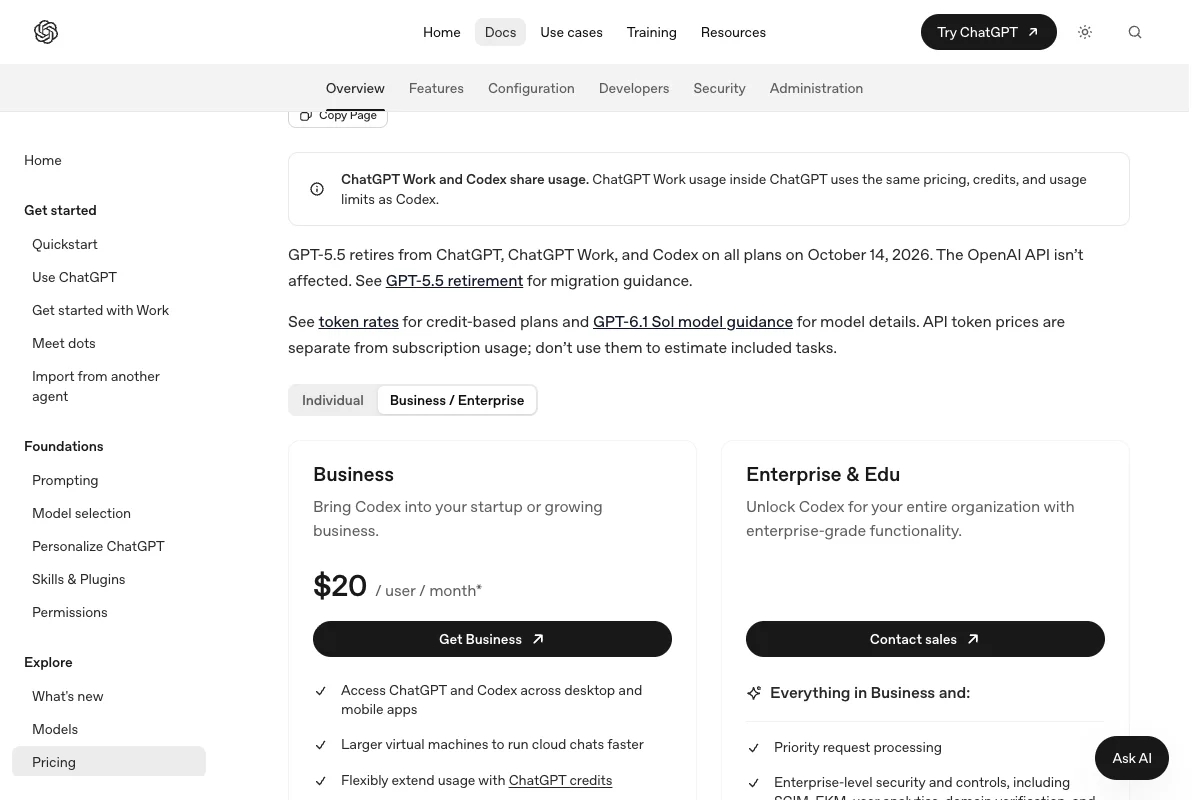
Business, Enterprise, Edu, and API content is not used for training by default, subject to separate feedback or data-sharing choices. Edu has its own agreement and workspace controls.
The standard Data Processing Addendum supplements the Services Agreement for customer data processed on the customer’s behalf. It names OpenAI Ireland Ltd for customers based in the EEA or Switzerland and OpenAI OpCo, LLC elsewhere, subject to the signed agreement and order form. The separate Edu Student Data Privacy Agreement names OpenAI, LLC.
Review the contract that governs your workspace and the current subprocessor list.
A DPA does not automatically make you the controller or processor. Determine roles from the actual purpose, instructions, and processing. See the GDPR basics for coding agents for more on the role test, and review OpenAI’s agreement separately.
On a personal account, the general model-improvement opt-out also applies to new Codex tasks. The environment-context control is separate.
2. How do you turn off training in Codex?
The general opt-out covers normal new tasks. Environment context has a separate control.
For personal ChatGPT plans, either switch off “Improve the model for everyone” under Profile > Settings > Data controls or opt out through the Privacy Portal. Either option is sufficient for normal new conversations and Codex tasks where available. A linked parent or guardian control may override the choice for a teen account. See OpenAI’s data-controls guidance.
“Include environments” controls additional environment context that may be used for model improvement. The general opt-out does not change this separate setting. Turn both controls off if you also want to exclude that environment context. OpenAI explains the distinction in its data-controls guidance.
The opt-out does not delete data already received or stop processing needed to provide the service. OpenAI says a rated conversation may still be used for model improvement even after opt-out. Temporary Chat’s feedback interaction is not clarified in the product documentation.
On client projects, I’d leave those rating buttons alone.
Business, Enterprise, and Edu content is not used for training by default. API content is also excluded by default, while organization owners can enable specific feedback or data-sharing options. Check current approvals and workspace settings.
These controls limit training use. They do not prevent model processing or every form of storage. Local analytics and records have separate settings.
3. What does Codex store on your machine?
The Codex CLI and the other local clients read their settings from ~/.codex/config.toml. Three entries in that file matter for privacy. Add them, and don’t create duplicate sections if they already exist:
[analytics]
enabled = false

[feedback]
enabled = false

[history]
persistence = "none"
analytics disables local usage analytics, and feedback disables /feedback submission across local clients. history.persistence = "none" stops new history.jsonl entries, not every session record. The keys are in the configuration reference.
However:
The file controls local clients. It changes no server-side retention, deletes no existing data, and does not prevent other local session records. Check their access controls and deletion too. See my Codex commands guide for more configuration options.
That leaves the biggest risk, Codex reading files that have nothing to do with the task.
4. How do you block .env files and everything outside the project?
Your project folder isn’t a boundary by itself. Without a profile, the commands Codex runs can read files outside of it too.
A permission profile defines which files those commands can read and write and whether they can reach the network. OpenAI still labels permission profiles as a beta feature:
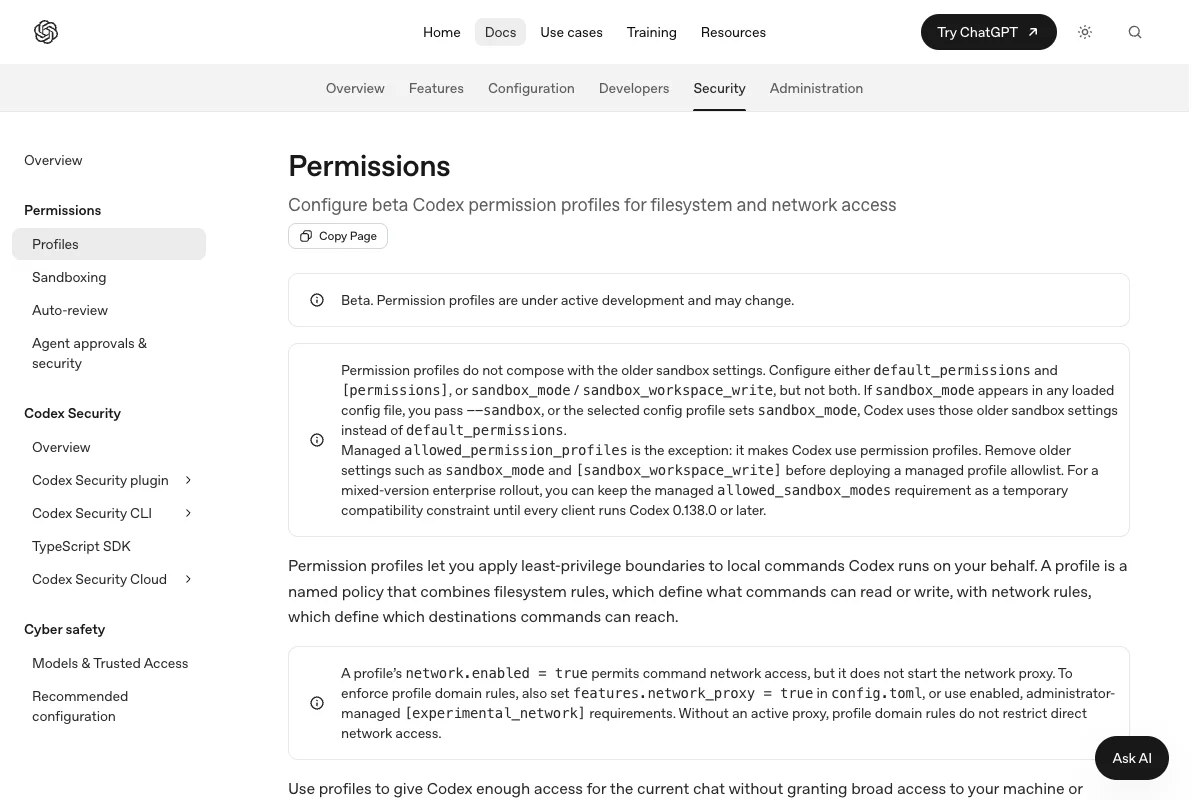
The profile allows work in workspace folders and necessary runtime reads through :minimal. It denies other paths, temporary folders, and matched .env files to sandboxed commands, with command networking off. The first two lines go before all sections in ~/.codex/config.toml. The paragraphs below explain platform and glob limits.
approval_policy = "on-request"
default_permissions = "projekt"

[permissions.projekt]
extends = ":workspace"

[permissions.projekt.filesystem]
glob_scan_max_depth = 3
":root" = "deny"
":minimal" = "read"
":tmpdir" = "deny"
":slash_tmp" = "deny"

[permissions.projekt.filesystem.":workspace_roots"]
"**/.env" = "deny"
"**/.env.*" = "deny"

[permissions.projekt.network]
enabled = false
Then start Codex without --sandbox.
If any loaded config still contains sandbox_mode or sandbox_workspace_write, Codex uses the old sandbox instead of your profile, so delete those lines. The approval_policy on-request makes Codex ask before a command runs outside the sandbox.
The :minimal entry gives Codex read access to the paths common tools need. Codex decides which paths those are on each platform. If the profile still blocks your build tool, allow exactly the missing path instead of opening up the whole machine.
On Linux, WSL, and Windows, Codex looks for .env files up to three folders deep before it starts. If yours sit deeper, raise glob_scan_max_depth. A file that only appears during a session isn’t reliably blocked until the next start.
.env file with a made-up value in your project and ask Codex to show it to you. If you see the value, the profile isn’t working.Enforcing profiles across a team
On a team, you don’t want to rely on everyone keeping their config.toml in order. As an admin, you set the allowed profiles in a requirements.toml instead. On Mac and Linux, that’s /etc/codex/requirements.toml, and Enterprise workspaces can also push it from the cloud:
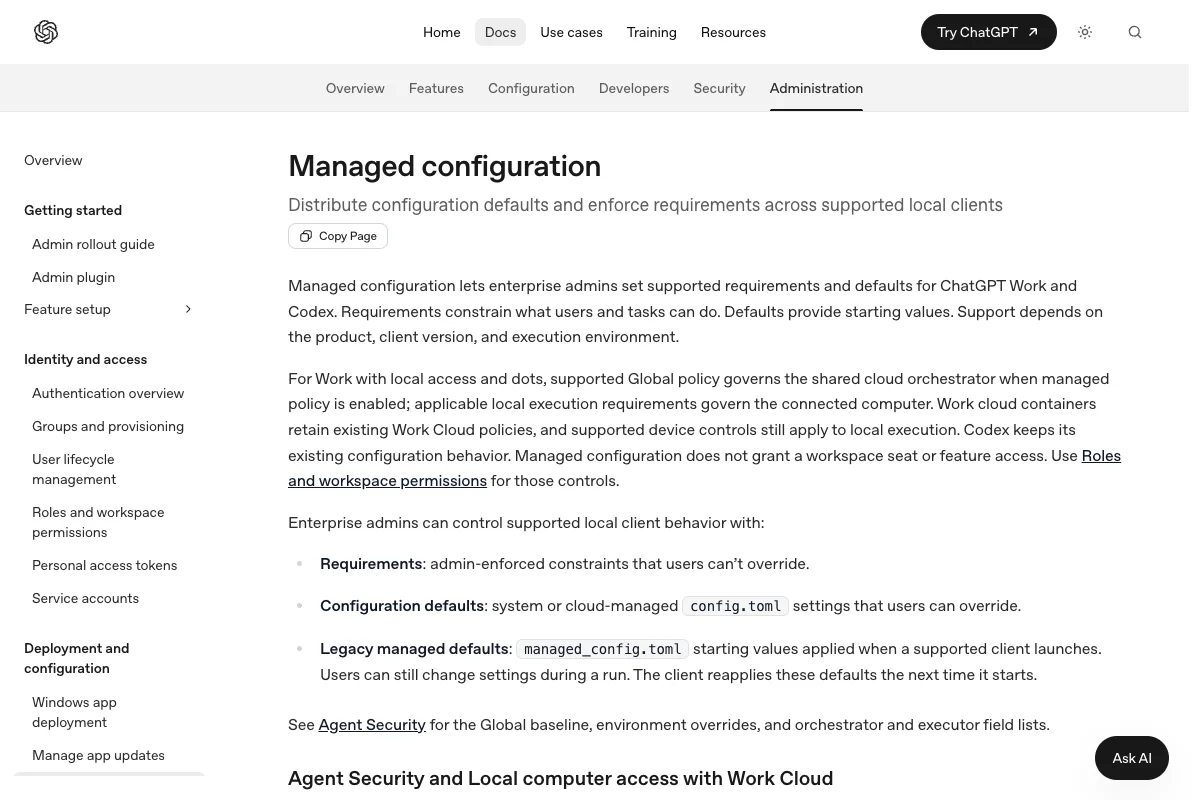
allowed_permission_profiles restricts selectable profile names. Define your custom profiles and default_permissions in managed requirements.toml too, so their boundaries are centrally controlled. The managed configuration docs require Codex 0.138.0 or newer; do not deploy this policy to older clients. The EU AI literacy guide helps with training.
All of this protects your machine. Once you send a task to the cloud, though, Codex keeps working on OpenAI’s hardware.
5. What ends up at OpenAI with a cloud task?
There, Codex runs in a virtual machine, even after you’ve closed your laptop.
The cloud environment holds your repositories, dependencies, tools, and access settings. Each task gets its own isolated workspace from it:
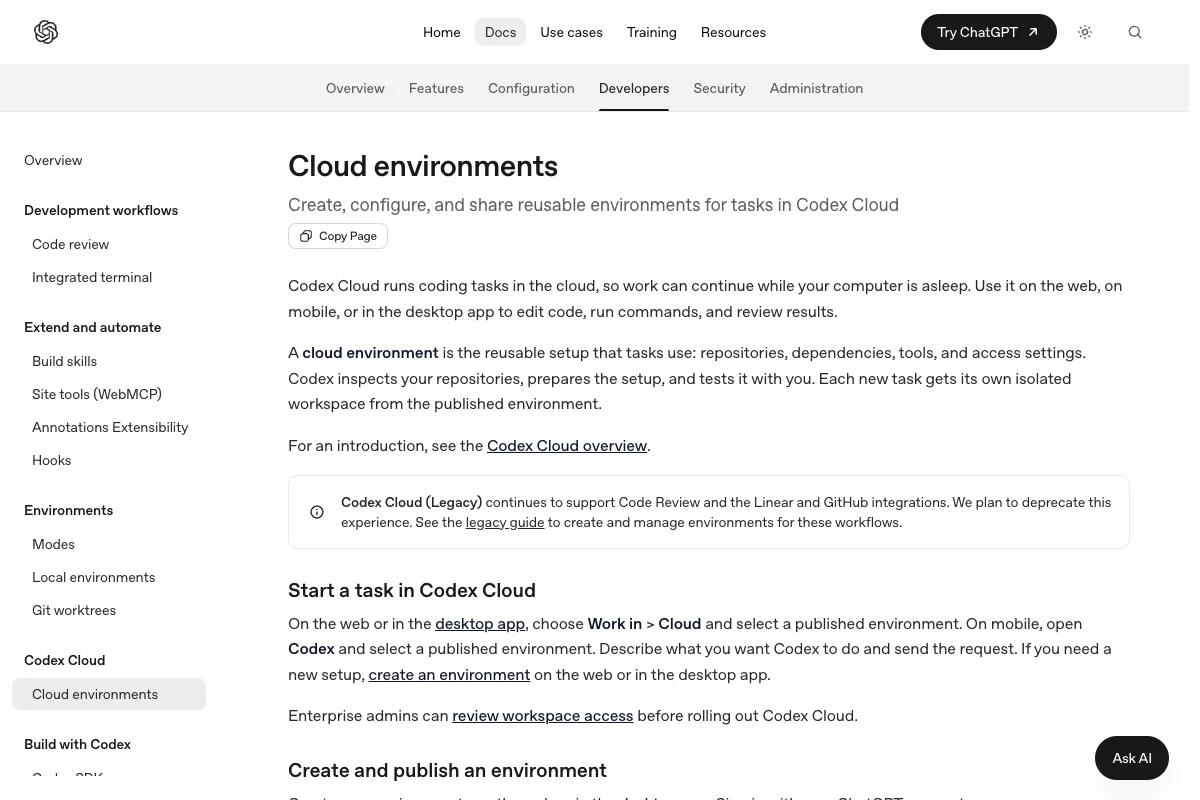
Saved VM state is recoverable for up to seven days after the last started turn or task resume by default. This is not a deletion period for every conversation, log, or other cloud record. Internet access and allowed domains are environment-specific; organizational restrictions also apply.
Your config.toml and your permission profile don’t apply here. That’s why I’d only connect the repositories Codex really needs for the task and store test credentials instead of real ones. With an API key, the question doesn’t even come up because there are no cloud tasks.
If your team also uses Cursor, its cloud agents work on the same principle with different retention periods. You’ll find them in my guide to Cursor and GDPR.
The last open question is where all of this happens.
6. Can Codex process your data in the EU?
Yes, but not on every plan. I see four routes, from an Enterprise contract to a model running on your own machine.
Enterprise and Edu with data residency
Eligible new Enterprise and Edu workspaces can enable residency for supported content. Data residency covers stored content; inference residency covers GPU execution. Europe includes the EEA and Switzerland, which is broader than the EU.
The data residency help page supports the app and CLI, but excludes Codex Web. Have an admin confirm both residency settings. CPU processing, system data, and external services may remain outside the region. Business lacks this workspace option; assess an approved API route, for example.
API key with an EU project or Azure
OpenAI defines Europe as the EEA plus Switzerland. For regional storage, use an eligible API project and endpoint such as eu.api.openai.com. The endpoint, model, and feature must qualify. Regional processing can instead be selected per request on an eligible Global project; that does not move its stored data.
Check the live API region matrix.
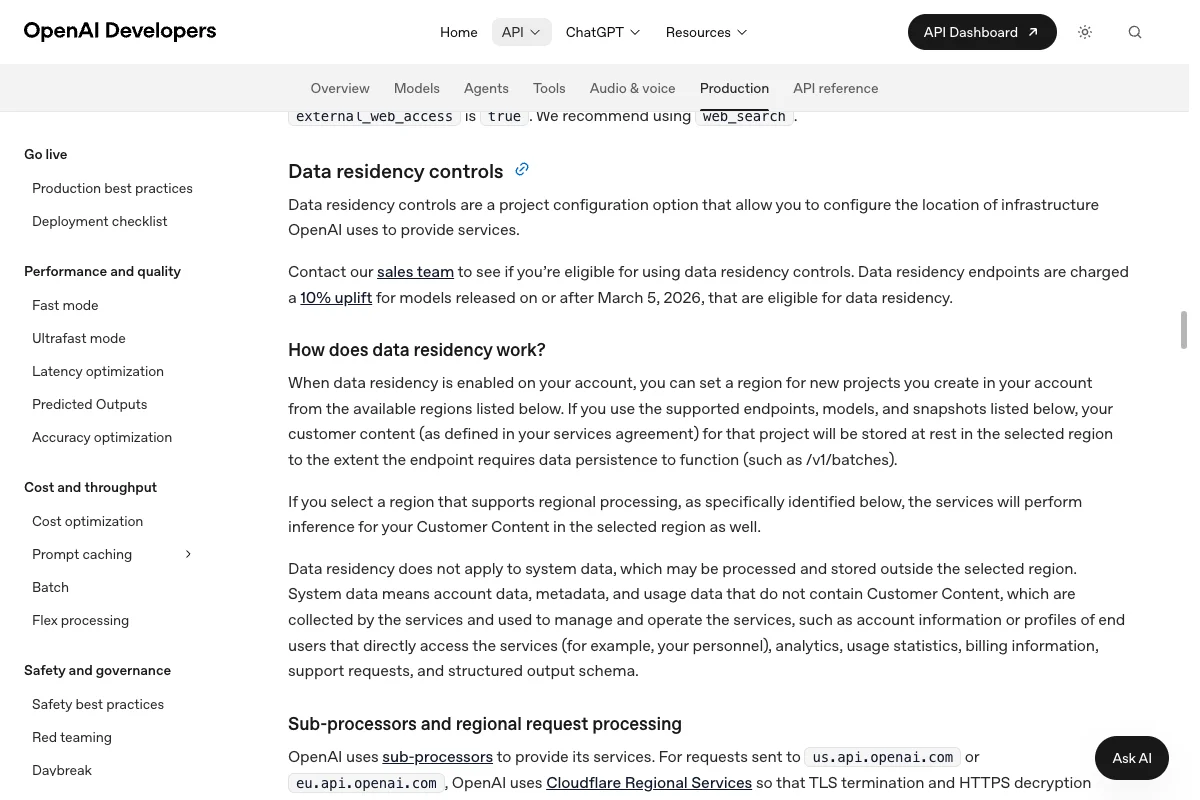
For non-US regions, OpenAI requires approved abuse monitoring controls and an executed Modified Retention amendment. The EU URL alone is insufficient.
Regional processing has a 10% uplift for models released on or after March 5, 2026. System data and external services fall outside the residency commitment.
Standard abuse-monitoring logs can contain prompts and responses for up to 30 days, with limited legal or safety exceptions. Responses, Conversations, files, and other endpoint state have separate rules. ZDR excludes Customer Content from abuse-monitoring logs in normal operation, subject to safety and security exceptions, but does not switch off every endpoint’s application state.
ZDR and Modified Abuse Monitoring require prior approval and eligibility.
A configured Azure provider can route local Codex model requests to your Azure OpenAI or Foundry deployment. The agreement, Product Terms, and DPA for that specific Azure service govern that route only. This does not make Microsoft the contract partner for all Codex, ChatGPT, telemetry, or tool data. Processing boundaries depend on deployment type.
Global deployments can process in any Azure region, Data Zone stays within its defined zone, and Regional deployment stays within its selected geography. Stored content has a separate geography commitment. Check Microsoft’s deployment types and data and privacy scope.
Microsoft’s current data-privacy and abuse-monitoring pages describe flagged prompts and responses that may be retained for human misuse review. Those pages do not state a general retention period. Do not transfer OpenAI’s API 30-day figure to Azure.
Local with Ollama
Only inference from a model you explicitly select as local runs on your machine. Ollama ships its own Codex integration, which you start like this:
ollama launch codexThen pick a local model, not one of the cloud models from the same list. The integration’s web search goes online even with a local model, so start the profile it created without it:
codex --profile ollama-launch -c 'web_search="disabled"'Block Ollama’s cloud features with OLLAMA_NO_CLOUD=1 when starting its server, or "disable_ollama_cloud": true in ~/.ollama/server.json, as the Ollama FAQ explains. Restart Ollama after the change. Also control analytics, MCP servers, and other network routes as in steps 3 and 4.
So how does Codex stack up against the other two big coding agents?
Claude Code, Codex, and Cursor compared
Each of the three tools has its own privacy guide here. These are the key values side by side:
| Feature | Claude Code | Codex | Cursor |
|---|---|---|---|
| Agreement | Team, Enterprise, API | Business, Enterprise, API | Teams, Enterprise |
| No business trainingNo training by default; exceptions apply | by default | by default | with Privacy Mode |
| No personal trainingNo training after the relevant choice | after opt-out | after opt-out | with Privacy Mode |
| RetentionProduct and record specific | Code/API records: usually up to 30 days | API logs up to 30 days; endpoint state differs | editor and cloud separate |
| European optionsLimited scope | e.g. AWS or Google | eligible Enterprise, Edu, API configuration | inference on request |
| Key switch | Help improve our AI models | Improve the model for everyone | Privacy Mode |
Edu uses a separate Student Data Privacy Agreement. Check the signed institutional terms. The table’s Code/API retention figures do not describe every stored chat or feature.
OpenAI offers eligible Enterprise and Edu customers, and approved API customers, regional commitments with different scopes. They do not cover every processing step.
Cursor offers regional model inference on request. See Claude Code and GDPR and Cursor and GDPR for details, or my Claude Code vs. Codex comparison when choosing a tool.
What you can do today
For personal data processed on your behalf, check whether your signed agreement covers that processing. Business and Enterprise have a standard DPA route, Edu uses a separate Student Data Privacy Agreement, and the API has its own DPA. A training opt-out does not replace a contract or your legal basis.
Recheck settings after client updates and changes to models, features, or organizational requirements. Start testing file access with made-up data.
Create an empty test project with a made-up .env file and add the profile from step 4. A rejected read only demonstrates that tested access, not complete protection. Check these points too, and refuse requests to run outside the sandbox.
- which account and which profile Codex is running with,
- whether a command outside the project folder fails,
- whether a network request from the terminal gets blocked,
- whether a
history.jsonlshows up after the session.
Whatever you approve belongs in an AI policy for your company. I’m not a lawyer, and this article is not legal advice for your specific case.
Your next step
First identify whether the content goes through a personal account, a managed workspace, the API, or a Codex workflow. Then check the right object and recipient. A chat, Memory entry, Library file, app connection, API Response, and Codex VM do not all disappear through the same control.
For work, record the purpose, data categories, legal basis, contract scope, app permissions, retention, and any transfer safeguard. Test file boundaries with invented data, not real customer information. Ask your data protection lead or counsel when the decision has legal consequences.