ChatGPT Guide: How to Sign Up for Free in 2026

In my guide, you'll learn how to easily and quickly sign up for ChatGPT and what first steps you need to take as a beginner.

FHFinn Hillebrandt
AI Basics
ChatGPT Guide: How to Sign Up for Free in 2026
Links marked with * are affiliate links. If a purchase is made through such links, we receive a commission.

You have probably heard of ChatGPT by now. It is everywhere. And for good reason.

ChatGPT represents an enormous advancement in AI text generators. It can write, rewrite, and continue texts on command. It remembers the chat history. It can ask follow-up questions. And it works in English, German, and dozens of other languages.

The best part:

You can use ChatGPT for free. I'll show you how to do that in this article (don't worry, it's dead simple and takes about 3 minutes).

TL;DRKey Takeaways
  • You can try ChatGPT in guest mode without an account. Create a free account directly with OpenAI to save chats and use account-specific features.
  • A phone number is not required for a new ChatGPT account. OpenAI still requires phone verification to create your first API key.
  • ChatGPT understands and responds in English. Just enter English commands and get started

1. Use Guest Mode or Create an Account

You can first try ChatGPT in guest mode. To save chats and use account-specific features, create an account at OpenAI. To do this, click on this link, which will take you to the ChatGPT login page.

Once there, choose "Log in or sign up" or one of the sign-up methods offered.
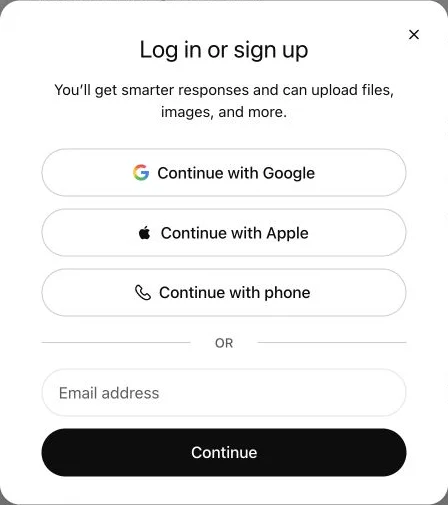
ChatGPT login or sign-up options

The available options can change, so follow the steps ChatGPT presents to you at that time.

2. Complete Sign-up

ChatGPT opens after you sign in. A phone number is not required for a new ChatGPT account. According to the OpenAI Help Center, it is required only when you create your first API key.

3. Use ChatGPT

The interface and available features can look different depending on your account and the time you sign in. Do not share sensitive information, and verify important answers against reliable sources.

To start a new chat with ChatGPT, you can either click "New chat" in the top left or enter your questions or commands to ChatGPT in the input field at the bottom:

By the way:

ChatGPT also understands German. If you give the chatbot a German question or command, it will respond in German.

Tell ChatGPT the length, language, and content you need. Here, it explains a language model in three short sentences:
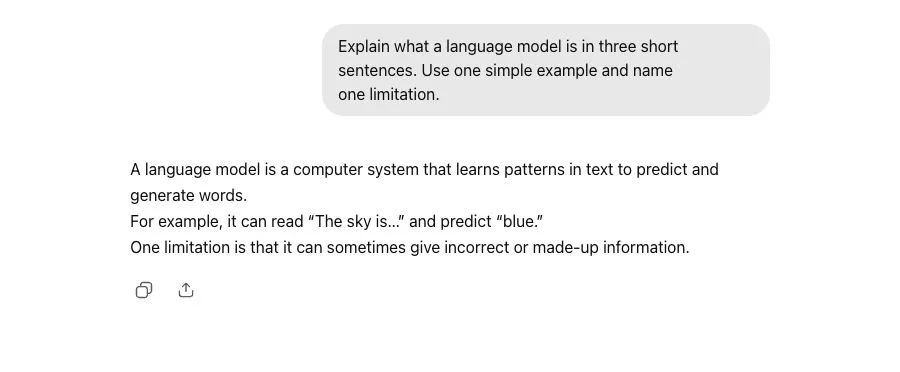

ChatGPT explains a language model in three short sentences

FAQ

No. You can enter questions and tasks in natural language. Programming knowledge is useful for coding tasks, but it is not required for regular use.

The model selector depends on your plan, country, and the current rollout. Check the model menu in your account, because OpenAI can change available models, limits, and tools.

Yes. You can use ChatGPT in a browser and through the official iOS and Android apps. The functions you see depend on your device, account, and the current rollout.

Yes. You can try ChatGPT in guest mode. You need an account to save chats and use account-specific features.

No. A phone number is not required to create a new OpenAI account or use ChatGPT. OpenAI requires it only when you create your first API key.

Yes. ChatGPT has a free tier. The models, tools, and limits available in that tier can change by account and over time.

ChatGPT can make mistakes or present incomplete sources. Verify important claims, especially about health, finance, law, and current events, against reliable primary sources.
FH

Finn Hillebrandt

AI Expert & Blogger

Finn Hillebrandt is the founder of Gradually AI, an SEO and AI expert. He helps online entrepreneurs simplify and automate their processes and marketing with AI. Finn shares his knowledge here on the blog in 50+ articles as well as through the AI Business Club.

Learn more about Finn and the team, follow Finn on LinkedIn, join his Facebook group for ChatGPT, OpenAI & AI Tools or do like 17,500+ others and subscribe to his AI Newsletter with tips, news and offers about AI tools and online business. Also visit his other blog, Blogmojo, which is about WordPress, blogging and SEO.