Most people get mediocre results from ChatGPT. Not because the tool is bad, but because their prompts are.
The difference between a vague prompt and a well-crafted one is enormous. I have seen it hundreds of times.
In this article, I've compiled 9 tips for writing better ChatGPT prompts. Refer back to these whenever you're not getting the output you hoped for.
- Good ChatGPT prompts are unambiguous, have a clear goal, and give only one task at a time - avoid ambiguity
- Detailed but not overloaded: Define writing style, provide examples, break complex tasks into steps
- Use commands instead of questions - they're shorter, clearer, and lead to better results
1. The Prompt is Clear and Unambiguous
To ensure that ChatGPT and other AI tools understand your prompts and deliver the desired output, it's important that your prompts are as clear and unambiguous as possible.
This implies, for example:
- No major spelling or grammar errors (ChatGPT usually understands you despite minor errors)
- Avoid ambiguous words or phrases
- Avoid slang, dialect, or colloquialisms
- Avoid idioms or expressions
- Clear references (especially important with personal pronouns: What does "he" or "it" refer to in the subordinate clause?)
- No complex sentence structures
Bad Prompt:
Write a report about a world trip that is very longBetter Prompt:
Write a report about a long world trip.In the second prompt, it's clear that it's about a long world trip and not a long report.
2. The Prompt Has a Clear Goal
Before you have ChatGPT write a text, ask yourself:
- What do I need this text for?
- What goal do I want to achieve with it?
- Is there something the text should definitely contain or not contain?
- Who is the text aimed at?
- What feeling should it evoke in readers?
- On which platform will the text be shared?
When you know exactly what you want to achieve with a ChatGPT prompt and communicate your goals in detail in the prompt, you'll generate significantly better texts.
And in the end, you'll have to ask fewer follow-up commands or questions, have less post-processing work, and save a lot of time.
Extremely Bad Prompt:
Can you help me with a blog article?Bad Prompt:
Can you help me with a blog article about types of cheese?Good Prompt:
Write a blog article about the three most popular types of cheese. The blog article should be 300 words long. The blog article is aimed at hobby cooks who want to learn which types of cheese are best used in cooking and for which dishes each type of cheese is used. The blog article should be written simply and not contain too many technical terms or foreign words.3. One Task at a Time
From points 2 and 3, you may have realized:
Giving ChatGPT a task is comparable to giving a person a task.
Neither can do multitasking well. When you write a prompt, don't give the AI five tasks at once, just one.
You should definitely avoid something like this:
Write a blog article, a Twitter post, and a presentation about the three most popular types of cheese. The target audience for the blog article and the Twitter post are hobby cooks who want to learn which types of cheese are best used in cooking and for which dishes each type of cheese is used. The target audience for the presentation are professional chefs. The texts should be easy to understand and not contain too many technical terms or foreign words (except for the presentation, which may contain many technical terms).And if you must, give ChatGPT a clear step-by-step instruction in the prompt:
4. Break Complex Tasks into Clear Steps
If you want to give ChatGPT a more complex task, you should break down exactly which steps are necessary. This ensures that the answer matches exactly what you expect:
I want you to create a poem interpretation for me. The following four steps are necessary:

Step 1: Summarize the content of the poem for me
Step 2: Describe the structure of the poem (verses, stanzas, rhyme scheme, meter, and end syllables)
Step 3: Analyze the language of the poem
Step 4: Interpret the poem

This is the poem to be interpreted:
[Insert poem]
The clear division into steps 1, 2, 3, and 4 in our example prompt ensures that ChatGPT executes the tasks in the correct order, doesn't skip any steps, or misinterprets your instructions.
5. The Prompt is Quick to Write
You may have thought (especially with the longer prompt examples):
"If I have to write very long and detailed prompts, I might as well write the text myself!"
And you're not entirely wrong.
It shouldn't take super long to write ChatGPT prompts. The perfect prompt can be put together quickly and is as short as possible.
A good way to do this is to use "list prompts" instead of writing out prompts in full sentences. The last prompt from point 2 would then look like this:
Text type: Blog article
Topic: The 3 most popular types of cheese
Length: 300 words
Target audience: Hobby cooks
Goal of the text: Show the best types of cheese for cooking; show which dishes each type of cheese is used for
Writing style: Simple language with few foreign words and technical terms6. The Prompt is Detailed but Not Overloaded
Adding details to ChatGPT prompts is one of the best measures to get better output.
However:
You can also write prompts that are "too detailed."
Too much information, additions, instructions, or examples in your prompts can cause ChatGPT to become overwhelmed and dilute the actual goal of the prompt.
So write detailed prompts, but still make sure to:
- Keep it as short as possible
- Leave out unnecessary details or instructions
- Communicate the goal of the prompt clearly and unambiguously
7. Define the Writing Style in the Prompt
The writing style of ChatGPT and other AI chatbots is rather mediocre by default:
They tend to repeat themselves and often write too long-windedly. Additionally, texts often sound monotonous and "robotic."
However, there's a simple remedy:
You simply tell the tools how they should write. If, for example, you want ChatGPT to write in simple language, you can add this to your prompt:
Write in simple language.Alternatively, you can write the ChatGPT prompt in list form:
Writing style: simple languageIf that doesn't produce the desired results, you can explain to ChatGPT what "simple language" means, for example:
Avoid metaphors, irony, and idioms. Always write out abbreviations (including common ones). Avoid nominalization. Use active verb forms instead of passive verb forms. Use words from spoken language. Replace abstract terms with concrete terms. Replace foreign words, difficult terms, or long compound words with simpler words. Use a simple and logical sentence structure. Avoid jumps in thought and long subordinate clauses. Each sentence should contain only one thought.Or alternatively in list form:
Metaphors, irony, and idioms: avoid
Abbreviations: always write out (including common ones)
Nominalization: avoid
Verb forms: avoid passive
Word choice: Use words from spoken language; replace abstract terms with concrete terms; replace foreign words, difficult terms, or long compound words with simpler words
Sentence structure: Simple, logical, avoid jumps in thought, avoid long subordinate clauses, each sentence should contain only one thought
8. Provide Examples (Optional)
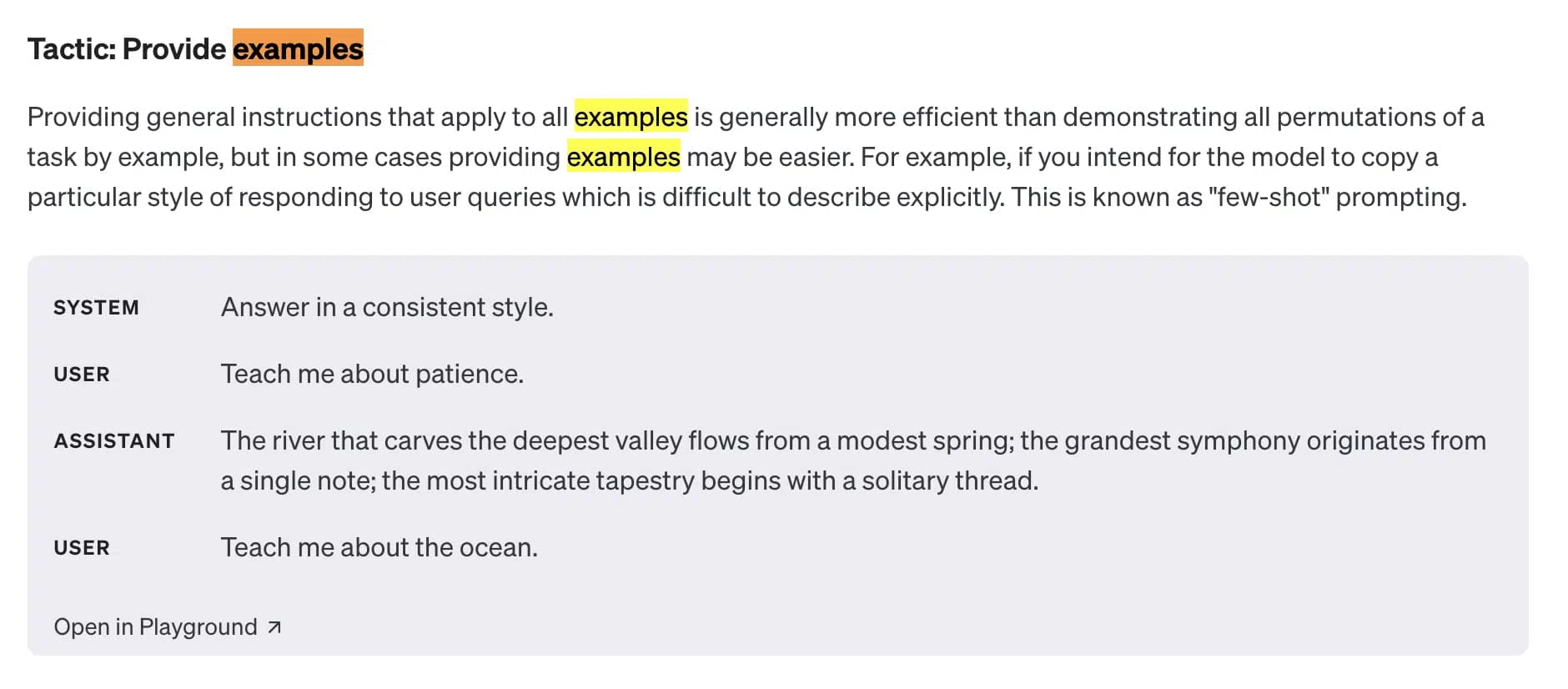
It can be enormously helpful to include example texts in ChatGPT prompts.
This is not necessarily required, but often ensures that the tools adhere even better to a specific writing style or the text structure you want.
And no, this tip doesn't come out of nowhere.
OpenAI also says in its ChatGPT Prompt Engineering Guide again and again that you should use examples in your prompts:
To provide ChatGPT with examples, you can use the following prompt:
This is a [text type] about [topic]:
[Insert example text]
Write a [text type] about [different topic] and use the above [text type] as a reference. Make sure that [text type] is unique and not a plagiarism of the above [text type].
An example in ChatGPT would look like this (the pink box is the example text):
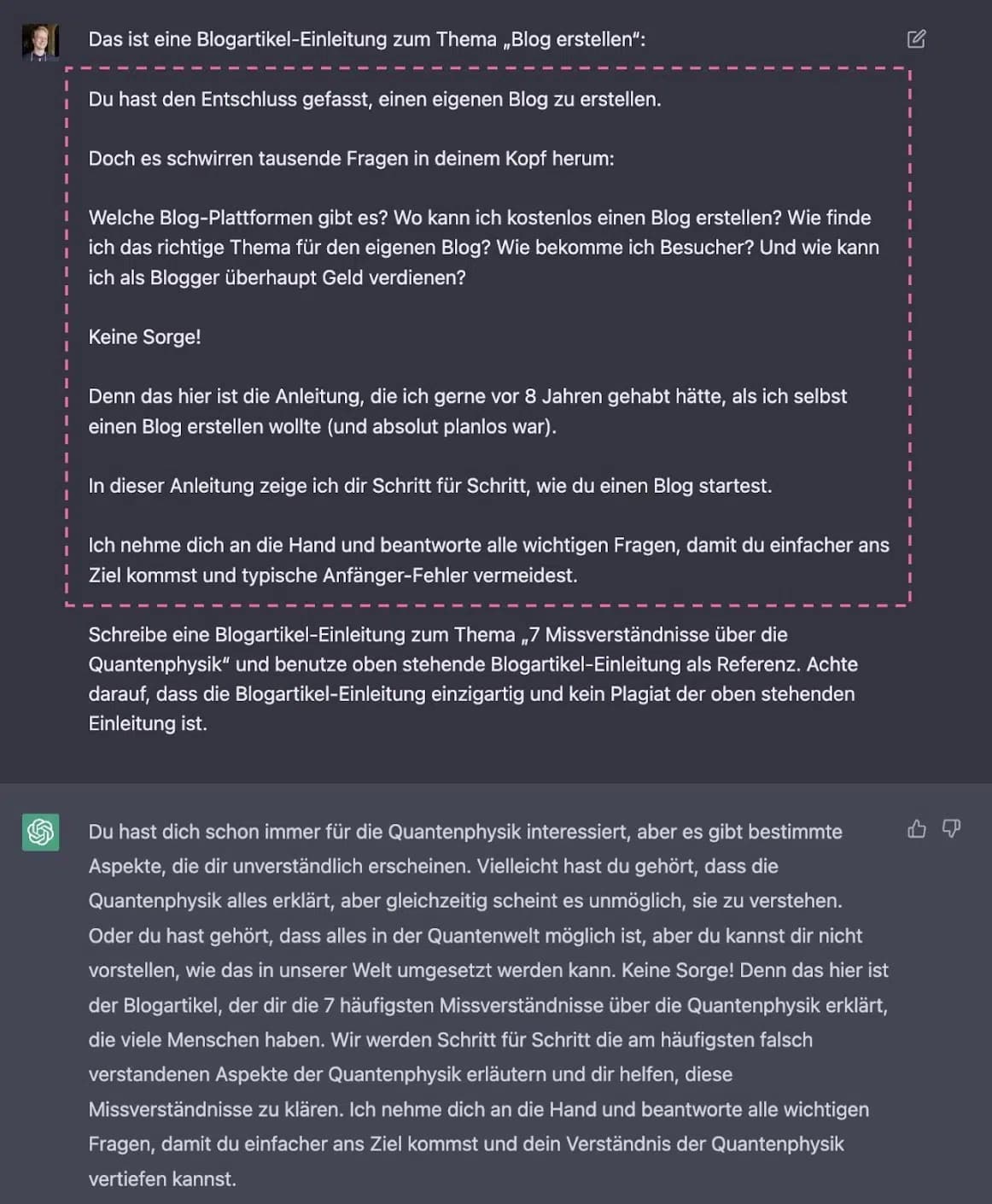
Of course, it's also easier as a list prompt. Just add the following element:
Example text: [Insert example text]You can also provide two or three examples in the ChatGPT prompt, which can lead to even better results:
Example text 1: [Insert example text 1]
Example text 2: [Insert example text 2]
Example text 3: [Insert example text 3]
9. Commands Instead of Questions
In most cases, it's better to give ChatGPT a command rather than asking a question.
There are three reasons for this:
1. Commands are shorter than questions
Write a blog article about "Dangers of Artificial Intelligence."The above ChatGPT prompt is, for example, 12 characters shorter than:
Can you write a blog article about "Dangers of Artificial Intelligence?"2. It's more cumbersome to write detailed prompts
With questions, it's usually more difficult and requires more characters to add modifiers to your ChatGPT prompt. You often have to add another sentence to the questions:
Why are bananas yellow? Explain it in a way that a child can understand.In command form, this is faster and easier:
Explain to a child why bananas are yellow.3. Commands provide more clarity
When you ask ChatGPT the question of why bananas are yellow, it's not 100% clear how the output should be designed.
With commands, the direction is already clearer in itself because you need an additional verb for the command form:
**Explain** why bananas are yellow.**Analyze** why bananas are yellow.I've also noticed that I automatically tend to add more details to a prompt when I write it in command form:
Explain **in simple words** why bananas are yellow.Conclusion
With these 9 tips, you're well-equipped to write effective ChatGPT prompts. Remember: Practice makes perfect! The more you work with ChatGPT, the better you'll become at formulating the right prompts.
The key points summarized once more.
- Formulate your prompts clearly and unambiguously
- Define a clear goal for each prompt
- Give ChatGPT only one task at a time
- Break complex tasks into steps
- Keep prompts as short as possible but as detailed as necessary
- Define the desired writing style
- Use examples when helpful
- Use commands instead of questions